Legal invoice template for lawyers and law firms

Nnabuike Okoroafor ·
On this page · 12 sections
The month has closed on a matter, the time entries are in your notes or your diary, and the client wants a bill they can read. Whether you are a solo attorney, a small law firm or a contract paralegal billing a firm, you need a legal invoice template that shows who did what, for how long, at what rate, and what it all comes to.
This guide gives you the free files and three filled-in samples: an hourly matter invoice with attorney and paralegal time recorded in tenths of an hour, a flat fee with a deposit, and a retainer draw. Every line and total is checked.
This is about the invoice's layout and arithmetic. Fee agreements, trust accounts and what you may bill are set by your bar's rules, not by an invoice template. Where those questions come up, we link the rule-maker's page instead of summarising it; ask your bar or an ethics lawyer about your own practice.
General information, not legal or tax advice.
Free legal invoice template: which file to use#
Our free templates page has Excel and Word invoice templates, no sign-up needed. None is legal-specific, but two of them fit a law practice well once you know where each piece goes.
| File | Calculates? | Best for |
|---|---|---|
| hourly-invoice-template.xlsx (Excel) | Yes: line amounts, total hours, tax, total, balance due, due date | Hourly matters: one dated line per time entry |
| invoice-template.xlsx (Excel) | Yes: line amounts, tax, total, balance due, due date | Flat fees, disbursements, a deposit or retainer draw |
| invoice-template.docx (Word) | No, you type every total | Short, simple bills |
| service-invoice-template.docx (Word) | No, you type every total | One defined piece of work with a deposit line |
The hourly spreadsheet has Date, Description of work, Hours, Hourly rate and Amount columns, with a Total hours cell under the hours. Because the rate is set per line, attorney and paralegal time can sit on the same invoice. Put the timekeeper's initials at the start of each description (“AR: Draft lease amendment”) so the client can see who did the work.
The general spreadsheet has a Reference / PO number box. Type the matter number there. Use this file for flat fees, for disbursements, and for the deposit and retainer samples below; it has an Amount paid cell for money already received.
The Word files do not calculate, so add the totals twice before you send. If you want more detail on either format, see our guides to the Excel invoice template with formulas and the free Word invoice template. The hourly and retainer layouts here are close cousins of the consulting invoice format, which has its own samples.
What a legal invoice shows#
A legal invoice is a standard invoice with three extras that a client, or a corporate client's accounts team, tends to look for: the matter it relates to, the period it covers, and the evidence for the number (time entries, a flat fee or a draw from money already paid). This table lists the fields that most legal invoice formats carry, and what to put in each.
| Field | What to put in it |
|---|---|
| Firm details | Your firm or practice name, address, email and phone, plus your logo if you have one |
| Client | The client's name and billing contact; for a company, often “Accounts Payable” |
| Matter | The matter name and your matter number, on every invoice for that matter |
| Invoice number and date | The next number in your sequence, and the date you issue it |
| Billing period | “1 to 31 October 2026”, so the client knows which work is included |
| Time entries | Date, timekeeper, description, hours, rate and amount, one line per entry |
| Professional fees subtotal | The total of the time entries (or the flat fee), with total hours |
| Disbursements or expenses | Filing fees, couriers, copying and similar costs, listed separately from fees |
| Retainer or trust summary | If you hold money for the client, the opening balance, the amount applied and what remains |
| Total due, terms and due date | The amount to pay now, and when |
| How to pay | Bank details, a payment link or your other accepted methods |
Two of those fields are common sources of queries. The invoice number should never repeat; our guide to invoice numbers: formats, gaps and examples covers schemes such as a prefix per year. And the due date follows from your terms, which invoice payment terms, in plain English explains. If your client is a company, who to address an invoice to covers its legal name and accounts payable contact.
Time entries in tenths of an hour#
Many law firms record time in tenths of an hour, so 0.1 hour is 6 minutes. That is common practice, not a universal rule: some firms use quarter hours (0.25) or exact minutes, and your engagement letter or your bar's guidance may have something to say about it. Whatever increment you use, state it on the invoice so the client can follow the arithmetic.
This table converts minutes to tenths.
| Minutes | Tenths of an hour | Minutes | Tenths of an hour |
|---|---|---|---|
| 6 | 0.1 | 36 | 0.6 |
| 12 | 0.2 | 42 | 0.7 |
| 18 | 0.3 | 48 | 0.8 |
| 24 | 0.4 | 54 | 0.9 |
| 30 | 0.5 | 60 | 1.0 |
The arithmetic. Each line is hours times the rate: 0.3 hour at 250.00 is 0.3 × 250.00 = 75.00. A 1 hour 12 minute call is 1.2 hours, so 1.2 × 250.00 = 300.00. Write the decimal, not the clock time: “1.2”, not “1:12”, because 1:12 typed as 1.12 would undercharge.
Mixed rates on one invoice. When an attorney and a paralegal both work on a matter, each line carries its own rate. You can show a subtotal per timekeeper, or one professional fees subtotal with total hours. Sample 1 does the second and shows the per-timekeeper split in the note below it.
Sample 1: hourly matter invoice with attorney and paralegal time#
An invented firm, Rivera Legal PLLC, bills an invented client, Northgate Bakery LLC, for a commercial lease amendment, matter 2026-014. The billing period is 1 to 31 October 2026. Rates are examples only, not guidance on what a reasonable fee is.
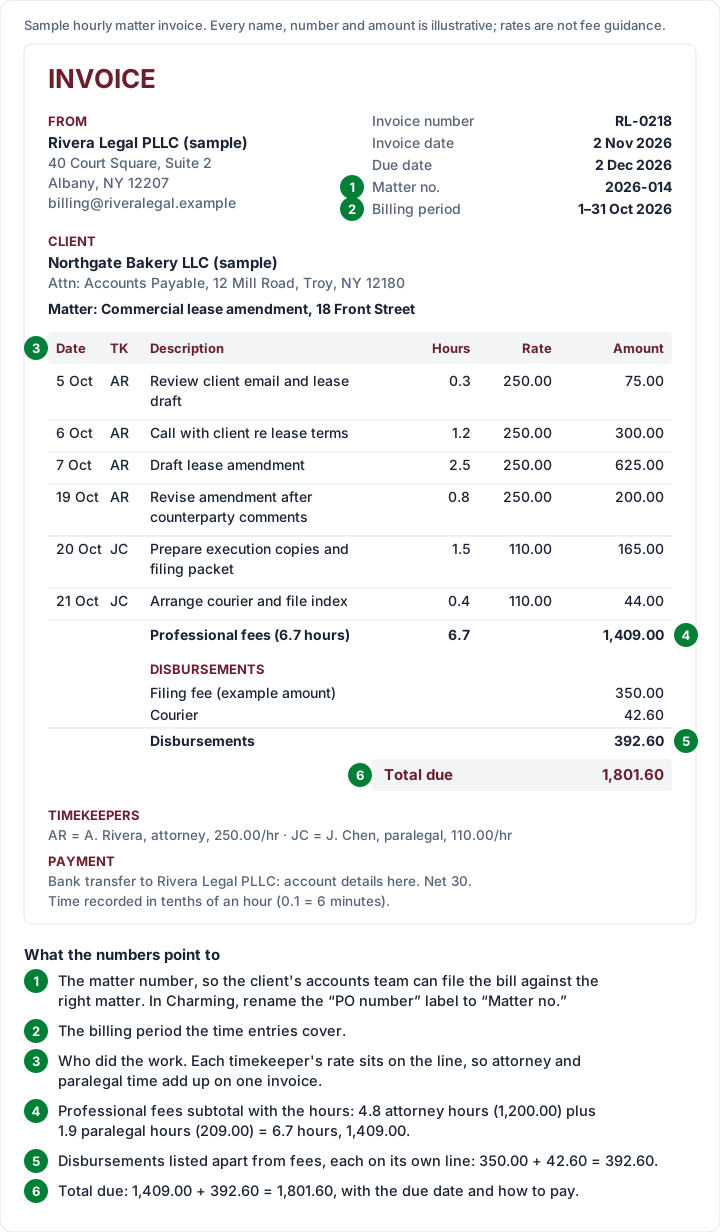
The same figures as a table:
| Date | Timekeeper | Description | Hours | Rate | Amount |
|---|---|---|---|---|---|
| Mon 5 Oct 2026 | A. Rivera (attorney) | Review client email and lease draft | 0.3 | 250.00 | 75.00 |
| Tue 6 Oct 2026 | A. Rivera | Call with client re lease terms | 1.2 | 250.00 | 300.00 |
| Wed 7 Oct 2026 | A. Rivera | Draft lease amendment | 2.5 | 250.00 | 625.00 |
| Mon 19 Oct 2026 | A. Rivera | Revise amendment after counterparty comments | 0.8 | 250.00 | 200.00 |
| Tue 20 Oct 2026 | J. Chen (paralegal) | Prepare execution copies and filing packet | 1.5 | 110.00 | 165.00 |
| Wed 21 Oct 2026 | J. Chen | Arrange courier and file index | 0.4 | 110.00 | 44.00 |
| Professional fees (6.7 hours) | 1,409.00 | ||||
| Filing fee (example amount) | 350.00 | ||||
| Courier | 42.60 | ||||
| Disbursements | 392.60 | ||||
| Total due | 1,801.60 |
The arithmetic, checked. Attorney time: 0.3 + 1.2 + 2.5 + 0.8 = 4.8 hours, and 4.8 × 250.00 = 1,200.00. Paralegal time: 1.5 + 0.4 = 1.9 hours, and 1.9 × 110.00 = 209.00. Fees: 1,200.00 + 209.00 = 1,409.00 for 6.7 hours. Disbursements: 350.00 + 42.60 = 392.60. Total: 1,409.00 + 392.60 = 1,801.60. The invoice is dated Monday 2 November 2026 and due Wednesday 2 December 2026 on 30-day terms.
The filing fee is labelled “example amount” because court and registry fees vary by court and change over time; use the receipt for the real figure.
In the hourly spreadsheet, the six time entries go on six lines, with the timekeeper's initials at the start of each description. The disbursements are not hours, so do not put them in the same file: a 350.00 filing fee typed as 1 × 350.00 would add 1 to Total hours. Bill disbursements on the general spreadsheet, or list them on a second invoice.
Describe the work, not the category. “Draft lease amendment” tells the client what they paid for; “Legal work” does not. Some firms avoid lumping several tasks into one time entry for the same reason. How much detail your bar expects in a time entry is a question for its own guidance.
Sample 2: a flat-fee matter with a deposit#
On a flat fee, the invoice shows the agreed service, not the hours. In this invented example, a client agreed a flat fee of 1,200.00 for an estate-planning package and paid a 600.00 deposit when they signed the engagement letter.
| Description | Amount |
|---|---|
| Estate-planning package: will, power of attorney and healthcare directive (flat fee) | 1,200.00 |
| Less deposit received 12 October 2026 | −600.00 |
| Balance due | 600.00 |
The arithmetic, checked: 1,200.00 − 600.00 = 600.00.
On the general spreadsheet, the flat fee is one line (quantity 1, rate 1,200.00) and the 600.00 goes in Amount paid, which brings the balance due to 600.00. Put the date the deposit was received in the notes, so the client can match it to their own records.
When a flat fee counts as earned, and how a deposit against it must be held, are questions for your bar's rules; this sample only shows how the invoice reads. For the general mechanics of billing a deposit and then the balance, see deposit and balance invoices.
Sample 3: a retainer draw invoice#
Many practices take money in advance and apply it to invoices as the work is done. The invoice then needs to show the work, the draw and the balance left, or the client cannot reconcile it. This sample uses the same fees and disbursements as Sample 1, 1,801.60, applied against an opening retainer balance of 5,000.00.
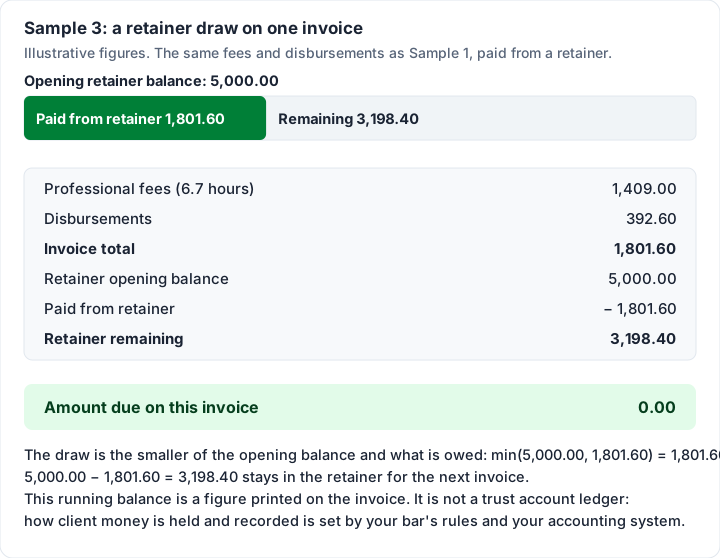
| Line | Amount |
|---|---|
| Professional fees (6.7 hours) | 1,409.00 |
| Disbursements | 392.60 |
| Invoice total | 1,801.60 |
| Retainer opening balance | 5,000.00 |
| Paid from retainer | −1,801.60 |
| Retainer remaining | 3,198.40 |
| Amount due | 0.00 |
The arithmetic, checked: the draw is the smaller of the opening balance and what is owed, so min(5,000.00, 1,801.60) = 1,801.60. Then 5,000.00 − 1,801.60 = 3,198.40 remains, and 1,801.60 − 1,801.60 = 0.00 is due. If the next month's bill came to 3,500.00, the draw would be the remaining 3,198.40 and 301.60 would be due.
A running balance on an invoice is not a trust ledger. The three figures above tell the client where their retainer stands. How client money is held, recorded and reconciled is a separate matter governed by your bar's rules and your accounting system, not by the invoice layout. To keep the figures between invoices for your own records, the free retainer tracker (Excel) logs deposits and draws as a running balance; it is not trust or client-money accounting. For how a drawdown retainer invoice is worded across the different kinds of retainer, and how a retainer draw works on an invoice in a consulting practice, see those guides.
LEDES® and e-billing: when a client asks for it#
Some corporate clients do not want a PDF. Their outside counsel guidelines ask firms to submit bills as a data file in a set format, through an e-billing system. Those requests often name LEDES®. The LEDES Oversight Committee's own site, ledes.org, describes the body like this (read 28 October 2026):
LEDES™ (Legal Electronic Data Exchange Standard) Oversight Committee (“LOC”) is an international, voluntary, not-for-profit organization comprised of legal industry representatives and is charged with creating and maintaining open standard formats for the electronic exchange of billing and other information between corporations and law firms.
The same page says the LOC creates and updates the UTBMS standards (task and activity codes some clients ask firms to attach to time entries) and maintains UTBMS.com. The LEDES formats and the UTBMS codes are published on those sites.
A template cannot produce a LEDES® file. Neither a spreadsheet invoice nor a general invoicing app will give you the file an e-billing portal expects. If a client's outside counsel guidelines ask for LEDES® or UTBMS codes, you need software that exports them. ledes.org has a vendor section listing e-billing systems, and legal billing or practice-management software is the category to look at.
Format, not ethics: the rules to check with your bar#
An invoice template answers “how should the bill look?”. It does not answer “what may I charge?”, “when is a fee earned?” or “how must I hold a client's money?”. Those come from the rules of professional conduct in your jurisdiction.
In the US, the American Bar Association publishes the Model Rules of Professional Conduct. Two of them deal with fees and with client property:
These are the ABA's model rules; your state's own rules can differ. We link them rather than quote or summarise them. Outside the US, start with your own bar or law society. Rules vary; see the official page, and ask your bar's ethics line or an ethics lawyer.
Legal invoices in Charming#
We make Charming Invoices, a general invoicing app. Here is what it does for a small practice that has outgrown copying a spreadsheet each month, checked in our code on 28 October 2026, with the limits next to each feature.
- Tenths of an hour and per-line rates. Quantities take up to 3 decimal places (0.3, or 0.25 for quarter hours), and each line has its own rate, so attorney and paralegal time sit on one invoice. The catch: Charming is not a time tracker. There is no timer, so you type in the time you recorded elsewhere.
- The Timesheet template. It groups lines under section headings, such as a timekeeper's name or a phase of the matter, with hours per group and a Total hours line. Only lines whose unit is an hour unit (h, hr, hrs, hour or hours) count towards the hours.
- Fees and disbursements as sections. Sections (up to 80 characters each) can split “Professional fees” and “Disbursements”, each with its own subtotal. Sections print on the templates that group by section, such as Timesheet and Contractor, or when you turn grouping on.
- The Retainer template. It prints the opening balance, “Paid from retainer” and the remaining balance, and works out the draw for you, as in Sample 3. An invoice the retainer covers in full has 0.00 due and is issued straight as paid. The catch: it is a running balance on the invoice, not trust accounting. Charming does not hold, ledger or reconcile client funds.
- Deposits. A “Deposit received” credit lowers the amount due, as in Sample 2.
- Matter numbers and client labels. Rename the “PO number” label to “Matter no.” (free text, up to 100 characters) and “Bill to” to “Client”. Label renames apply to the whole business's template, not to one invoice.
- Numbering, PDFs and a private link. Invoice numbers assign themselves with no gaps when you issue an invoice. You download the PDF or copy a private link the client opens without creating an account, send it however you like, and can see when the invoice was “Viewed by the client”.
- Overdue invoices flagged once the due date passes, so you know which to follow up.
What Charming does not do: time tracking, trust or IOLTA accounting, LEDES® or UTBMS export, conflict checks or matter management. Those belong to legal practice-management software. It also does not take card payments: your client pays you directly, and you record the payment or mark the invoice paid yourself. It has no accounting integrations, and it does not email invoices or send reminders.
Plans. The free plan is $0 forever with no invoice limit, for 1 business, and adds a small “Sent with Charming Invoices” line to its invoices. Individual ($29 once) adds separate businesses, for example a solo practice and a mediation practice, each with its own branding and numbering. Team ($79 once) adds up to 5 teammates, such as an assistant or a bookkeeper; Pro ($12 a month or $99 a year) has unlimited teammates. Lifetime plans are final sale. Every template, Timesheet and Retainer included, is on every plan.
If that covers your bills, create a free invoice and try Sample 1 with your own time entries, or see pricing for the paid plans.
When a template stops being enough#
A template plus a general invoicing app tends to suit practices whose billing looks like the samples above: private clients, a manageable number of matters, flat fees or straightforward hourly work, and payment by bank transfer.
It tends to stop being enough when you need any of these:
- Trust accounting: a ledger per client and reconciliation.
- LEDES® e-billing or UTBMS codes for corporate or insurer clients.
- Conflict checks and matter management across a team.
- Time capture from a timer or calendar straight into the bill.
Those are the jobs of legal practice-management and billing software. Lawyer invoicing software: legal tools vs simple apps compares what those tools include and cost. If you send a monthly summary of several invoices to one client, what a client statement shows explains the difference between an invoice and a statement.
Legal invoice questions#
Is there a free legal invoice template in Word?#
Yes. Both Word files on the downloads page are free: a general invoice with a 10-line table and a service invoice with a deposit line. Neither calculates. For hourly time entries, the hourly Excel file adds up the hours and the amounts for you.
What should a lawyer's invoice include?#
Your firm's details, the client, the matter name and number, the invoice number and date, the billing period, the time entries (date, timekeeper, description, hours, rate, amount), disbursements listed separately, any retainer balance, the total due, the due date and how to pay. The table near the top of this post lists them. What your bar requires on a bill is a question for its own rules.
How do I show disbursements on a legal invoice?#
On their own lines, below the professional fees, with their own subtotal, as in Sample 1. Use the receipt amount for each and keep the receipts in case the client asks.
How do I show a retainer on an invoice?#
Print three figures on every invoice: the opening balance, the amount paid from the retainer on this invoice and the balance remaining. Sample 3 shows the layout. Whether and how you may hold and apply that money is a question for your bar's rules.
Can I use a general invoicing app for a law practice?#
For the invoice itself, often yes: hourly lines, flat fees, disbursements and a retainer balance all fit a general app or a spreadsheet. Trust accounting, LEDES® files and conflict checks need dedicated legal software, and your bar can tell you what records it expects. And if a client does not pay, our guide on what to do when a client is not paying an invoice covers the next steps.
The short version#
A legal invoice is a standard invoice that names the matter and the billing period and shows its working: dated time entries with the timekeeper, hours and rate, a professional fees subtotal, disbursements on their own lines and, where you hold a retainer, the balance before and after. Record time as decimals (0.1 = 6 minutes), check that every line multiplies out, and leave the questions of what you may charge and how you hold client money to your bar's rules and the people who interpret them.
Free download
No sign-up and no email address. More on the free templates page.
- Download .xlsx: Retainer tracker
Retainer tracker
Excel .xlsxFor prepaid and drawdown retainers: a running balance of money paid in, work drawn from it and anything refunded, with a low-balance alert.