Consulting invoice template: hourly, retainer and fixed fee

Nnabuike Okoroafor ·
On this page · 10 sections
You have agreed the work, done the first stretch of it, and now you need a consulting invoice template that does not look like a hardware-store receipt. Most consultants bill in one of three ways: by the hour, from a monthly retainer, or a fixed fee paid at milestones. Each one needs a slightly different page.
This post gives you the free files and three filled-in samples, one per billing model, with every line and total checked. Each sample is built in the actual template file we offer, so you can copy the layout cell for cell. If you want the reasoning behind each model (how to word deliverables, how much hours detail to show, how retainers work), our guide on how to invoice for consulting services covers it. This page is the templates and the worked examples.
General information, not legal or tax advice. Where a rule is mentioned, we quote and link the official page; ask an accountant or lawyer about your own situation.
Free consulting invoice templates: Excel and Word#
Our free templates page has Excel and Word invoice templates that suit consulting, no sign-up needed. We read each file with a script on 23 October 2026 to describe exactly what is in it; they are made for Excel and Word, and we have not opened them in either app.
| File | Calculates? | Best for consultants who |
|---|---|---|
| hourly-invoice-template.xlsx (Excel) | Yes: amounts, total hours, tax, total, balance due, due date | Bill by the hour, one dated line per day or task |
| invoice-template.xlsx (Excel) | Yes: amounts, tax, total, balance due, due date | Bill fixed fees, milestones, day rates or a retainer draw |
| invoice-template.docx (Word) | No, you type every total | Prefer a document to a spreadsheet; 10-line table |
| service-invoice-template.docx (Word) | No, you type every total | Bill one defined engagement, with a description of the work and a deposit line |
What the two spreadsheets do for you. Each has 15 lines. The amount on each line is quantity (or hours) times rate, rounded to the cent. Below the lines, the file works out the subtotal, takes off a fixed discount, applies one tax rate, and shows the total, the amount paid and the balance due. The total never drops below 0. The due date is the invoice date plus your payment terms in days, which start at 30. If you are deciding whether to give a client 30 days at all, our guide to pay by invoice weighs up the risk.
What the hourly file adds. A Date column on every line, and a Total hours cell under the Hours column that adds them up, so your client can check the time against your agreement in one glance.
Two catches worth knowing. The tax rate cell takes a plain number: 0, or anything from 1 to 100. Type 8.25 for 8.25%, not 0.0825 or “8.25%”. If a value under 1 gets in anyway (pasted from somewhere, say), a red note appears under the totals. And the Word files do not calculate at all. They carry a short note, which you delete before sending, giving the formulas to work out by hand.
You can upload the files to Google Drive and open them in Google Sheets or Google Docs, but we have not tested the conversion: type a test invoice and check the totals before you send a real one. There are no Google-hosted copies. For a deeper look at each file, see our guides to the Excel invoice template and the Word invoice template.
If you want a printable sheet to fill in by hand, our hours-worked invoice template with a timesheet has a blank PDF with dated tasks and weekly subtotals.
What a consulting invoice should show#
The consulting invoice format is the standard invoice plus three things clients in professional services tend to check: the agreement it bills against, the period or milestone it covers, and evidence for the number (hours, a deliverable, or a draw from a prepaid balance).
| Field | What to put in it | Where it goes in our templates |
|---|---|---|
| Your business name and contact details | The name on your contract | From |
| Client's legal name and billing contact | Often “Accounts Payable”, from their supplier form | Bill to |
| Invoice number | The next in your own sequence, never reused | Invoice number |
| Invoice date and payment terms | The terms in your agreement, in days | Invoice date, Payment terms (days) |
| Due date | Worked out by the spreadsheet; typed in Word | Due date |
| PO, statement of work or project reference | Exactly as the client gave it | Reference / PO number |
| The engagement and the period | “Pricing review, November 2026” or “Milestone 2 of 3” | Line descriptions or notes |
| Hours, deliverables or the draw | Whatever your agreement prices | Line items |
| Expenses | At cost, one per line, with receipts | Line items |
| Tax, if you are registered | One rate on the taxable amount | Tax rate (%) |
| How to pay you | Bank details or a payment link | Payment details |
A consultant in a public online discussion described the whole of their monthly invoice like this (the people we quote from our research are not Charming customers):
In terms of the invoice data... it's super simple.. the number of days I'm billing for, the rate, the total..
That is the right instinct. A consulting invoice is simple to read when every number on it traces back to the agreement. The work is in getting the reference, the period and the units right.
Tax lines. Whether consulting services carry sales tax, VAT or GST depends on where you and your client are, and on what the service is. The templates leave the tax rate at 0 until you type one. Check your tax authority's guidance or ask an accountant before you add or leave out a tax line.
Sample 1: hourly consulting invoice#
Here is the hourly spreadsheet filled in by an invented consultancy, Linden Row Consulting, billing an invented client, Oakfield Dental Group, for a front-desk process project. We typed these values into a copy of hourly-invoice-template.xlsx and checked every result against the file's own formulas.
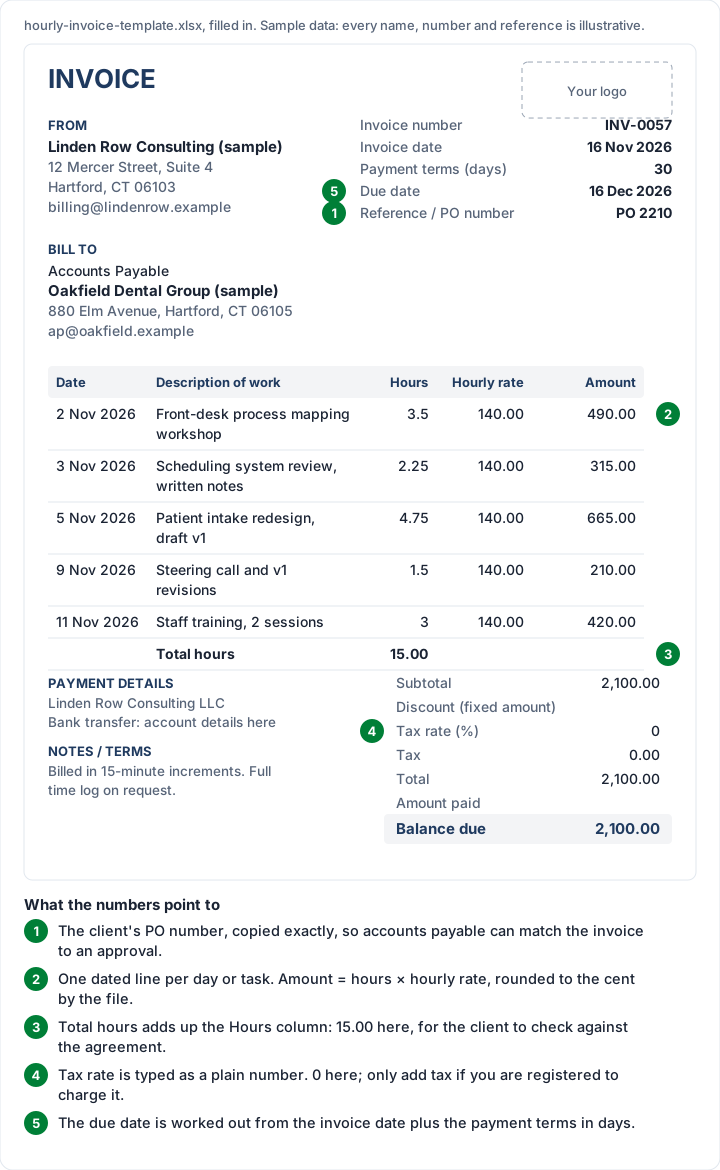
The figures (all names and amounts are illustrative):
| Date | Description of work | Hours | Hourly rate | Amount |
|---|---|---|---|---|
| Mon 2 Nov 2026 | Front-desk process mapping workshop | 3.5 | 140.00 | 490.00 |
| Tue 3 Nov 2026 | Scheduling system review, written notes | 2.25 | 140.00 | 315.00 |
| Thu 5 Nov 2026 | Patient intake redesign, draft v1 | 4.75 | 140.00 | 665.00 |
| Mon 9 Nov 2026 | Steering call and v1 revisions | 1.5 | 140.00 | 210.00 |
| Wed 11 Nov 2026 | Staff training, 2 sessions | 3 | 140.00 | 420.00 |
| Total hours | 15.00 | |||
| Balance due | 2,100.00 |
The arithmetic, checked: 3.5 × 140.00 = 490.00; 2.25 × 140.00 = 315.00; 4.75 × 140.00 = 665.00; 1.5 × 140.00 = 210.00; 3 × 140.00 = 420.00. The hours add to 15, and 490.00 + 315.00 + 665.00 + 210.00 + 420.00 = 2,100.00, which is also 15 × 140.00. The invoice is dated Monday 16 November 2026 and, on 30-day terms, the file shows a due date of Wednesday 16 December 2026.
Three things to copy from it:
- Hours as decimals. The file multiplies hours by the rate, so 2.25 means two hours and fifteen minutes, not 2 hours 25 minutes. Say in your notes which increment you bill in.
- One line per working day or task. A client can match “Mon 9 Nov 2026, steering call” against their own calendar. A single line of 15 hours gives them nothing to check.
- Keep expenses out of the hourly file. Every line in it is hours times a rate, and Total hours adds up the Hours column. Type a train fare there as 1 × 86.40 and Total hours goes up by one. Bill expenses on the general spreadsheet (as in sample 2), or on a second invoice.
Not everyone likes this level of detail. Another person in the same research, replying in a consulting forum, put the other side plainly:
I also don’t know what billing model OP is on, but I absolutely loathe any teams that track every activity into 15 minute increments. It makes the whole engagement feel so… cold?
Which is a good reason to ask a client at the start how much detail they want on the invoice, and to keep the full log for when they ask.
Sample 2: monthly retainer with a draw-down#
A prepaid retainer works like a deposit account: the client pays a balance up front, and each month's invoice draws on it. The invoice has to show the work and the arithmetic of the balance, or the client cannot reconcile it. The retainer invoice guide covers the types of retainer and the wording; here is how one month looks on our general spreadsheet.
The client, an invented outdoor brand called Brightwater Outdoor Co., prepaid $4,000.00 against retainer RA-03. November's work:
| Description | Quantity | Rate | Amount |
|---|---|---|---|
| Advisory hours, November (log attached) | 12.5 | 160.00 | 2,000.00 |
| Quarterly planning workshop, facilitation | 1 | 900.00 | 900.00 |
| Train fare and hotel, workshop 19 Nov, at cost | 1 | 184.60 | 184.60 |
| Total | 3,084.60 | ||
| Amount paid (drawn from retainer RA-03) | 3,084.60 | ||
| Balance due | 0.00 |
The arithmetic, checked: 12.5 × 160.00 = 2,000.00; 2,000.00 + 900.00 + 184.60 = 3,084.60. The retainer covers all of it, so 4,000.00 − 3,084.60 = 915.40 stays in the balance for December. The invoice is dated Monday 30 November 2026 with 14-day terms (due Monday 14 December 2026), though nothing is due on it.
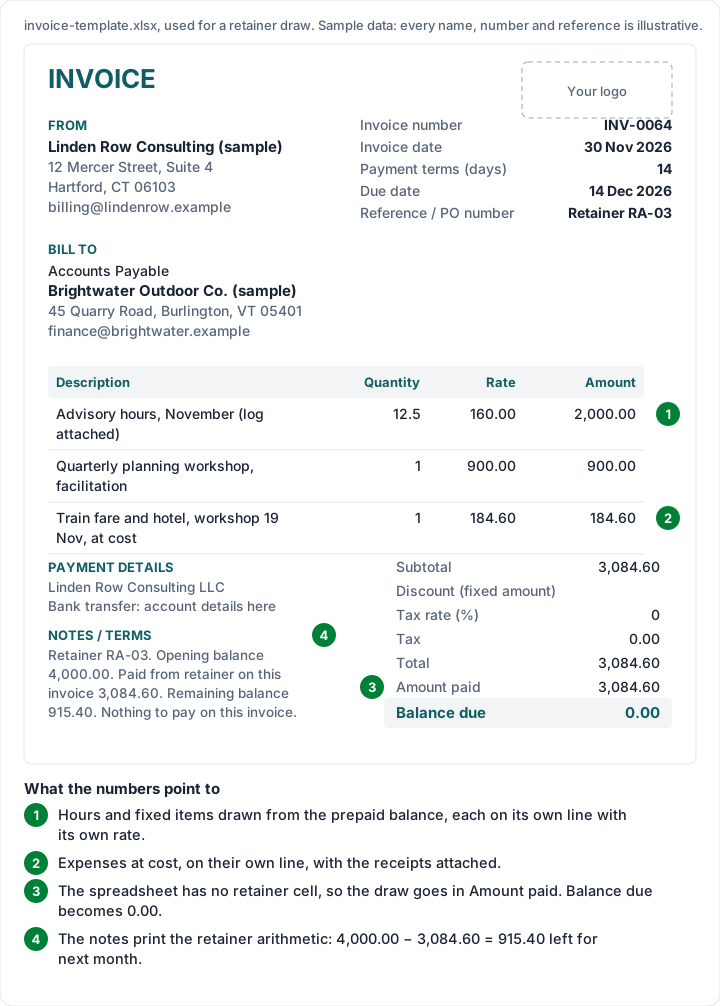
How to build it in the spreadsheet. The general file has no retainer cell, so use what it does have. Put the amount drawn in Amount paid, which brings the balance due to 0.00. Then write the retainer arithmetic in Notes / terms: the opening balance, the amount paid from the retainer on this invoice and the remaining balance. Printing all three every month means the client can reconcile the retainer from your invoices alone.
When the work runs over. If December's work came to 1,200.00 against the 915.40 left, you would type 915.40 in Amount paid, the file would show 284.60 due, and the notes would show a remaining balance of 0.00. Agree in advance whether you top the retainer up with a new invoice, and say so in the notes.
When the retainer is a flat monthly fee instead (“20 hours a month, billed on the 1st”), it is simpler: one line for the month's fee and a separate line for any agreed overage. The same invoice goes out every month, which is exactly what recurring invoices are for.
Sample 3: fixed-fee project billed by milestone#
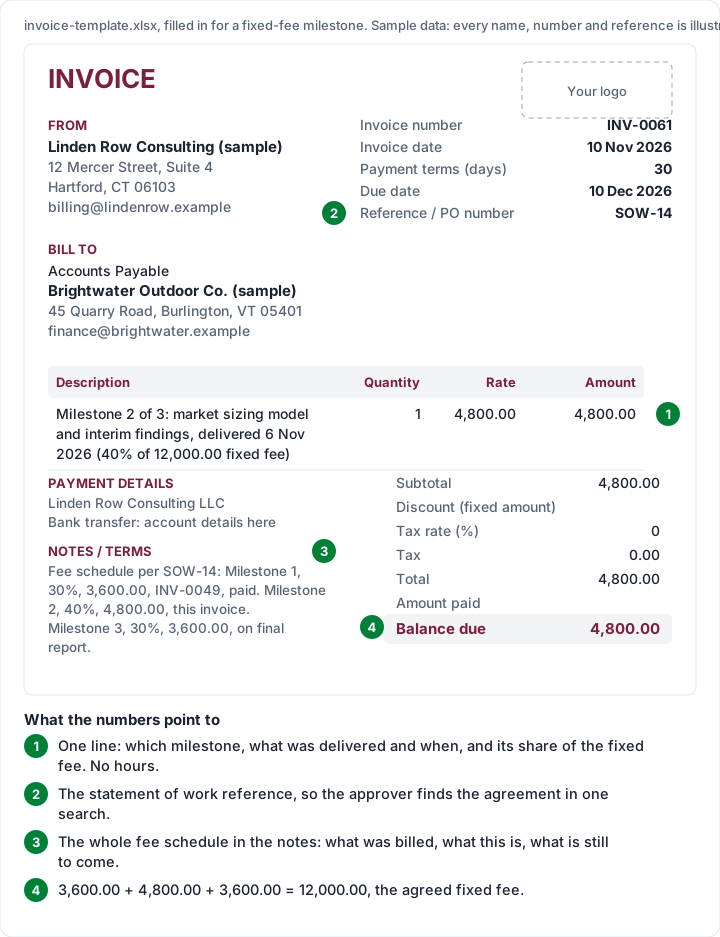
On a fixed fee, the client agreed a price for an outcome, so the invoice shows the outcome, not your hours. Most fixed-fee engagements are billed in stages. In this invented example the statement of work (SOW-14) sets a $12,000.00 fee in three parts: 30% on signing, 40% when the market sizing model and interim findings are delivered, and 30% on the final report.
| Milestone | Share | Amount | Invoice | Status |
|---|---|---|---|---|
| 1: engagement start | 30% | 3,600.00 | INV-0049 | Paid |
| 2: market sizing model and interim findings | 40% | 4,800.00 | INV-0061 | This invoice |
| 3: final report | 30% | 3,600.00 | To come | On delivery |
| Total fee | 100% | 12,000.00 |
The arithmetic, checked: 30% of 12,000.00 is 3,600.00; 40% is 4,800.00; 3,600.00 + 4,800.00 + 3,600.00 = 12,000.00.
The milestone 2 invoice has a single line: “Milestone 2 of 3: market sizing model and interim findings, delivered 6 Nov 2026 (40% of $12,000.00 fixed fee)”, quantity 1, rate 4,800.00. It is dated Tuesday 10 November 2026, due Thursday 10 December 2026 on 30-day terms, with SOW-14 in the Reference / PO number box. The full fee schedule goes in the notes, so the approver sees what has been billed, what this is and what is still to come.
Send the delivery note before the invoice. When a milestone is reached, a short email saying what was delivered against the statement of work, and that the milestone invoice follows, gives the client a chance to raise a concern before the invoice reaches accounts payable rather than after.
If you take money on signing, our guide on how a deposit invoice works shows how to word the first invoice and credit it later. And if you are new to staging work at all, how to invoice as a freelancer walks through milestone schedules from the start.
Consulting invoice format for IT, HR and marketing consultants#
The template is the same for every kind of consultant; what changes is the line items. The table below shows typical lines and the unit each is usually priced in. It shows no rates on purpose: rates vary too widely by field, place and seniority for any figure we printed to be useful, so these are illustrative structures only.
| Consultant | Typical line items | Usual unit | Best file |
|---|---|---|---|
| IT consultant | Systems audit; migration planning; on-site support day; out-of-hours call-out; software licences bought for the client, at cost | Hours, days, fixed fee per stage | Hourly xlsx for support; general xlsx for project stages |
| Software consultant | Discovery and scoping; build milestone; code review; handover documentation | Fixed fee per milestone, or hours | General xlsx |
| HR consultant | Policy handbook review; recruitment campaign (per role filled); investigation interviews; training workshop | Fixed fee per deliverable, per role, per session | General xlsx or the Word service template |
| Marketing consultant | Monthly retainer; campaign strategy; content calendar; ad spend passed through at cost | Monthly fee, fixed fee, at cost | General xlsx, with retainer notes as in sample 2 |
| Management or strategy consultant | Diagnostic; workshops; interim report; steering meetings | Fixed fee per stage, day rate | General xlsx |
Two patterns hold across all of them. Pass-through costs (software, ad spend, travel) go on their own lines, at cost, with receipts, and only if the agreement lets you bill them. And day rates fit the general spreadsheet as quantity × rate: 3 days at 950.00 is 3 × 950.00 = 2,850.00.
A contractor invoicing a company for the first time, with a W-9 and supplier forms to fill in, will find the US paperwork side in our independent contractor invoice template guide. Lawyers and clinicians bill by time too, with fields of their own: see the legal invoice template for matter numbers and disbursements, and the medical invoice template for patient and locum invoices. Bookkeepers and accountants billing a monthly package have the bookkeeping invoice template, and law firms weighing billing software can read lawyer invoicing software: legal tools vs simple apps.
How to fill in a consulting invoice template#
- Download the file that matches your billing model from the downloads page and keep an untouched master copy.
- From and Bill to: your business name as it appears on the agreement; the client's legal name, “Accounts Payable” if they use it, and the billing email they gave you.
- Invoice number: the next in your sequence. Save a copy per invoice so past invoices stay as they were sent.
- Dates and terms: type the invoice date and your agreed terms in days. The spreadsheet works out the due date; in Word, count it yourself. Our guide to net 30 and other payment terms explains how the days are counted.
- Reference: the PO number or statement of work reference, exactly as the client gave it. Why a PO number matters explains why invoices without one often wait.
- Lines: dated hours, a milestone, or retainer work, as in the samples above. Expenses on their own lines, at cost.
- Tax: leave the rate at 0 unless you are registered to charge tax, then type the rate as a plain number.
- Notes: your billing increment, the retainer arithmetic or the fee schedule.
- Check and send: read the totals (in Word, add them up twice), save as PDF and email it to the billing address.
Consulting invoices in Charming#
We make Charming Invoices, so here is what it does for a consultant who has outgrown copying a spreadsheet, with the limits next to each feature.
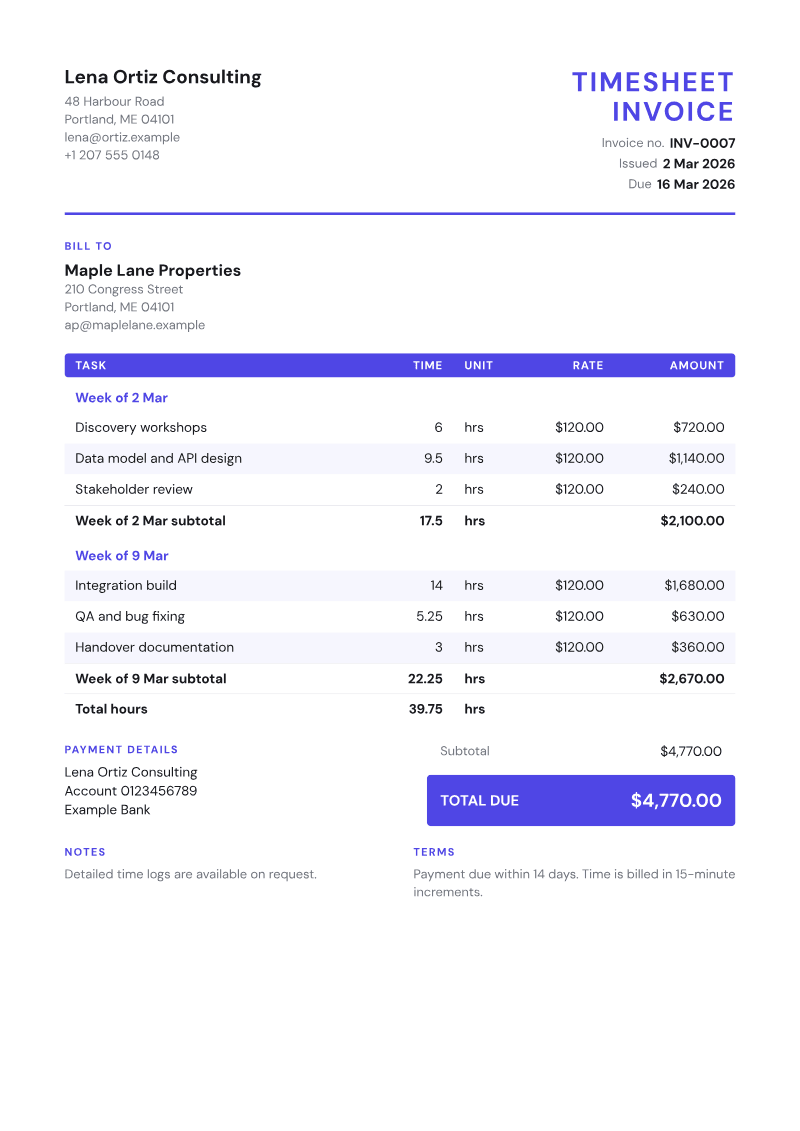
- The Timesheet template groups line items under headings such as a week or a project, shows hours per group and a total hours line, like the sample above. The catch: it is a layout, not a time tracker. Charming has no timer and does not import hours from a time-tracking tool, so you type the hours from your own log.
- The Retainer template prints the opening balance, the amount paid from the retainer and what remains, and works out the amount due after the draw. For sample 2, that is a 4,000.00 opening balance, 3,084.60 drawn, 915.40 remaining and 0.00 due, without typing the arithmetic into the notes.
- Starter kits. An “Hourly consulting” kit adds a line for your hourly rate, and a “Product build milestone” kit adds discovery and milestone lines. Every price is left at 0 on purpose, so you type your own.
- Numbering, PDFs and a private link. Invoice numbers assign themselves with no gaps when you issue an invoice. You download the PDF or copy its private link, which the client opens without creating an account, and send it however you like.
- Payment tracking. You see what is paid and what is still owed, and overdue invoices are flagged. Charming does not send reminders; set a calendar reminder or use your own email.
- On paid plans: recurring invoices for a flat monthly retainer, created as drafts you review before issuing, and AI line items drafted from one sentence (unknown prices stay at 0; it never sends anything).
What it does not do: Charming does not take card payments or hold retainer money. Your client pays you directly by bank transfer or your own payment link, and you record each payment or mark the invoice paid yourself. It does not import Word or Excel invoices, and it has no accounting integrations. The free plan is $0 forever with no invoice limit, for 1 business, and adds a small “Sent with Charming Invoices” line to its invoices. All 60 templates, Timesheet and Retainer included, are on every plan. Create a free invoice and try the samples above with your own numbers.
If you also work with photographers or other creatives, our photography invoice template post does the same job for shoots, prints and wedding balances.
Questions about consulting invoice templates#
Is there a free consulting invoice template in Word?#
Yes. Both Word files on the downloads page are free: a general invoice with a 10-line table, and a service invoice with a description-of-work box and a deposit line. Neither calculates, so you type the totals. If you want the arithmetic done for you, use one of the Excel files.
What is the best consulting invoice format for hourly work?#
Dated lines with the task, hours and rate, a total hours figure, the client's PO or project reference, and your billing increment in the notes. Sample 1 above is that format on the hourly spreadsheet.
How do I show a retainer on a consulting invoice?#
Print three figures every time: the opening balance, the amount paid from the retainer on this invoice and the remaining balance. In our spreadsheet, the draw goes in Amount paid and the three figures go in the notes, as in sample 2.
Should a fixed-fee consulting invoice show hours?#
Usually not. The client agreed a price for an outcome, so show the milestone, what was delivered and its share of the fee. Keep your hours for your own records.
Do consultants charge sales tax or VAT on invoices?#
It depends on where you and your client are and on the service, so check your tax authority's guidance or ask an accountant. Our templates take one tax rate per invoice, typed as a plain number.
The short version#
Pick the file that matches how you bill: the hourly spreadsheet for time, the general spreadsheet for milestones and retainer draws, the Word files if you would rather type the totals yourself. Put the agreement's reference on every invoice, show the evidence for the number (dated hours, the milestone, or the retainer arithmetic) and keep expenses on their own lines. Every sample above adds up; check yours the same way before you send it.