Medical invoice template: free files and 2 filled samples

Nnabuike Okoroafor ·
On this page · 9 sections
You run a small cash-pay practice, you pick up locum shifts at a clinic, or you are the person in the office who has to bill for a box of copied records. Either way you need a medical invoice template, and a guide to what goes where on it.
This page gives you free Word and Excel files that fit medical invoicing, two samples filled in with arithmetic that adds up (a self-pay patient visit and a locum physician's shift invoice to a clinic), and a plain explanation of the three documents patients mix up: an invoice, a superbill and an insurance claim form. If you bill for a dental practice or a dental lab, the dental invoice template has samples built for that work.
One thing first, because it decides whether a template is even the right tool. An invoice template is for billing a patient or a business directly. It is not insurance billing software, and nothing on this page (including Charming) files claims with insurers. If most of your income comes through insurance, you need medical billing or practice-management software, and we say more about that below.
General information, not legal, tax or medical-billing advice. Where a rule is mentioned, we quote and link the official page; rules vary by state and payer, so ask a qualified billing professional or a lawyer about your own situation.
Free medical invoice template: which file to use#
The free templates page has Excel and Word invoice templates, with no sign-up and no email address. None of them is medical-specific, but three fit medical work well:
| Your medical billing | Best file | Why |
|---|---|---|
| A self-pay patient visit, with an amount paid at the desk | invoice-template.xlsx (Excel) | 15 lines that calculate, a Reference / PO cell for a patient or account ID, an Amount paid line and a Balance due |
| Locum or per-diem shifts billed by the hour, with nothing else on the invoice | hourly-invoice-template.xlsx (Excel) | A Date column for each shift, hours times your hourly rate, and a Total hours line |
| Locum shifts plus mileage or other agreed extras | invoice-template.xlsx (Excel) | Quantity and rate on every line, so 192 miles at an agreed rate sits under the shifts without upsetting a total-hours count |
| A one-off service, such as a home visit or an occupational health check for an employer | service-invoice-template.docx (Word) | A “Description of work” box for the date, place and service, and a 6-row table |
The two formats behave differently:
- The Excel files calculate. Each line is quantity times rate, rounded to the cent, and the subtotal, tax, total, amount paid, balance due and due date are formulas.
- The Word files do not. You type every amount and total yourself, so add them up twice.
- None of them is a Google file. There are no Google-hosted copies and we have not tested the conversion. If you open one in Google Docs or Sheets, type in a test invoice and check the totals before you send a real one.
For a full tour of each file, see the free Word invoice template guide and the Excel invoice template with formulas.
What a medical invoice should show#
A medical invoice has the same skeleton as any invoice (who is billing, who owes, a number, dates, line items, a total and how to pay), plus a few details that let a patient or a clinic's accounts team match it to a visit or a shift. The general field-by-field list is in what actually belongs on an invoice; this table is the medical version.
| Field | Example | Why it helps |
|---|---|---|
| Provider or practice name and contact details | Riverside Family Practice, billing email | The patient knows who to ask about the bill |
| Patient name and billing address | Sam Example, 12 Fictional Lane | Who owes the money, which is not always the person treated |
| Patient or account ID | RFP-0193 | Lets your office find the right record without printing more personal detail |
| Invoice number | RFP-2026-0412 | Unique, never reused; see how to number invoices |
| Invoice date and date of service | Both 14 Oct 2026 | They can differ; patients check the service date first |
| Services, one per line, in plain words | Office visit, new patient, 45 minutes | What was done, in words the patient understands |
| Code column, only if you use codes | Left blank in our samples | Some payers ask for codes; see the privacy and codes section |
| Amount paid at the visit | 50.00 | The patient sees the full fee and the credit |
| Balance due and due date | 218.00, due 13 Nov 2026 | The one number they act on |
| How to pay | Bank details or a payment link | See what payment methods to offer on an invoice |
Some practices also print a licence number or an NPI on invoices, because a payer, an employer or a patient's reimbursement claim asks for it. Treat that as something to add when the person paying asks for it, not as a fixed rule from this page.
Invoice, superbill or claim form: which one the patient needs#
Patients often ask for “an invoice” when they mean something else. Three documents get mixed up, and they do different jobs:
| Document | Who sends it, to whom | What it is for |
|---|---|---|
| Invoice | The provider to the patient, or a locum to a clinic | Asks for payment: what is owed, by when and how to pay |
| Superbill | The provider to the patient | An itemised summary of a visit that a patient can send to their insurer to ask for reimbursement, typically when the provider is out of network |
| Insurance claim form | The provider (or its billing service) to the insurer | The practice's own claim for payment from the insurer |
The superbill is a business term, not an official form: practices build their own, usually from their practice-management or billing software, because it carries the codes and provider identifiers an insurer works from. The claim form is official: CMS publishes the CMS-1500, titled “Health Insurance Claim Form”. Neither is something to improvise in an invoice template.
There is one more document a self-pay patient may ask about before the visit, rather than after it. CMS tells patients on its good faith estimate page (as of 28 October 2026):
“Usually, if you aren’t using health insurance to pay for your care, your health care provider must give you a good faith estimate of expected charges if you request one or schedule services at least 3 business days in advance.”
An estimate is not an invoice. If you are unsure how the two differ in general, the difference between an estimate, a quote and an invoice explains it; for what the good faith estimate rules require of your practice, read the CMS page and ask a billing professional or a lawyer.
Sample 1: a self-pay patient visit#
A new patient pays cash at a small family practice. They put 50.00 down at the desk and the practice invoices the rest. The general Excel file handles this cleanly: the payment at the desk goes in Amount paid, and the balance works itself out.
Every name, number and price below is invented and illustrative, not a real fee schedule. No codes are printed, and no tax is added (the image marks tax “not charged”): that is an example, not a tax position.
- Invoice: RFP-2026-0412, dated Wednesday 14 October 2026, 30-day terms, due Friday 13 November 2026
- From: Riverside Family Practice (sample practice)
- To: Sam Example (sample patient), patient ID RFP-0193
- Date of service: Wednesday 14 October 2026
| Description | Qty | Rate | Amount |
|---|---|---|---|
| Office visit, new patient, 45 minutes | 1 | 185.00 | 185.00 |
| In-office lab panel | 1 | 48.00 | 48.00 |
| Vaccine administration | 1 | 35.00 | 35.00 |
| Subtotal and total | 268.00 | ||
| Amount paid (at the visit, by card, 14 Oct 2026) | 50.00 | ||
| Balance due | 218.00 |
The arithmetic: 185.00 + 48.00 + 35.00 = 268.00. Taking off the 50.00 paid at the desk leaves 218.00, and 30 days after Wednesday 14 October is Friday 13 November 2026.
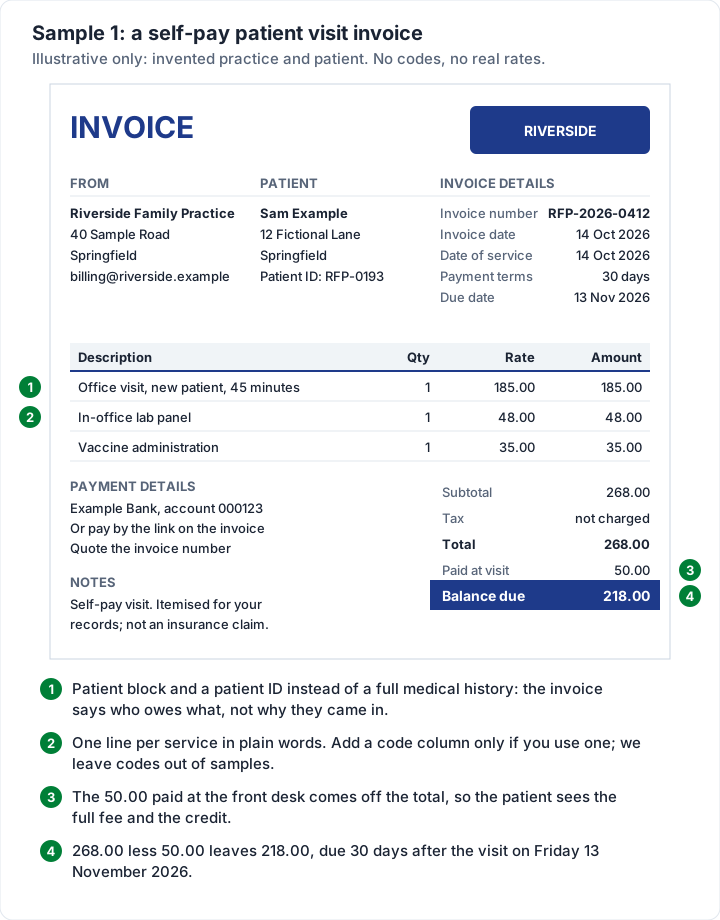
Three habits make this kind of invoice easy for a patient to pay:
- Plain-language lines. “In-office lab panel” tells the patient what they paid for. A diagnosis does not need to be on a payment request.
- The desk payment shown as a credit. The patient sees the full fee and what they already paid, not a mystery figure. How the deposit shows on the final invoice works the same way for any money received up front.
- A receipt when the balance is paid. An invoice asks for money; once the patient pays, they may want proof of payment for their own records. Is an invoice a receipt explains the difference.
If the patient then asks for something to send their insurer, that is a superbill request, not a reason to edit this invoice.
Sample 2: a locum shift invoice to a clinic#
A locum physician works three shifts at an urgent care clinic and bills the clinic, not the patients. This is a business-to-business invoice: it goes to an accounts team, it is checked against the clinic's rota, and it is paid on the terms in the locum agreement.
Every name, number and rate below is invented and illustrative. The mileage rate is the rate the two sides agreed in this example, not a government rate.
- Invoice: AS-0031, dated Monday 26 October 2026, Net 30, due Wednesday 25 November 2026
- From: Dr Alex Sample (sample locum physician)
- To: Lakeside Urgent Care (sample clinic), attention accounts payable
- Reference: LA-10/26, the locum agreement
| Description | Qty | Rate | Amount |
|---|---|---|---|
| Clinic shift, Mon 19 Oct 2026 | 10 hrs | 150.00 | 1,500.00 |
| Clinic shift, Tue 20 Oct 2026 | 10 hrs | 150.00 | 1,500.00 |
| Clinic shift, Wed 21 Oct 2026 | 10 hrs | 150.00 | 1,500.00 |
| Mileage at the agreed rate (3 round trips of 64 miles) | 192 | 0.70 | 134.40 |
| Total and balance due | 4,634.40 |
The arithmetic: each shift is 10 × 150.00 = 1,500.00, so three come to 4,500.00. The mileage is 3 × 64 = 192 miles, and 192 × 0.70 = 134.40. The total is 4,500.00 + 134.40 = 4,634.40, for 30 hours on site.
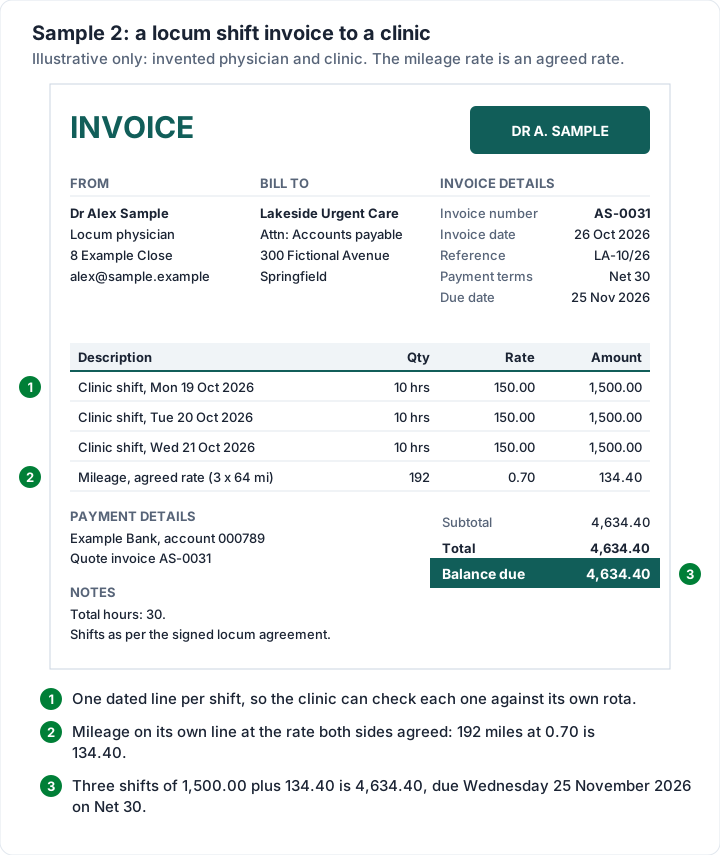
What makes a locum invoice go through first time:
- Address it to the people who pay. The clinic's accounts payable team, not the medical director who booked you. Who to address an invoice to covers company billing in general.
- Quote the agreement. A reference to the locum agreement or the clinic's booking number lets the accounts team match it without asking you.
- Say when it is due. “Net 30” only works if both sides read it the same way; what Net 30 actually means shows how the due date is worked out.
Whether a locum is an independent contractor or an employee is a question for the agreement, the clinic and a tax professional, not for the invoice template. The IRS explains the distinction on its independent contractor or employee page, and our independent contractor invoice template covers billing as a contractor in more depth.
Invoicing for copies of medical records#
Practices are regularly asked for copies of records: by patients, by law firms, by insurers and by other providers. Many search for a “medical records invoice template” because they need to bill for the copying.
The fee wording in the HIPAA Privacy Rule, at 45 CFR 164.524(c)(4) on eCFR (as of 28 October 2026), opens:
“If the individual requests a copy of the protected health information or agrees to a summary or explanation of such information, the covered entity may impose a reasonable, cost-based fee, provided that the fee includes only the cost of:”
The rule then lists the cost items that may be included; read the full list on eCFR rather than relying on a summary. HHS publishes guidance on individuals' right of access, including fees. We are not going to suggest amounts or tell you which rule applies to which request; ask your compliance adviser or a lawyer.
The invoice itself is the easy part. Whichever fee is right for the request, a records invoice usually carries:
- The requester, as the person or firm you are billing
- A request reference, such as the date of the request or the firm's file number, in the Reference / PO cell
- The items you are charging for, one per line, in the terms your compliance adviser has approved
- Nothing clinical. The records themselves go through your normal release process, not attached to the invoice
Privacy and codes: what to keep off a general invoice#
A general invoice template does not know anything about patient privacy. That is your job, and a few practical habits keep the invoice itself plain:
- Describe the service, not the condition. “Office visit, 45 minutes” is enough to ask for payment.
- Use a patient or account ID to link the invoice to the record, rather than printing a date of birth or other identifiers that payment does not need.
- Think about how you send it. Email is convenient, but whether and how you can email patient information is a privacy question. HHS has an FAQ on providers using email with patients; ask your compliance adviser how it applies to your practice.
Codes need care too. CPT, a common source of procedure codes, is the AMA's code set. Some payers and patients ask for codes on a bill; if you use them, take them from your practice-management or billing software rather than typing them from memory. Our samples keep a code column blank or drop it entirely, because we will not print or invent codes in an example.
Medical invoices in Charming Invoices#
The files work for a handful of invoices. If you are retyping the same practice details, the same services and the same payment instructions every week, this is what Charming Invoices does for a small practice or a locum, checked in the code:
- Unlimited invoices and clients on the free plan, with no card and no expiry. The free plan covers 1 business.
- Rename every printed label. “Bill to” can read “Patient”, and “PO number” can read “Patient ID” or “Account no.”: the reference field takes up to 100 characters. Labels belong to the business's template, so a rename applies to every invoice that business issues from then on; invoices already issued keep the labels they were issued with.
- Paid at the visit, shown as a credit. The deposit field is for money received before the invoice, and prints as “Deposit received” unless you rename it, for example to “Paid at visit”. It lowers the total, exactly like Sample 1.
- 60 templates on every plan. Timesheet groups time entries by week or project and adds a total hours line, which suits locum shifts.
- Line items with room for detail: descriptions up to 500 characters, an optional unit such as “hrs”, and optional section headings. There is no separate date or code column, so a date of service goes in the description.
- A PDF and a private link. Issue the invoice, then download the PDF, print it or copy a link the patient opens without an account, and send it however you like. Overdue invoices are flagged; Charming does not send reminders.
- Payment details on the invoice, plus one payment link of your own.
The catches, plainly:
- Charming is general invoicing software, not medical billing or practice-management software. It does not file insurance claims (no CMS-1500 or electronic claims), build superbills, check eligibility, store patient records or run a patient portal. For insurance work, use medical billing software, a practice-management system with billing, or a billing service.
- No HIPAA claim. Charming's terms and privacy pages do not mention health information, HIPAA or a business associate agreement, and we do not claim it is suitable for protected health information. Keep clinical detail off the invoice.
- No card payments through Charming. Patients and clinics pay you directly by the methods you list. You record payments yourself (part-payments are allowed) and mark it paid.
- One tax rate per invoice, and no per-line rates.
- Free invoices carry a small “Sent with Charming Invoices” line in the footer. Paid plans hide it by default: Individual is $29 once, Team $79 once and Pro $12 a month or $99 a year; the lifetime plans are final sale. See the pricing page.
If your work is self-pay visits or invoicing clinics for your time, create a free invoice and try Sample 1 or Sample 2 with your own details. You can also browse the invoice templates first.
Medical invoice template questions#
Is there a free medical invoice template in Word?#
Yes. The free Word files on the templates page cost nothing and need no sign-up. The service template's “Description of work” box suits a one-off visit or service; for anything with several lines, a payment at the desk or hours, the Excel files calculate the totals for you.
What should a medical invoice include?#
Your practice details, the patient (or the business you are billing), a unique invoice number, the invoice date and the date of service, each service on its own line in plain words, the total, anything already paid, the balance due, the due date and how to pay. Add a patient or account ID so your office can match it to the record.
Is a medical invoice the same as a superbill?#
No. An invoice asks the patient for payment. A superbill is an itemised visit summary a patient can send to their insurer to ask for reimbursement, and it usually comes from practice-management or billing software because it carries codes and provider identifiers. A patient can receive both for the same visit.
Can I put insurance details on a medical invoice?#
You can add a line with the patient's insurer and policy number if that helps your office or the patient. It does not turn the invoice into a claim: insurers are billed on their own forms, such as the CMS-1500, through billing software or a billing service.
Can I charge for copies of medical records?#
The opening of the HIPAA Privacy Rule's fee wording is quoted above from 45 CFR 164.524(c)(4). Read the full eCFR text and HHS's access guidance, and ask a compliance adviser or lawyer before setting a fee. The invoice template is the same either way.
Do I need medical billing software instead of a template?#
If you bill insurers, yes: claims, superbills with codes and eligibility checks are what medical billing and practice-management software are built for. If you bill self-pay patients, or a clinic for your time, an invoice template or a general invoicing app is enough. Therapists billing per session can use the same files. The therapy invoice template guide adds filled-in samples for sessions, prepaid packages and late cancellations.