Dental invoice template, with patient and lab samples

Nnabuike Okoroafor ·
On this page · 8 sections
A blank grid is a start, but the hard part of a dental invoice is fitting an insurance payment, a patient balance or a lab's case numbers on the page. If you are billing a self-pay or partly insured patient, or you run a dental lab billing practices, that is exactly the part you need.
This page gives you free Word and Excel files that fit dental work, and two dental invoice samples filled in with numbers that add up: a patient balance after an insurance payment, and a dental lab's case invoice to a practice. Both leave the procedure-code column blank, on purpose, and we explain why. For a doctor's office, clinic or locum work, the medical invoice template has samples built for that.
An invoice template bills a patient or a practice directly. It does not file insurance claims, post insurer payments or estimate what a patient owes. If that is most of your billing, you need dental practice-management software, and we say so plainly below.
General information, not legal, tax or dental-billing advice. Where a rule or an official source is mentioned, we quote and link it; ask a qualified billing professional, an accountant or a lawyer about your own situation.
Free dental invoice template: which file to use#
The free templates page has Excel and Word invoice templates, with no sign-up and no email address. None of them is dental-specific, but three suit dental billing:
| Your dental billing | Best file | Why |
|---|---|---|
| A patient invoice after an insurance payment | invoice-template.xlsx (Excel) | 15 lines that calculate, an Amount paid line for the insurer's payment and a Balance due |
| A dental lab billing a practice for cases | invoice-template.xlsx (Excel) | The Reference / PO cell takes a case or batch number, and every line has its own quantity and rate |
| A one-off service, such as a single visit for a self-pay patient | service-invoice-template.docx (Word) | A “Description of work” box for the date and treatment, and a 6-row table |
| A temp hygienist's hours, if they invoice at all (see the FAQ) | hourly-invoice-template.xlsx (Excel) | A Date column per day worked, hours times rate, and a Total hours line |
The Excel files calculate each line, the totals, the amount paid, the balance due and the due date. The Word files do not, so you type the totals and should add them up twice. There are no Google-hosted copies and we have not tested the conversion, so check the totals on a test invoice if you open one in Google Sheets or Docs.
The free Excel invoice template guide walks through every cell, and the invoice template for Word guide covers the Word files.
What a dental invoice should show#
A dental patient invoice and a dental lab invoice share the basics (who is billing, who owes, a unique number, dates, line items, a total and how to pay), but the details the reader checks are different. The general version is the field-by-field invoice checklist; this is the dental version side by side.
| Field | Patient invoice (practice to patient) | Lab invoice (lab to practice) |
|---|---|---|
| Who is billed | The patient or the person paying, with a billing address | The practice, usually its practice manager or accounts contact |
| Reference | Patient account number | Case or pan number for each case |
| Patient identity | Name on the bill, as the person who owes | Initials and case number only, not full names |
| Dates | Visit date and invoice date | Invoice date, and delivery date where it matters |
| Lines | Each procedure in plain words, with its fee | Each restoration or appliance, with shade, units and any rush fee |
| Code column | Only if you use codes; blank in our samples | Not usually needed |
| Credits | Insurance paid, or anything paid at the visit | Credits for remakes, if agreed |
| Total | Patient balance due | Total for the cases on this invoice |
| How to pay | Payment details, a payment link | Bank details and your terms with the practice |
The code column: why our samples leave it blank#
Codes on dental bills come up in every template search, so it is worth knowing whose they are. The American Dental Association describes its CDT Code on its CDT page (as of 28 October 2026):
“The Code on Dental Procedures and Nomenclature (the CDT Code) assures consistency in documenting dental treatment.”
The ADA also owns it. Its licensing page for commercial users says (as of 28 October 2026):
“The ADA is the exclusive copyright owner of CDT, the Code on Dental Procedures and Nomenclature (CDT Code), Consumer-Friendly CDT, and the ADA Dental Claim Form.”
That is why the samples on this page show a code column and leave it empty: we are not going to reproduce or invent codes in an example. If your patient invoices carry codes, they normally come from your practice-management software, which is where your practice's coding is kept. This is not advice about your own use of the codes; if you have a question about that, the ADA page is the place to start.
Dental invoice sample 1: patient balance after insurance#
A patient has a comprehensive exam, full-mouth X-rays and a cleaning. The patient's insurer has already paid part of the bill, and the practice now invoices the patient for the rest. The Excel file fits: the insurer's payment goes in Amount paid, and the balance works itself out.
Every name, number and fee below is invented and illustrative. The insurance figure is an example payment, not a way of estimating what an insurer pays. No tax line is shown; that is an example, not a tax position.
- Invoice: HD-2026-0388, dated Monday 26 October 2026, 30-day terms, due Wednesday 25 November 2026
- From: Harbourview Dental (sample practice)
- To: Jo Placeholder (sample patient), patient account HD-2208
- Visit date: Tuesday 6 October 2026
| Description | Code | Qty | Fee | Amount |
|---|---|---|---|---|
| Comprehensive exam | 1 | 95.00 | 95.00 | |
| Full-mouth X-rays | 1 | 140.00 | 140.00 | |
| Adult cleaning | 1 | 120.00 | 120.00 | |
| Total fees | 355.00 | |||
| Insurance paid (received Mon 26 Oct 2026) | 212.00 | |||
| Patient balance due | 143.00 |
The arithmetic: 95.00 + 140.00 + 120.00 = 355.00. The insurer paid 212.00, which leaves 355.00 − 212.00 = 143.00 for the patient, due 30 days after the invoice date.
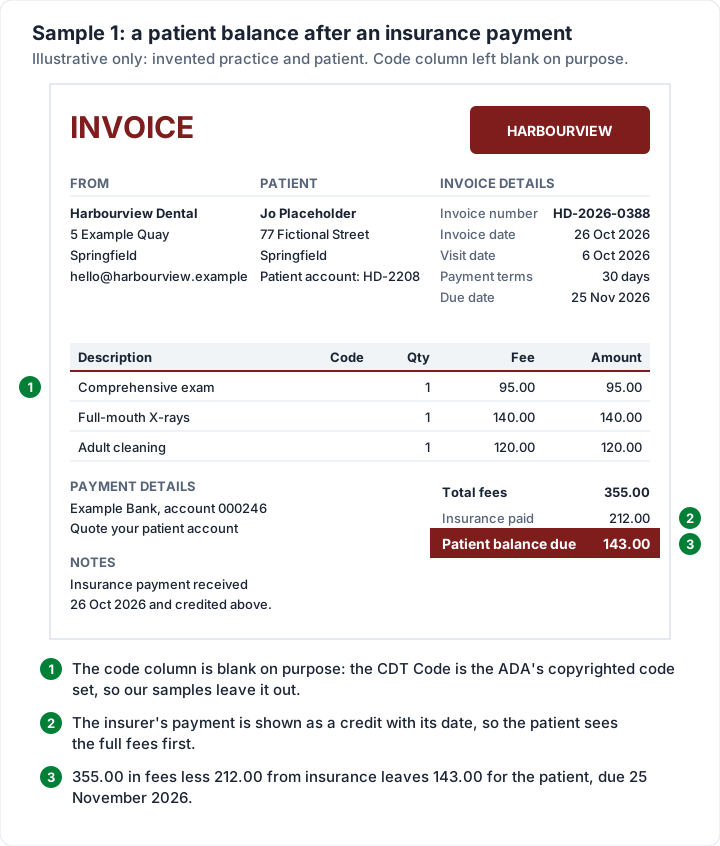
Why this layout works for patients:
- The full fee is visible. The patient sees what the treatment cost before the insurance credit, so the balance does not look arbitrary.
- The insurer's payment is dated. It answers the first question a patient asks: has insurance paid yet?
- One number to act on. 143.00, with a due date and a way to pay.
When the patient pays, record it and stop sending reminders; when an invoice counts as paid covers what “paid” means and what to keep.
Dental invoice sample 2: a dental lab case invoice#
A dental lab bills the practices it makes crowns, bridges and appliances for. Its invoice is checked by a practice manager against the cases the lab delivered, so every line needs the case number, and the patient appears only as initials. Here is one filled in.
Every name, case number and price below is invented and illustrative.
- Invoice: NDL-1187, dated Friday 30 October 2026, due Monday 30 November 2026 (the end of the following month)
- From: Northgate Dental Lab (sample lab)
- To: Harbourview Dental (sample practice), attention practice manager
- Reference: cases DL-4471 and DL-4472
| Description | Qty | Rate | Amount |
|---|---|---|---|
| Zirconia crown, case DL-4471 (patient J.M.), shade A2 | 2 | 189.00 | 378.00 |
| Night guard, case DL-4472 (patient R.K.) | 1 | 95.00 | 95.00 |
| Rush fee, case DL-4471 (3-day turnaround) | 1 | 40.00 | 40.00 |
| Total and balance due | 513.00 |
The arithmetic: 2 × 189.00 = 378.00 for the crowns, plus 95.00 for the night guard and 40.00 for the rush, comes to 513.00. In the Excel file, enter 31 days as the payment terms to land on 30 November.
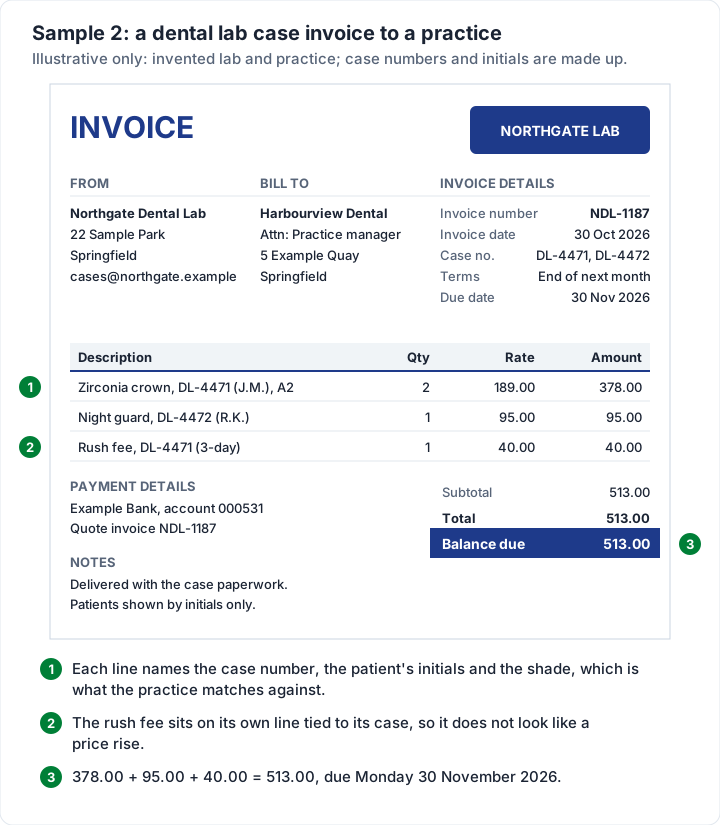
What makes a lab invoice easy for a practice to approve:
- Case numbers on every line. The practice matches lab invoices to its own case records; a line without a case number gets queried.
- Rush fees and remakes on their own lines, tied to the case, so they do not read as a price rise.
- Billed to the right person. The practice manager or accounts contact, not the dentist who sent the case. How to invoice a company covers business billing in general.
- Clear terms. Many labs bill per case and then send a monthly summary of what is still open. A statement of open invoices does that job, and when to send a statement instead of re-sending invoices explains the difference. If your agreement with a practice includes a late fee, see late fee wording for your invoice and say so on the invoice before it is ever late.
Insurance claims, superbills and dental invoices#
A dental invoice asks the patient, or a practice, for money. It is not an insurance claim. Dental claims go to insurers on their own forms, such as the ADA Dental Claim Form named in the ADA quote above, usually through practice-management software or a clearinghouse.
Patients who pay up front and want reimbursement may ask for an itemised statement to send their insurer, sometimes called a superbill. The difference between an invoice, a superbill and a claim form is explained, with a comparison table, in the medical invoice template guide; the same distinction holds for dental. The therapy invoice template covers the same question for counselling, massage and physical therapy.
Patient privacy belongs here too: ask your compliance adviser how privacy rules apply to your invoices and how you send them. The medical invoice template guide links HHS's own guidance, including its FAQ on providers emailing patients. Keeping clinical detail off the invoice, as in Sample 1, is a sensible habit either way.
Dental invoices in Charming Invoices#
If you are a lab sending invoices to the same practices every week, or a small practice billing self-pay patients, the files start to feel slow. This is what Charming Invoices does for dental billing, checked in the code:
- Unlimited invoices and clients on the free plan, with no card and no expiry. The free plan covers 1 business.
- Rename the printed labels. “PO number” can read “Case no.” for a lab or “Patient account” for a practice, with up to 100 characters in the field. Labels belong to the business's template, so a rename applies to every invoice that business issues from then on.
- Insurance paid, shown as a credit. The deposit field is for money received before the invoice, so it can carry an insurer's payment, renamed to “Insurance paid”. You type the amount yourself; it lowers the total, as in Sample 1.
- Units on each line, such as “unit”, “case” or “arch”. The unit column is off by default; turn it on in the template.
- Client statements as a PDF, with ageing, on every plan. A lab can download each practice's list of open invoices, showing how far past due each one is, and send it on. It is a summary of open invoices, not one combined monthly invoice.
- Overdue invoices flagged. An issued invoice past its due date shows as Overdue. Charming does not email invoices or send reminders: you download the PDF or copy its private link and send it yourself.
- Recurring invoices for a fixed monthly arrangement, on the paid plans. Each one arrives as a draft for you to review before you issue it.
- 60 templates on every plan, and payment details plus one payment link of your own on every invoice.
The catches, plainly:
- Charming is general invoicing software, not dental practice-management software. It does not file claims (no ADA Dental Claim Form or electronic claims), read or post insurer payments, estimate patient portions, look up codes or keep patient records. For insurance billing, use dental practice-management software or a billing service.
- No HIPAA claim. Charming's terms and privacy pages do not mention health information, HIPAA or a business associate agreement, and we do not claim it is suitable for protected health information.
- No card payments through Charming. Patients and practices pay you directly. You record payments yourself (part-payments are allowed) and mark it paid.
- One tax rate per invoice, and no per-line rates.
- Free invoices carry a small “Sent with Charming Invoices” line in the footer. Paid plans hide it by default: Individual is $29 once, Team $79 once and Pro $12 a month or $99 a year; the lifetime plans are final sale. The pricing page has the details.
If that fits your billing, create a free invoice and rebuild Sample 2 with one of your own cases. Or browse the invoice templates first.
Dental invoice template questions#
Is there a free dental invoice template?#
Yes. The Word and Excel files on the free templates page cost nothing and need no sign-up. Use the general Excel file for patient balances and lab cases, and the Word service template for a single one-off visit.
What should a dental invoice include?#
Your practice or lab details, who is billed, a unique invoice number, the invoice date (and the visit or delivery date), each procedure or case on its own line with its fee, any insurance payment or other credit, the balance due, the due date and how to pay. Labs add case numbers and patient initials to every line.
Should a dental invoice show procedure codes?#
Only if you use them and the person paying needs them. The CDT Code is the ADA's copyrighted code set, so our samples leave the column blank; if your invoices carry codes, take them from your practice-management software. Ask your billing adviser what your patients' insurers expect.
Can a temp hygienist invoice the practice?#
That depends on whether the hygienist is an independent contractor or an employee, and an invoice template cannot settle that. The IRS says on its independent contractor or employee page (as of 28 October 2026): “It is critical that business owners correctly determine whether the individuals providing services are employees or independent contractors.” Ask an accountant before anyone sends or pays a hygienist invoice. If the answer is contractor, our 1099 contractor invoice guide covers the invoice itself.
How do I show an insurance payment on a dental invoice?#
List the full fees first, then the insurer's payment as a credit with the date it arrived, then the patient balance, as in Sample 1. In the Excel file it goes in Amount paid; in Charming, in the deposit field renamed “Insurance paid”.