Free independent contractor invoice template, with a sample

Nnabuike Okoroafor ·
On this page · 13 sections
A company has hired you as an independent contractor, the work is done, and someone in their finance team has asked you to “send an invoice”. You do not have accounting software, you are not sure what a contractor invoice needs, and somewhere in the onboarding email there was a mention of a W-9.
This guide gives you a free independent contractor invoice template, a filled-in sample you can copy, and a plain account of how an invoice differs from the W-9 and the 1099-NEC, quoting IRS pages as they read on 23 October 2026. General information, not legal or tax advice: for how any of it applies to you, ask a tax professional.
In short#
- Download a template: the hourly spreadsheet if you bill by the hour, or one of the others on our free invoice templates page.
- Put your legal name on it, the same name you give the client on your W-9, plus the client's legal name and their PO number if they gave one.
- Bill by dated lines or by deliverable, with a total, a due date and how to pay you.
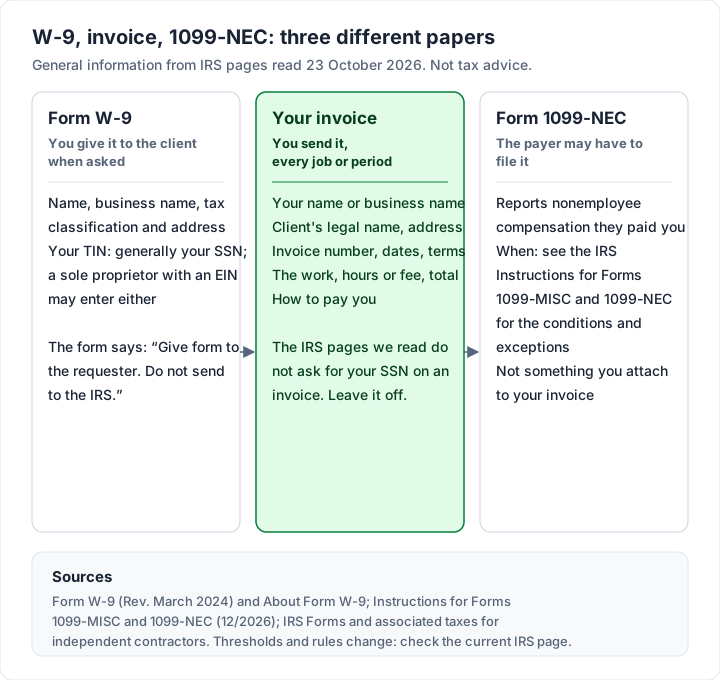
- Keep your Social Security number off the invoice. The W-9 is the form for that, and the form itself says to give it to the requester, not the IRS.
- The 1099-NEC is filed by the payer, not attached to your invoice.
Free independent contractor invoice templates#
These invoice templates are free, with no sign-up. We read each one with a script on 22 October 2026 to describe exactly what is in it. For other kinds of job, from a deposit to a progress bill, see our nine annotated invoice examples.
| Template | Format | Calculates? | Best for |
|---|---|---|---|
| hourly-invoice-template.xlsx | Excel; Google Sheets can open it after conversion | Yes, including Total hours | Contractors who bill by the hour, one dated line per day or task |
| invoice-template.xlsx | Excel; Google Sheets can open it after conversion | Yes | Fixed fees, day rates or a mix, priced by quantity and rate |
| service-invoice-template.docx | Word; Google Docs can open it after conversion | No, you type the totals | A defined job: description of work, dates, labour and materials, deposit paid |
| invoice-template.docx | Word; Google Docs can open it after conversion | No, you type the totals | A general invoice with a 10-row item table |
In the two spreadsheets above, each amount is quantity (or hours) times rate, the due date is the invoice date plus your payment terms in days (30 to start with), and the totals block works out the subtotal, tax, total and balance due. The hourly file adds a Date column on each of its 15 lines and a Total hours cell that sums them. The Word files leave the arithmetic to you, and say so in a short italic note you delete before sending.
Work in Google Drive? Upload the file and save it as a Google file; our guide to the invoice template for Google Docs and Sheets has the steps and the checks to run after converting.
For the records behind the invoice, the same page has a free weekly timesheet (Excel) that splits billable from non-billable hours and gives the hours and amount to invoice, and a mileage log (Excel) for trips you bill to a client. The mileage log has no rate filled in: you type the rate you agreed. How to invoice for hours worked takes one week from that timesheet to a finished hourly invoice.
What an independent contractor invoice should show#
The IRS describes an independent contractor this way: “The general rule is that an individual is an independent contractor if the person for whom the services are performed has the right to control or direct only the result of the work and not what will be done and how it will be done” (IRS, Independent contractor defined, as of 23 October 2026). Whether you are one is not something an invoice decides; if you are unsure, read that page or ask a tax professional. This post only covers the invoice.
In the US, most of what an invoice needs comes from what the client's accounts payable team usually wants to see before it pays. Every field below has a place in our templates:
| Field | Why the client needs it | Where it goes in the template |
|---|---|---|
| Your legal name (and business name, if you use one) | So the payment matches the name on your W-9 | From, first line |
| Your address, email and phone | Supplier record and questions | From |
| Client's legal company name, with “Attn: Accounts Payable” | The invoice reaches the people who pay | Bill to |
| Invoice number | No duplicates in their system | Invoice number (starts at INV-0001) |
| Invoice date and due date | Their payment run | Invoice date, Payment terms (days), Due date |
| PO or reference number | Matching your invoice to an approval | Reference / PO number |
| Dated work lines or deliverables | Approval by your contact | Line items |
| Total and balance due | What to pay | Totals block |
| Bank details or a payment link | How to pay you | Payment details |
What to leave off: your Social Security number, your date of birth and anything else the client does not need to approve and pay the invoice. More on the SSN below.
If you are in the UK, GOV.UK has its own list of what an invoice must include; there is a short section on that further down. For the full field-by-field reasoning, see what actually belongs on an invoice.
Sample independent contractor invoice#
Here is the hourly template filled in by an invented contractor, Sam Okafor, a user experience researcher billing an invented company, Fernway Logistics Inc.
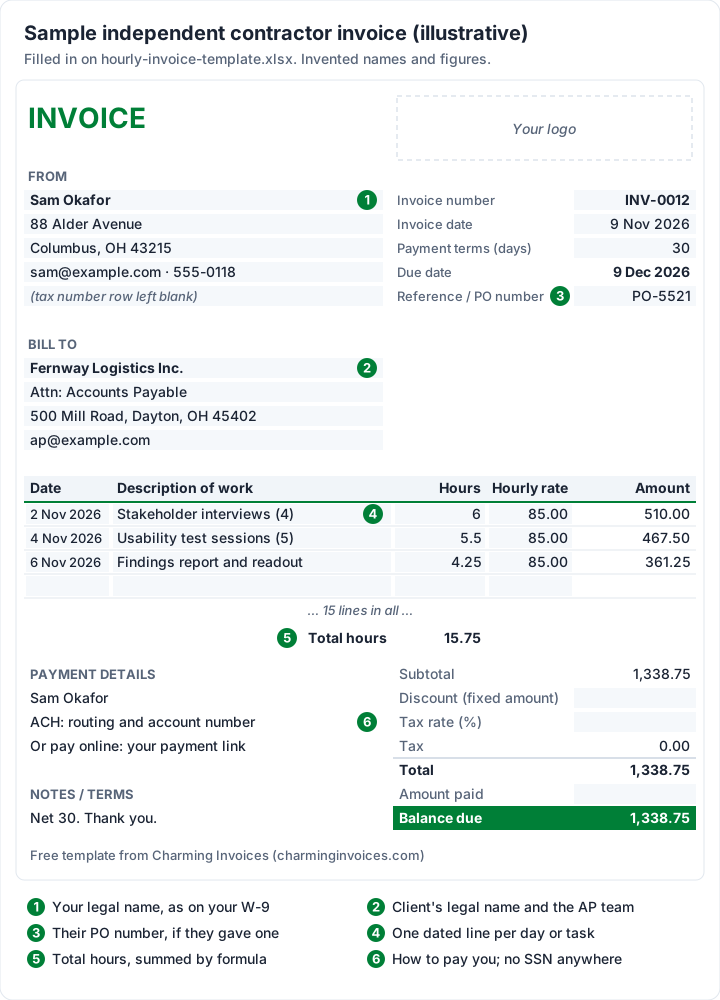
The figures (invented names and amounts):
| Date | Description of work | Hours | Hourly rate | Amount |
|---|---|---|---|---|
| 2 Nov 2026 | Stakeholder interviews (4) | 6 | 85.00 | 510.00 |
| 4 Nov 2026 | Usability test sessions (5) | 5.5 | 85.00 | 467.50 |
| 6 Nov 2026 | Findings report and readout | 4.25 | 85.00 | 361.25 |
| Total hours | 15.75 | |||
| Balance due | 1,338.75 |
The arithmetic, checked: 6 × 85.00 = 510.00; 5.5 × 85.00 = 467.50; 4.25 × 85.00 = 361.25. The hours add to 15.75, and 510.00 + 467.50 + 361.25 = 1,338.75. There is no tax line in this example. Whether a sales tax applies to a service is a question for your state's tax agency or an accountant. The invoice is dated Monday 9 November 2026 and, on 30-day terms, due Wednesday 9 December 2026. The work dates (Monday 2, Wednesday 4 and Friday 6 November 2026) sit on the lines, so the client can check them against its own calendar.
Sample: a fixed-fee project with a deposit#
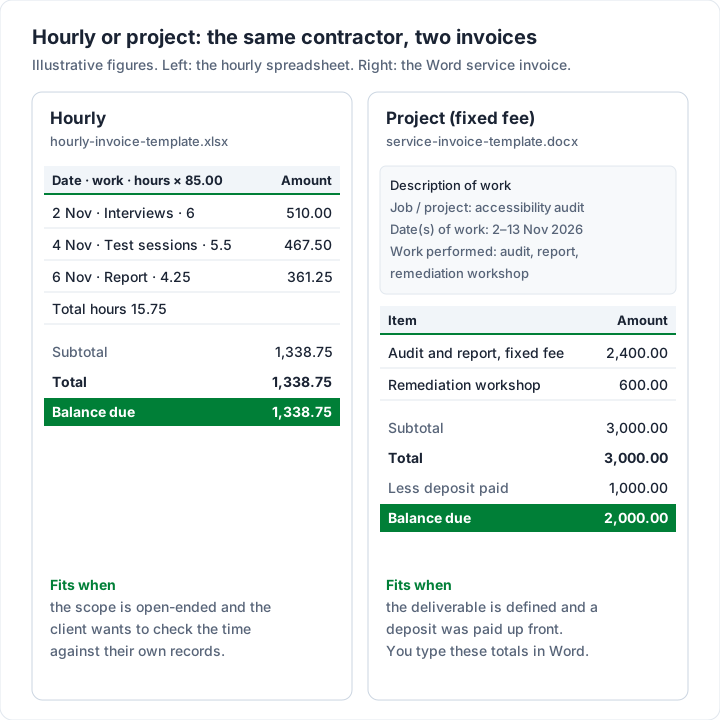
The same contractor, billing a defined project instead, on the Word service template. The client paid a $1,000.00 deposit when the work was agreed (invented figures):
| Item | Qty | Rate | Amount |
|---|---|---|---|
| Accessibility audit and written report, fixed fee | 1 | 2,400.00 | 2,400.00 |
| Remediation workshop for the product team, half day | 1 | 600.00 | 600.00 |
| Subtotal | 3,000.00 | ||
| Total | 3,000.00 | ||
| Less deposit paid | 1,000.00 | ||
| Balance due | 2,000.00 |
The arithmetic, checked: 2,400.00 + 600.00 = 3,000.00, and 3,000.00 − 1,000.00 = 2,000.00. In Word you type each of those figures yourself. If deposits are new to you, how a deposit invoice works shows how to word the deposit invoice and the balance invoice so they match.
Should your Social Security number go on an invoice?#
Usually not. In the US, the paperwork for your taxpayer identification number (TIN) is Form W-9, which a client often asks you to complete once, before or with your first invoice. The IRS says: “Use Form W-9 to provide your correct Taxpayer Identification Number (TIN) to the person who is required to file an information return with the IRS” (IRS, About Form W-9, as of 23 October 2026).
What the form itself (Rev. March 2024, read on 23 October 2026) says, quoted:
- Who gets it: “Give form to the requester. Do not send to the IRS.”
- Which number: for individuals, the TIN “is generally your social security number (SSN)”, and the instructions add: “If you are a sole proprietor and you have an EIN, you may enter either your SSN or EIN.”
- Backup withholding: “Persons making certain payments to you must under certain conditions withhold and pay to the IRS 24% of such payments.” The form lists those conditions.
Read the form's own line-by-line instructions for which name goes where. An employer identification number (EIN) is how many contractors keep their SSN off paperwork. The IRS says “You never have to pay a fee for an EIN” and lets you apply online (IRS, Get an employer identification number, as of 23 October 2026). That is not a recommendation that you need one.
None of the IRS pages we read asks for a TIN to be printed on an invoice. So our templates have a row called “Tax or business number (if registered)”, which you can leave blank or delete. If a client asks for a number on the invoice itself, ask what it is for; many contractors give an EIN rather than an SSN.
What people mean by a “1099 invoice”#
“1099 invoice” is not an IRS form. People use it to mean an invoice from a 1099 contractor: someone the client pays as a non-employee and may report on Form 1099-NEC. Your invoice looks the same as any other business invoice. The form is the payer's side of things.
What the IRS pages say, quoted as they read on 23 October 2026:
- Who files it: the IRS page for payers says “If you pay independent contractors, you may have to file Form 1099-NEC, Nonemployee Compensation” (IRS, Reporting payments to independent contractors).
- When: the Instructions for Forms 1099-MISC and 1099-NEC set out the conditions for reporting a payment as nonemployee compensation. One of them reads: “You made payments to the payee of at least $2,000 during the year.” The instructions also say the threshold “increased to $2,000 and may be adjusted for inflation beginning in calendar year 2027”. Read the instructions for the full conditions and exceptions; if you are incorporated, ask the client whether it expects to send you one.
- Your side: the IRS says independent contractors are “generally considered self-employed” (IRS, Independent contractor (self-employed) or employee?), and its self-employed tax centre says: “You have to file an income tax return if your net earnings from self-employment were $400 or more.”
The practical upshot: keep every invoice you send and note when each one was paid, whether or not a 1099 arrives; they are your own record of what you billed. Thresholds and rules change, so check the current IRS pages, or ask a tax professional how they apply to you.
How to fill in the independent contractor invoice template#
- Download the hourly template or another file from the downloads page, and save a master copy you never send.
- From: type your legal name exactly as on your W-9, then your address, email and phone. Leave the tax number row blank unless you have a reason to fill it in.
- Bill to: the client's legal company name (from their contract or supplier form), “Attn: Accounts Payable”, their billing address and the invoice email they gave you.
- Invoice number: the next in your own sequence. How to number invoices covers formats that never repeat.
- Dates and terms: type the invoice date and your agreed payment terms in days. The spreadsheet works out the due date. If you agreed net 30, what net 30 means explains how it is counted.
- Reference / PO number: copy it exactly if the client gave you one. Our guide to the PO number on an invoice explains why invoices without one often wait.
- Lines: one per day or task (hourly), or one per deliverable (project). Hours can be decimals: 1.5 is an hour and a half, 0.25 is fifteen minutes.
- Payment details: account name and bank or ACH details, or a payment link.
- Check and send: read the totals, download a PDF and email it to the address the client named. How to email an invoice has subject lines and wording.
In the public online discussions we read while researching invoicing (the people quoted are not Charming customers), one self-employed person described where the difficulty usually sits:
When I started out as self-employed, it began with writing my first invoices. I quickly realized how hard it actually is to define a proper value for your work.
A useful test for each line: could your contact approve it without asking you what it means? “Usability test sessions (5)” passes. “Research work” does not.
Hourly or project billing for independent contractors#
Your contract usually decides this, and the invoice follows it.
| Hourly | Project (fixed fee) | |
|---|---|---|
| Template | hourly-invoice-template.xlsx | service-invoice-template.docx or invoice-template.xlsx |
| Each line shows | Date, task, hours, rate | Deliverable or milestone, fee |
| The client checks | Hours against their own records | That the deliverable arrived |
| Deposits | Rare | Common; shown as “Less deposit paid” or Amount paid |
| When to invoice | Weekly, fortnightly or monthly | At milestones or on completion |
| Risk | Debates about how long things took | Scope creep inside a fixed fee |
For a deeper look at choosing between them, and at milestone schedules, see how to invoice as a freelancer. Consultants with retainers will find more in how to invoice for consulting, and consulting invoice templates with hourly, retainer and fixed-fee samples fill in all three. Locum doctors invoicing a clinic will find a per-shift sample in our medical invoice template guide, and the legal invoice template shows time entries at two hourly rates. If you only want a printable blank for hours, the hours-worked invoice template with a timesheet has a blank PDF to print and fill in by hand.
Getting paid by a company as a contractor#
A correct invoice can still sit unpaid if the client cannot set you up as a supplier. The usual order:
- Supplier setup first. Return the client's vendor form and, in the US, the W-9 they asked for, before or with your first invoice.
- Ask for a PO number and who approves your invoices.
- Agree the terms in writing: net 30 is common at larger companies, and some pay on fixed payment runs.
- Send the invoice to the finance inbox and copy your contact.
Invoicing a company walks through each of those steps, including the W-8BEN for contractors outside the US billing a US company. If you work in construction or the trades rather than professional services, what a contractor invoice should include covers labour, materials, change orders and retainage, and contractor invoice templates for Word and Excel fill one in for a deck replacement with a deposit. Musicians billing a venue or an artist will find a gig sample and a session sample in the musician invoice template. The job invoice template has a filled-in sample of a trade job with labour, materials and a deposit.
Self-employed in the UK: what an invoice must include#
UK readers searching for a self-employed invoice template need the same layout with a slightly different checklist. GOV.UK's page on what an invoice must include (as of 23 October 2026) says “Your invoice must include:” and lists “a unique identification number”, “your company name, address and contact information”, “the company name and address of the customer you’re invoicing”, “a clear description of what you’re charging for”, “the date the goods or service were provided (supply date)”, “the date of the invoice”, “the amount(s) being charged”, “VAT amount if applicable” and “the total amount owed”.
For sole traders, the same page adds “your name and any business name being used” and “an address where any legal documents can be delivered to you if you are using a business name”. Our templates have a place for each of these; put the supply date on each line, or in the notes. The page also says VAT invoices “include more information than non-VAT invoices”, so if you are VAT registered, read GOV.UK's VAT invoice guidance before using the template for VAT.
When a template stops being enough#
Templates are fine for a handful of clients. The admin grows with each one: numbering by hand, tracking who has paid, and remembering to chase. If you are new to all of this, what to do before your first invoice is a short checklist.
We make Charming Invoices, so here is what it does for an independent contractor, and its limits:
- An hourly consulting starter kit pre-fills a line for an hourly rate. The price is left at 0 on purpose, so you type your own.
- Numbering per business, with no gaps, and a “Next invoice number” setting to continue from your template (it can be raised, never lowered).
- A PDF to download and a private link your client's finance team opens without an account, and a place for your PO number. You send them however you like.
- Overdue invoices are flagged once the due date passes, so you know whom to follow up.
The catches: Charming has no time tracker, so you type the hours (from the free timesheet above, or your own records). It does not file taxes, prepare 1099s or collect W-9s, and it does not email invoices or send reminders for you. Clients pay you directly; Charming does not process card payments, and you record each payment or mark the invoice paid yourself. The free plan is $0 forever with no card and no invoice limit, for 1 business, and adds a small “Sent with Charming Invoices” line to its invoices. Create a free invoice and see whether it beats copying a file.
Questions about independent contractor invoices#
Do independent contractors need to send invoices?#
In practice, almost always. A company's accounts payable team usually needs an invoice to approve and record the payment, and your own invoices are your record of what you earned.
What is a 1099 invoice?#
An ordinary invoice from a contractor the client treats as a non-employee. The “1099” refers to Form 1099-NEC, which the client may file after the year ends. You do not attach or send a 1099 with your invoice.
Can I invoice as an independent contractor without a business name?#
Yes. Use your own legal name, the same one on line 1 of your W-9. If you use a business name, add it under your legal name.
Should I put my EIN or SSN on the invoice?#
The IRS pages quoted above put your TIN on the W-9, and none of them asks for it on an invoice; our templates leave it off. If a client asks for a number on the invoice, ask what it is for; many contractors give an EIN rather than an SSN on a document that passes through many hands.
Is the independent contractor invoice template free?#
Yes. The invoice templates on the downloads page are free to download, change and use, with no sign-up.
The short version#
Download the hourly or project template, put your legal name and the client's legal name on it, add the PO number, dated lines or deliverables, the due date and how to pay you, and send a PDF. Your SSN goes on the W-9 the client asks for, not on the invoice, and the 1099-NEC is the payer's filing, not something you attach.
Free downloads
No sign-up and no email address. More on the free templates page.
- Download .xlsx: Hourly invoice template for Excel
Hourly invoice template for Excel
Excel .xlsxFor time-based work: one line per day or task, billed by the hour.
- Download .xlsx: Invoice template for Excel
Invoice template for Excel
Excel .xlsxThe general-purpose invoice: products, services or a mix, priced by quantity and rate.
- Download .docx: Service invoice template for Word
Service invoice template for Word
Word .docxFor a job: what you did, where and when, then labour and materials.
- Download .docx: Invoice template for Word
Invoice template for Word
Word .docxThe general invoice as a Word document, for people who would rather type than use cells.
- Download .xlsx: Weekly timesheet for hourly work
Weekly timesheet for hourly work
Excel .xlsxFor anyone who bills by the hour: log a week of time, split billable from non-billable, and get the hours and amount to put on the invoice.
- Download .xlsx: Mileage log
Mileage log
Excel .xlsxFor trips you bill to clients: log each journey from the odometer, mark it billable, and total the miles at the rate you agreed.