Photography invoice template, with filled-in samples

Nnabuike Okoroafor ·
On this page · 9 sections
The shoot went well, the gallery is nearly edited, and the client has asked you to “just send an invoice”. Maybe it is your first paid job. In the public online discussions we read while researching invoicing (the people quoted are not Charming customers), one person described exactly that moment:
I am definitely not a professional (which is why I don't have any of this stuff in place), but an opportunity was handed to me and it would have been monumentally stupid to turn it down, so I played pro photographer for one day.
This post is the photography invoice template part of the answer: which free file to use, what goes on the page, and three filled-in photography invoice examples (a portrait session with prints, a real-estate listing shoot and a wedding balance after a deposit), every one built in the actual template file and every total checked. For the business side of photography billing, such as when to send files and how deposits hold a date, see our photographer's guide to invoicing.
General information, not legal or tax advice. Where a rule is mentioned, we quote and link the official page; ask an accountant or lawyer about your own situation.
Free photography invoice templates: which to use#
There is a free photography invoice template for Excel and one for Word, with no sign-up. Both have photography lines printed in advance, from the session fee through retouched images, an online gallery, prints, a second photographer and travel to a usage licence line, with every rate left blank so you type your own. The general invoice files on our Excel and Word invoice templates page work for a shoot too, and the samples below use them. The photography files were built and checked by script.
| File | Calculates? | Best for |
|---|---|---|
| photography-invoice-template.xlsx (Excel) | Yes: line amounts, tax, total, balance due, due date | Sessions, prints and products, with a “Less deposit paid” row for the booking payment |
| photography-invoice-template.docx (Word) | No, you type every total | A booked job: a description-of-work box, the photography lines already printed and a “Less deposit paid” line |
| invoice-template.xlsx (Excel) | Yes: line amounts, tax, total, balance due, due date | Sessions, per-image pricing, prints and per-property shoots |
| hourly-invoice-template.xlsx (Excel) | Yes, plus a Total hours cell | Event or second-shooter work billed by the hour |
| service-invoice-template.docx (Word) | No, you type every total | One booked job, such as a wedding: a description-of-work box, a 6-row table and a “Less deposit paid” line |
| invoice-template.docx (Word) | No, you type every total | A general invoice with a 10-line table |
In the spreadsheets, each of the 15 lines works out quantity times rate, rounded to the cent. The totals block takes off a fixed discount, applies one tax rate, and shows the total (never below 0), the amount paid and the balance due. The due date is the invoice date plus your payment terms in days, which start at 30; change them to 7 or 14 for shorter terms. The tax rate cell takes a plain number, 0 or 1 to 100 (type 7.5 for 7.5%), and shows a red note under the totals if a value such as 0.2 gets in.
In Word, nothing calculates. Each file carries a short note with the formulas, which you delete before sending. More on filling in the Word file below.
You can upload either kind to Google Drive and open it in Google Sheets or Google Docs, but we have not tested the conversion: type a test invoice and check the totals first. There are no Google-hosted copies.
If you would rather not use a file at all, Charming's Photographer template (more on it at the end) does the arithmetic and the branding for you.
What a photography invoice should include#
Beyond the basics every invoice needs (your details, the client's, a number, dates, totals and how to pay), a photography invoice is clearer when it splits the job into the things you actually sold. A thread in our research asked whether a real-estate photographer should split one job into separate line items at all. One reply in that thread came back to how the invoice looks:
I wouldnt stress too much about the way you invoice since you are only getting started, but if you are serious about this business and want to grow, professional looking invoices can only help.
Separate lines are a big part of what makes an invoice look professional. Typical lines:
| Line | Example wording | Usual unit |
|---|---|---|
| Session or coverage fee | “Family portrait session, 1 hour, studio, 31 Oct 2026” | Per session, per hour |
| Editing and retouching | “Retouched digital images, high resolution” | Per image, per set |
| Deliverables | “Online gallery, 12 months” | Per job |
| Prints and products | “Canvas print, 16x20 in” | Per item, with size |
| Add-ons | “Virtual staging, per image” or “Second photographer” | Per item, per hour |
| Travel | “Travel, venue beyond 40 miles” | Flat fee or per mile, as agreed |
| Usage licence | “Usage licence: listing marketing for this property only” | Per licence or per job |
| Deposit already paid | “Less deposit paid (INV-0118)” | A credit, not a charge |
Sales tax on prints, files and sessions. Whether any of these is taxable depends on where you and the client are, and the answer can differ between a physical print, a digital file and the session itself. The samples below use a tax rate of 0 so the arithmetic stays visible. Check your state or national tax agency's guidance, or ask an accountant, before you set a rate. Our files take one tax rate per invoice.
Usage licence and copyright: what the invoice can and cannot do#
A usage line tells the client what they are paying to do with the images. It is worth knowing what the US Copyright Office says about US law (other countries differ). From its Circular 1, Copyright Basics (revised September 2021, quoted as of 23 October 2026):
- Who owns it at the start: “The copyright in a work initially belongs to the author(s) who created that work.”
- Work made for hire is the exception: “When a work is made for hire, the author is not the individual who actually created the work.” The Circular adds that “The concept of work made for hire can be complicated and has serious consequences” for both sides.
- Owning a copy is not owning the copyright: “Mere ownership of a copy or phonorecord that embodies a work does not give the owner of that copy or phonorecord the ownership of the copyright in the work.”
- Transfers: a transfer of rights “generally must be made in writing and signed by the owner of the rights conveyed or the owner’s authorized agent”, while “Transferring a right on a nonexclusive basis does not require a written agreement.”
In practice: what the client may do with your photos depends on your written agreement, so put it in writing, and make the licence line on the invoice match it rather than replace it. If a client asks you to sign a work-for-hire or rights-transfer clause, ask a lawyer before you sign. A model release is a separate document signed by the person photographed, not an invoice line; the American Society of Media Photographers has a questions-and-answers page on model releases. Painters and illustrators face the same split between selling the work and licensing it; the artist invoice template shows it on an illustration invoice.
Sample 1: portrait session with prints#
An invented studio, Saltmarsh Studio, photographed a family on Saturday 31 October 2026. The client paid 100.00 when booking, then chose ten retouched images and some prints. We typed these values into a copy of invoice-template.xlsx and checked every result against the file's formulas.
| Description | Quantity | Rate | Amount |
|---|---|---|---|
| Family portrait session, 1 hour, studio, 31 Oct 2026 | 1 | 250.00 | 250.00 |
| Retouched digital images, high resolution | 10 | 18.00 | 180.00 |
| Fine-art print, 8x10 in | 3 | 32.00 | 96.00 |
| Canvas print, 16x20 in | 1 | 145.00 | 145.00 |
| Subtotal and total (tax rate 0) | 671.00 | ||
| Amount paid (booking payment, 20 Oct 2026) | 100.00 | ||
| Balance due | 571.00 |
The arithmetic, checked: 10 × 18.00 = 180.00; 3 × 32.00 = 96.00; 250.00 + 180.00 + 96.00 + 145.00 = 671.00; 671.00 − 100.00 = 571.00. The invoice is dated Thursday 12 November 2026 with 7-day terms, so the file shows a due date of Thursday 19 November 2026. All names and figures are illustrative, not a rate guide.
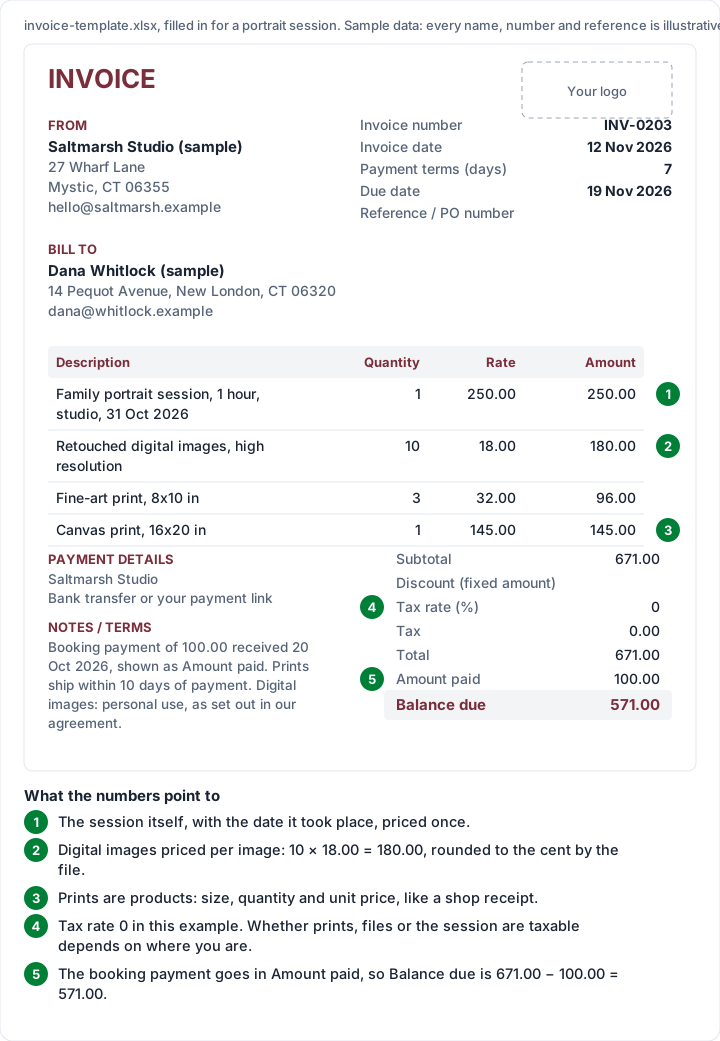
Three details worth copying:
- Price the session once, and the products separately. A client who adds two more prints changes one line, not the whole invoice.
- Sizes on print lines. “Fine-art print, 8x10 in” cannot be confused with a different order.
- The booking payment as Amount paid. The file subtracts it and shows 571.00 due. Put the date it was paid in the notes.
Sample 2: real-estate listing shoot#
Real-estate photographers usually bill an agent or brokerage for several properties in a week. The question is one invoice per listing or one per batch. Per listing is easier for agents who pay from each sale's marketing budget; a weekly batch suits brokerages that pay centrally. Either way, start every line with the property address.
| Description | Quantity | Rate | Amount |
|---|---|---|---|
| 14 Alder Way: listing photos, 25 edited images (17 Nov) | 1 | 195.00 | 195.00 |
| 14 Alder Way: twilight exteriors, 3 images | 1 | 75.00 | 75.00 |
| 14 Alder Way: 2D floor plan | 1 | 60.00 | 60.00 |
| 9 Kestrel Court: listing photos, 25 edited images (18 Nov) | 1 | 195.00 | 195.00 |
| 9 Kestrel Court: virtual staging, per image | 4 | 30.00 | 120.00 |
| 301 Birch St, Unit 4: listing photos, 15 edited images (19 Nov) | 1 | 150.00 | 150.00 |
| Travel fee, Unit 4 outside service area | 1 | 25.00 | 25.00 |
| Total (tax rate 0) | 820.00 |
The arithmetic, checked: 4 × 30.00 = 120.00. Per property: 195.00 + 75.00 + 60.00 = 330.00 for 14 Alder Way; 195.00 + 120.00 = 315.00 for 9 Kestrel Court; 150.00 + 25.00 = 175.00 for Unit 4. 330.00 + 315.00 + 175.00 = 820.00. The shoots were on Tuesday 17, Wednesday 18 and Thursday 19 November 2026; the invoice is dated Friday 20 November 2026 with 7-day terms, due Friday 27 November 2026. Every address, name and price is invented.
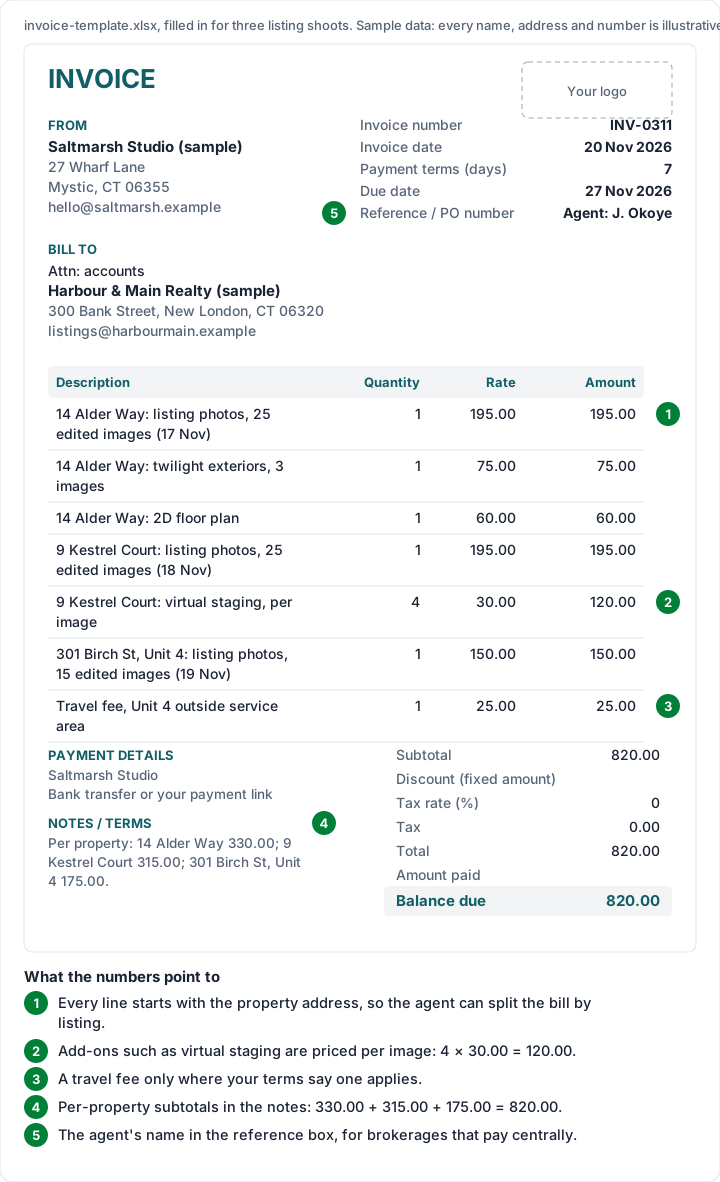
Real-estate threads in our research return again and again to agents who use the photos before paying. One photographer described their fix:
I’ll be watermarking these images this go around and let him know I’ll deliver unmarked images once both invoices are paid.
Whatever delivery rule you choose, write it in your terms and in the invoice notes, so the agent reads it on the document that asks for the money.
Sample 3: wedding balance invoice after a deposit#
Weddings are usually billed twice: a deposit when the couple books, and the balance before the day. Our deposit invoice guide covers the first invoice. This is the second, on the Word service template, because its “Less deposit paid” line fits a balance invoice exactly.
The invented couple booked Saltmarsh Studio for Saturday 12 June 2027 and paid a 1,500.00 deposit on invoice INV-0118. The balance invoice:
| Item | Qty / hours | Rate | Amount |
|---|---|---|---|
| Wedding coverage, 8 hours, two photographers | 1 | 3,200.00 | 3,200.00 |
| Engagement session, 1 hour | 1 | 350.00 | 350.00 |
| Edited images, online gallery, 12 months | 1 | 400.00 | 400.00 |
| Wedding album, 10x10 in, 30 pages | 1 | 650.00 | 650.00 |
| Parent albums, 6x6 in | 2 | 180.00 | 360.00 |
| Travel, venue beyond 40 miles | 1 | 90.00 | 90.00 |
| Subtotal and total (tax 0%) | 5,050.00 | ||
| Less deposit paid (INV-0118) | 1,500.00 | ||
| Balance due | 3,550.00 |
The arithmetic, checked: 2 × 180.00 = 360.00; 3,200.00 + 350.00 + 400.00 + 650.00 + 360.00 + 90.00 = 5,050.00; 5,050.00 − 1,500.00 = 3,550.00. The invoice is dated Wednesday 28 April 2027 with 30-day terms, so it is due Friday 28 May 2027, 15 days before the wedding. Names, venue and prices are illustrative.
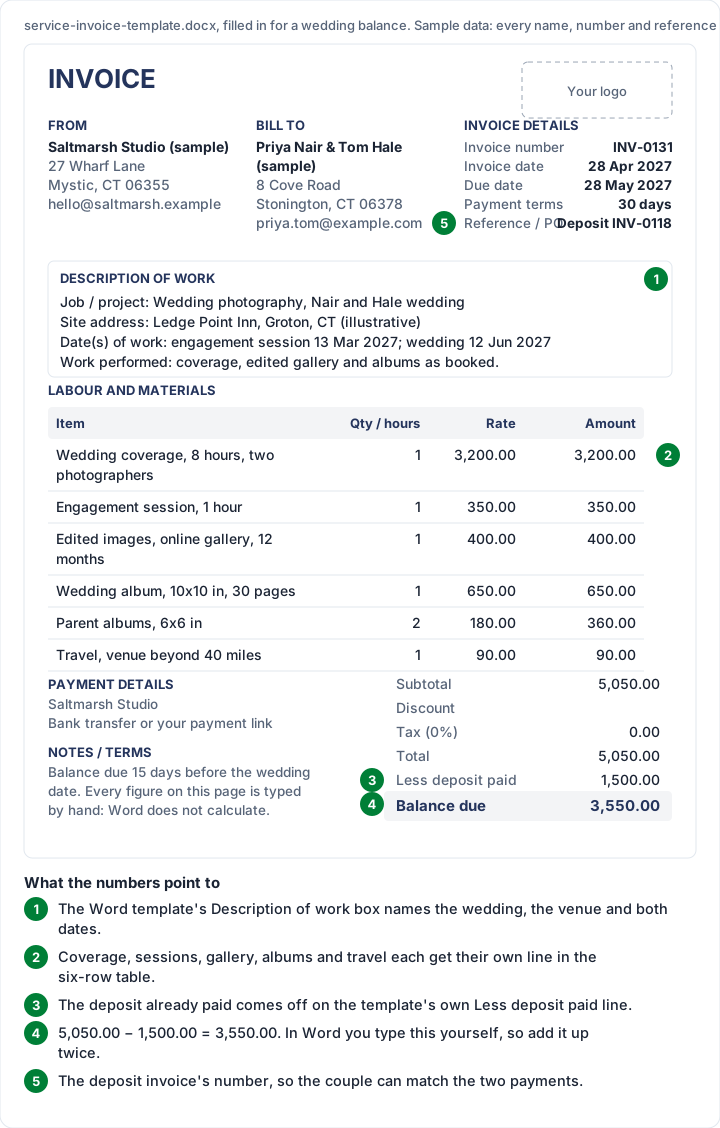
If a tax line applies, the Word template and Charming both work out tax on the full job first, then take the deposit off the total. Our videographer invoice guide shows the same deposit-then-balance pattern for video work.
Photography invoice template in Word: how to fill it#
Many photographers search for a photography invoice template in Word because a document is easier to make look like their brand than a spreadsheet. Here is how to fill in the service template for a booked job, using sample 3. The photography Word file works the same way, with the photography lines already printed and 8 rows in the table; the general Word file works the same way too, without the description-of-work box.
- Make it yours once. Replace “Your business name” and the address lines in From, then click the “Your logo” box and insert your logo. Save this as your master copy. Our guide to a logo on an invoice covers size and file type.
- Bill to: the couple's or client's names, their address and email.
- Invoice details: a new invoice number, the invoice date, the due date (count it yourself from the payment terms) and, in Reference / PO, the number of the deposit invoice.
- Description of work: the job (“Wedding photography”), the site address (the venue), the dates of work (engagement session and wedding day) and a sentence on what was delivered.
- Labour and materials: one row per thing you sold. The table has 6 rows; add a row in Word if you need more.
- Totals, by hand: amount = qty × rate on each row; subtotal = the amounts added up; total = subtotal − discount + tax; balance due = total − deposit already paid. Add everything up twice.
- Delete the italic note under the totals, save as PDF and send the PDF, not the .docx.
If typing totals by hand worries you, use the photography Excel file or invoice-template.xlsx instead: both have the same fields and do the arithmetic. Our Word invoice template guide explains the options, including adding Word table formulas yourself.
Design matters more to photographers than to most invoice senders, since the invoice sits next to a gallery the client has just admired. For layout ideas beyond these files, see our post on invoice design.
Photography invoices in Charming#
We make Charming Invoices, so here is what it adds for photographers, with the limits next to each feature.
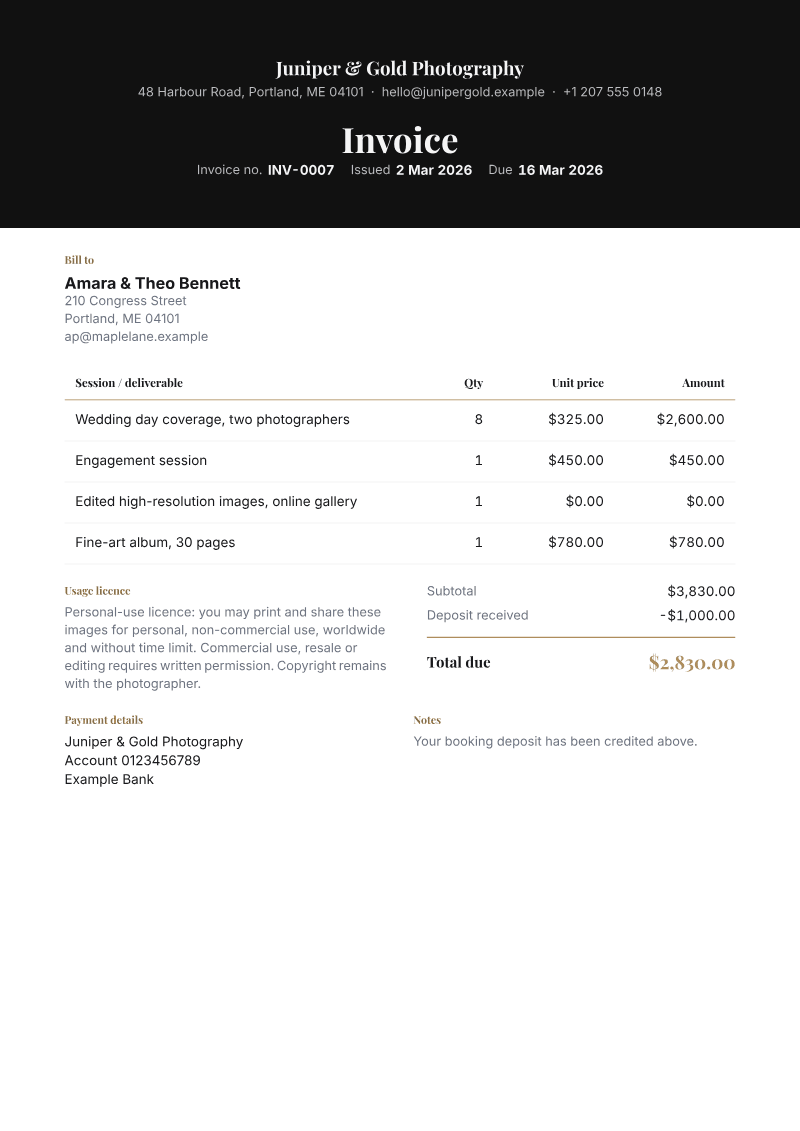
- The Photographer template: a dark gallery band, gold accents, a “Session / deliverable” column and a terms block labelled “Usage licence”, so the licence sits next to the totals. Your own logo, brand colour and fonts replace the sample's. It is one of 60 templates on every plan, including the free one.
- A photography shoot starter kit adds lines for a shoot day on location, editing and retouching, and travel and expenses. Every price is left at 0 on purpose, so you type your own.
- Deposits: enter the deposit received and Charming credits it after tax and works out the amount due, as in sample 3.
- A PDF and a private link your client opens without creating an account, with your bank details and one payment link of your own (Stripe, PayPal, Square or a bank page). Issue the invoice and send it however you like.
- Payment tracking: you see what is paid and what is still owed, and overdue invoices are flagged. Charming does not send reminders; set a calendar reminder or use your own email.
The limits: Charming does not take card payments, host galleries or hold back downloads until payment, so if pay-to-download matters to you, use a gallery service that does it. Clients pay you directly, and you record each payment or mark the invoice paid yourself. It does not import Word or Excel invoices. The free plan is $0 forever with no invoice limit, for 1 business, and adds a small “Sent with Charming Invoices” line to its invoices. Our page for photographers and other creative freelancers shows the rest. Create a free invoice and try sample 1 with your own prices.
Consultants and other professional-services freelancers can find hourly, retainer and milestone samples in our consulting invoice template post. Designers will find a logo project and a kill fee worked through in our graphic design invoice template. Wedding planners and florists working the same day have the event planner and florist invoice template.
Questions about photography invoice templates#
Is there a free photography invoice template?#
Yes. There is a photography invoice template for Excel, which calculates, and one for Word, which does not. Both are free to download, change and use, with no sign-up, and have the session, deliverables, prints, travel and usage licence lines already printed. The general files on our downloads page work too; the samples above show how to fill them for a shoot.
What should a photography invoice include?#
Your details and the client's, an invoice number, the invoice and due dates, separate lines for the session, editing, deliverables, prints and any usage licence, the total, any deposit already paid, the balance due and how to pay you.
Is there a photography invoice template for Word?#
Yes: the photography Word file has the photography lines already printed, the service template suits a booked job such as a wedding, and the general Word template suits everything else. None of them calculates, so you type the totals and check them.
Should I put a usage licence on a photography invoice?#
Many photographers do, as its own line, so the client sees what the fee covers. The licence itself is set by your written agreement, and the invoice line should match it. Copyright and licensing are legal questions: see the US Copyright Office's Circular 1, and ask a lawyer about your own agreement.
How do I show a deposit on a photography invoice?#
On a balance invoice, list the full job, then take the deposit off: “Less deposit paid” in the photography files and the Word service template, or the deposit typed as Amount paid in the general Excel files. Quote the deposit invoice's number so the client can match the two payments.
The short version#
Choose the photography Excel file if you want the totals worked out, or the photography Word file or the Word service template for a booked job like a wedding. Split the job into the session, editing, deliverables, prints and any licence, put the property address first on real-estate lines, and take any deposit off on its own line. Check every total the way the samples above are checked, and keep rights in your written agreement.
Free downloads
No sign-up and no email address. More on the free templates page.
- Download .xlsx: Photography invoice template for Excel
Photography invoice template for Excel
Excel .xlsxFor photographers: session fee, editing, deliverables, prints, travel and usage licence.
- Download .docx: Photography invoice template for Word
Photography invoice template for Word
Word .docxFor photographers: session fee, editing, deliverables, prints, travel and usage licence.