Lawyer invoicing software: legal tools vs simple apps

Nnabuike Okoroafor ·
On this page · 9 sections
Disclosure: We make Charming Invoices, a general invoicing app, not legal practice-management software. Every vendor price and plan below was read on the vendor’s own pricing page on 28 October 2026 and is linked. We say plainly where a legal tool is the better fit, which, for many law firms, it is.
You bill clients for legal work and you are choosing software to do it. What you need to know is simple: which jobs need legal software, what it costs, and when a simple invoice is enough.
General information, not legal advice. For the rules on fees and client money, ask your bar or regulator.
Lawyer invoicing software in short#
- Legal billing software does jobs a general invoicing app cannot: trust (IOLTA) ledgers, LEDES files with UTBMS codes, timers tied to matters, conflict checks and payments built for law firms.
- Prices as read on 28 October 2026, per user a month: MyCase Basic $60 billed monthly or $50 billed annually; PracticePanther Solo $59 monthly or $49 annually.
- The entry plan is not always the plan with the feature you need. MyCase’s comparison table ticks LEDES billing from Pro ($120 or $100); PracticePanther’s ticks it from Business ($99 or $89).
- Bill4Time, Clio and TimeSolv also sell legal billing software; we did not record a plan price for them, so check their pages, linked below.
- If you hold client money in trust through your billing system or bill corporate and insurer clients through e-billing portals, use legal software.
- If neither applies, a legal invoice template or a general invoicing app can be enough.
What legal billing software does that an invoicing app does not#
A general invoicing app makes, sends and tracks invoices. Legal billing and practice-management software adds jobs specific to law practice:
| Job | What it means | General invoicing app? |
|---|---|---|
| Trust accounting | A ledger of client money held in trust (for example an IOLTA account in the US) per client and matter, with reconciliation | No |
| LEDES and UTBMS | Exporting a bill as a data file in a LEDES format, with UTBMS task and activity codes, for a client’s e-billing system | No |
| Matter time capture | Timers and time entries tied to a client and matter, flowing into the bill | Usually not; some have timers |
| Conflict checks | Searching existing clients and matters before taking on a new one | No |
| Matter management | Documents, deadlines and tasks per matter | No |
| Law-firm payments | Card and eCheck payments set up for operating and trust accounts | Varies; Charming has none |
For how client money is held, recorded and reconciled, ask your bar or regulator; software only keeps the records. We do not summarise those rules; the format-not-ethics section of our legal invoice template links the ABA’s model rules, and your own bar has the version that applies to you.
For time tracking on its own, without the rest of a practice-management system, see time tracking and invoicing software.
Lawyer invoicing software compared, as of 28 October 2026#
This table shows each vendor’s entry plan and the cheapest plan whose page lists trust accounting and LEDES. Prices are regular list prices per user a month, as each page prints them.
| Vendor | Entry plan | Trust accounting listed on | LEDES listed on | Trial |
|---|---|---|---|---|
| MyCase | Basic: $60 billed monthly, $50 billed annually (USD) | Basic (“Time Entry, Invoicing and Trust Accounting”) | Pro: $120 billed monthly, $100 billed annually | 10 days |
| PracticePanther | Solo: $59 monthly, $49 annually ($, currency not named) | Solo (“Trust Account Ledger & Reconciliation” ticked on every plan) | Business: $99 monthly, $89 annually | 7 days |
| Bill4Time | Price not recorded here; see its pricing page | Not recorded | Not recorded | Not recorded |
| Clio | Price not recorded here; see its pricing page | Not recorded | Not recorded | Not recorded |
| TimeSolv | No plan price printed (“You pay per active user, monthly or annually”) | Not mapped to a plan | Not mapped to a plan | Listed |
Notes on reading the table:
- MyCase’s comparison table ticks “Trust Ledger and Reconciliation” on Basic, Pro and Advanced. Its “Billing” row (“Simplify billing with options for LEDES billing, subscription billing, and account statements”) is ticked on Pro and Advanced, not Basic. Its separate MyCase Accounting add-on, “$39 USD/user/month (available on Pro & Advanced)”, lists “Compliance with three way trust reconciliations”.
- PracticePanther’s comparison table ticks “Trust Account Ledger & Reconciliation” on Solo, Essential, Business and Business Pro. Its Business Pro card ($124 monthly, $114 annually) adds “PantherAccounting Plus”, with “Trust Accounting” and “Operating Accounting”. “UTBMS Coding & LEDES Billing” is ticked on Business and Business Pro.
- Bill4Time and Clio are left out of the price comparison because we did not record their prices first-hand; read them on their own pages.
- Prices change, so read the vendor’s own pricing page before you buy.
If you are comparing general invoicing apps rather than legal ones, see invoicing apps for freelancers compared.
What a year of billing software costs a law practice#
Here are the regular prices above over 12 months, for a solo lawyer and for a lawyer plus a paralegal who also logs in. Each figure is the monthly price per user × 12 × users, so MyCase Basic is $60 × 12 = $720 billed monthly, or $50 × 12 = $600 billed annually.
| Option | Trust listed? | LEDES listed? | 1 user: monthly / annual billing | 2 users: monthly / annual billing |
|---|---|---|---|---|
| MyCase Basic | Yes | No (Pro and up) | $720 / $600 | $1,440 / $1,200 |
| MyCase Pro | Yes | Yes | $1,440 / $1,200 | $2,880 / $2,400 |
| PracticePanther Solo | Yes (ledger) | No | $708 / $588 | $1,416 / $1,176 |
| PracticePanther Business | Yes (ledger) | Yes | $1,188 / $1,068 | $2,376 / $2,136 |
| Charming | No | No | $0 Free, or $29 once (Individual) | $79 once (Team) |
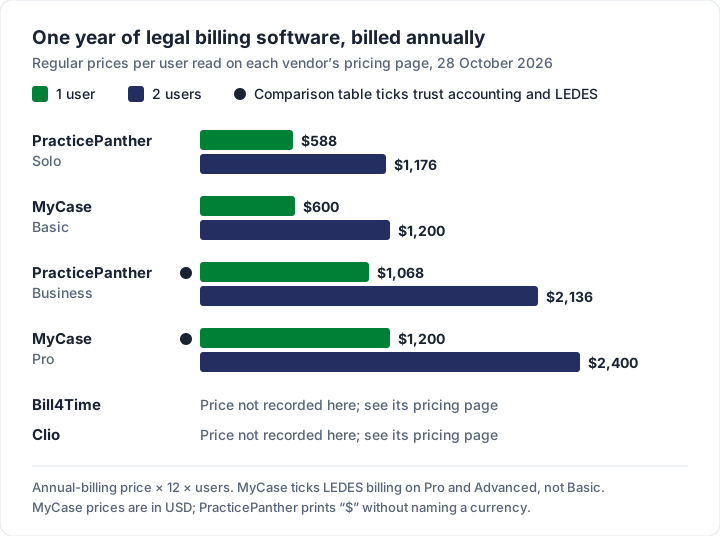
Do not rank these on price alone. The Charming row is there for contrast, not as an equal: it has no trust accounting and no LEDES export. Free and Individual are for one person; a paralegal with their own login needs Team ($79 once, up to 5 teammates) or Pro ($12 a month or $99 a year, unlimited teammates).
What a LEDES invoice is, and which tools produce one#
A LEDES invoice is a bill sent as a structured data file rather than a PDF. LEDES (Legal Electronic Data Exchange Standard) formats are maintained by the LEDES Oversight Committee at ledes.org, which also creates and updates the UTBMS code sets (task and activity codes, published at UTBMS.com) that some clients ask firms to attach to time entries. Some corporate and insurer clients ask for one in their outside counsel guidelines, and the file is uploaded to their e-billing system.
A spreadsheet or a general invoicing app cannot produce that file. Of the tools read above, PracticePanther ticks LEDES on Business and up, and MyCase on Pro and Advanced. Our legal invoice template guide has a longer section on LEDES and e-billing.
When a simple invoicing app or a template is enough#
Not every practice holds client money through its billing system or receives e-billing requests. For those that do not, legal software can be more than they need. Run through these four questions:
- Do you hold client money in trust and need the ledger in your billing system? If yes, use legal software or dedicated trust-accounting software.
- Do any clients require LEDES files or UTBMS codes? If yes, you need software that exports them.
- Do several timekeepers need timers tied to matters? If yes, legal software or a time tracker will save you retyping.
- Do you need conflict checks and matter management in one place? If yes, that is practice-management software.
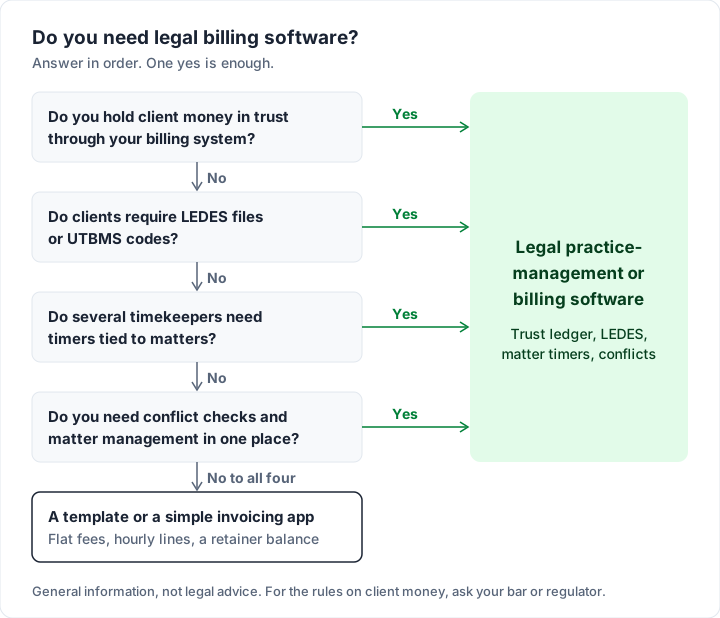
If all four answers are no, a template or a general app covers the invoice itself: flat fees, hourly lines, disbursements and a retainer balance. Our legal invoice template guide has three worked samples, and the consulting invoice template covers hourly and retainer layouts. To judge any app, use eight questions to ask any invoicing app, and see what to look for in a simple invoicing app.
Where Charming fits, and where it does not#
Charming suits a solo practitioner or small practice on flat or simple hourly fees, billing clients who pay by bank transfer, who does not run trust money through the billing tool. Here is what it does, checked in our code on 28 October 2026:
- Tenths of an hour. Quantities take up to 3 decimal places, and each line has its own rate, so attorney and paralegal time can sit on one invoice. There is no timer: you type in time recorded elsewhere.
- 60 templates, including Timesheet and Retainer. Timesheet groups hours under headings; Retainer prints the opening balance, “Paid from retainer” and the balance remaining. That is a running balance on the invoice, not trust accounting. For retainer wording, see how to bill each type of retainer.
- Matter numbers. Rename the “PO number” label to “Matter no.”. Label renames apply to the whole business.
- Deposits. A deposit already received lowers the amount due.
- Sharing and follow-up. Issue the invoice, then download the PDF or copy its private link and send it however you like; “Viewed by the client” shows on the timeline when the link is opened, and overdue invoices are flagged. Charming does not send reminders.
- Client statements. A statement lists a client’s open invoices; see what a client statement shows.
What Charming does not do: time tracking, trust or IOLTA accounting, LEDES or UTBMS export, conflict checks, matter management or accounting integrations. It does not take card payments: your client pays you directly by the methods you list (see what payment methods to offer on an invoice), and you record the payment or mark the invoice paid yourself. For card payments on invoices generally, see what card payments on an invoice cost. It is a web app.
Plans. Free is $0 forever, with no invoice limit, for 1 business and 1 person, and its invoices carry a small “Sent with Charming Invoices” line. Individual is $29 once and hides that line by default. Team is $79 once with up to 5 teammates; Pro is $12 a month or $99 a year with unlimited teammates. Lifetime plans are final sale.
If your answers to the four questions were all no, create a free invoice with your next matter’s time entries, or compare plans on the pricing page.
Lawyer invoicing software questions#
What is the best invoicing software for a solo lawyer?#
It depends on whether you hold client money in trust through your billing system and whether any client needs LEDES files. If either is true, compare the legal tools above on the plan that lists that feature. If neither is, a template or a simple app may be enough.
Do I need trust accounting software?#
That is a question for your bar or regulator, and your accountant. Software only helps you keep the records; we do not summarise the rules on client money.
What is a LEDES invoice?#
A bill as a data file in a format maintained by the LEDES Oversight Committee, which a client’s e-billing system can read, often with UTBMS codes. You need software that exports it.
Can I use QuickBooks or a general app for a law firm?#
For making and sending invoices, a general app can work. For trust ledgers, LEDES files and conflict checks, look at legal software. For QuickBooks specifically, see how QuickBooks invoicing works.
Is there free legal billing software?#
Neither of the two legal tools whose prices we read lists a free plan; they offer free trials (10 days for MyCase, 7 for PracticePanther). General invoicing apps, Charming included, have free plans, without the legal-specific features.
The short version#
Legal billing software earns its price when you hold client money in trust through it, bill clients who require LEDES files, or need matter timers and conflict checks. At 28 October 2026 list prices, the entry plans we read cost $588 to $600 a year per user billed annually, more for the plan with the feature you need. If none of that applies, a template or a simple invoicing app covers the bill.