Bonsai invoices: plans and listed fees for freelancers in 2026

Nnabuike Okoroafor ·
On this page · 11 sections
We make Charming Invoices, an invoicing app for freelancers and small businesses, so we compete with Bonsai for people who only need invoices. Bonsai does a lot that Charming does not, and we say where it is the better fit. Every Bonsai fact below comes from Bonsai's own pricing and help pages, read on 28 October 2026.
You are a freelancer, consultant or small studio, and Bonsai keeps coming up: proposals, contracts, time tracking and invoices in one place. Before you commit, two questions are worth answering in one place. Which plan do you need to send an invoice? And which payment fees does Bonsai list for an invoice paid online?
This guide answers both from Bonsai's own pages: the plan that unlocks invoicing, every listed payment fee on an example $2,000.00 invoice (including the foreign exchange fee that applies to some cross-border invoices), the two-year cost, where Bonsai's free invoice templates fit, and when a client-management tool suits you.
Bonsai invoices in short#
- Invoicing starts on Essentials, at $25 per user a month, or $19 billed annually, as of 28 October 2026. The cheapest plan, Basic, does not list invoices.
- Removing Bonsai branding is a Premium feature, at $39 per user a month, or $29 billed annually. Premium also adds the QuickBooks and Xero integrations.
- Card payments through Bonsai Payments cost 2.9% + $0.30. American Express is 3.25% + $0.30 and ACH bank transfer is 1% ($1 minimum).
- Three further fees are listed: a 1% platform fee when you use Stripe or PayPal where Bonsai Payments is available, 1.5% for an Instant Payout, and a 2.5% foreign exchange (FX) fee when the invoice currency differs from your payout country's currency.
- Offline payment instructions are free. Bonsai's “Other” payment option shows your bank or wire details with no Bonsai fee; you mark the invoice paid yourself.
- Bonsai is a strong fit if you want proposals, contracts and a client portal in one tool. If you only need invoices, an invoicing-only tool may fit too.
Comparing more tools than Bonsai? Our guide to the best invoicing software for freelancers sets Bonsai beside FreshBooks, Harvest, Wave and others.
What Bonsai invoices do#
Bonsai is client and project management software for freelancers and agencies. Its pricing page footer reads “Bonsai, a Zoom company”, and its invoicing feature page now lives on zoom.com.
Bonsai's plan comparison lists these under client billing:
- Unlimited invoices and online payments, paid by card or bank transfer through Bonsai Payments, Stripe or PayPal.
- Retainer invoices and subscription invoices for ongoing clients. Our guides to how to bill each type of retainer and how recurring invoices work explain the difference in plain terms.
- Time entries and expenses attached to invoices, so hours tracked in Bonsai become invoice lines. Adding a markup to expenses is an Elite feature.
- Multi-currency billing, scheduled sending and locked attachments.
Bonsai's zoom.com feature page also describes branded invoices, read receipts that show when an invoice is opened, automatic payment reminders and an accounting integration with QuickBooks Online.
Essentials also includes “Proposals & Contracts”, “Forms & Questionnaires”, “Scheduling” and a “Client portal”. If a signed contract and a deposit invoice usually go out together, our guide to what an invoice and a contract each do explains why you want both.
Which Bonsai plan includes invoicing#
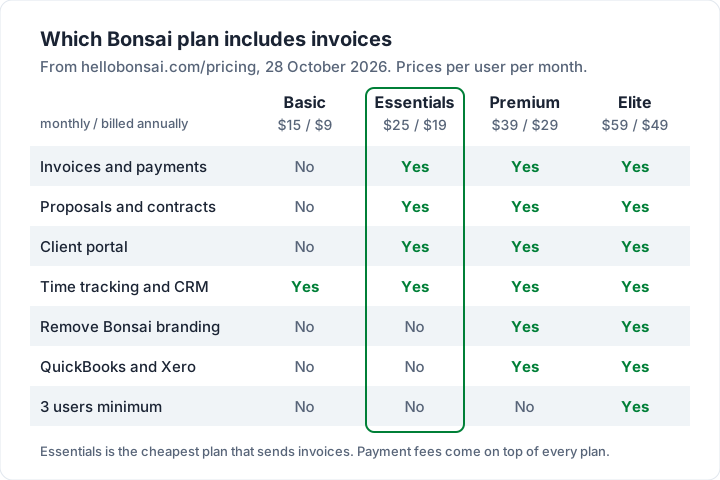
Bonsai prices per user, per month. Here are its four plans as of 28 October 2026, with the features that matter for billing:
| Plan | Monthly | Billed annually | What it adds for billing |
|---|---|---|---|
| Basic | $15 | $9 | Time tracking, CRM, “Unlimited clients”; no invoices listed |
| Essentials | $25 | $19 | “Invoices & Payments”, “Proposals & Contracts”, client portal, expense and income tracking |
| Premium | $39 | $29 | “Remove Bonsai branding”, “Integrations (QuickBooks, Xero, Zapier, Calendly, Google)” |
| Elite | $59 | $49 | Custom permissions, expense markups; “3 users minimum” |
Bonsai's trial gives “full, unlimited access to Bonsai for 7 days”, after which you choose a plan and add a card. There is no free plan on the pricing page.
Two-year cost for one person:
| Plan | Billed annually | Monthly |
|---|---|---|
| Essentials (invoices) | $19 × 24 = $456 | $25 × 24 = $600 |
| Premium (no Bonsai branding) | $29 × 24 = $696 | $39 × 24 = $936 |
| Elite (3 users minimum) | $49 × 3 × 24 = $3,528 | $59 × 3 × 24 = $4,248 |
Because Bonsai charges per user, a two-person studio on Essentials billed annually pays $912 over two years.
Every fee on a Bonsai invoice#
Bonsai's pricing FAQ says payment fees “vary depending on the payment method used”, and its help article Understanding online payment methods and fees at Bonsai lists them. As of 28 October 2026:
| Fee | Rate | When it applies |
|---|---|---|
| Card (Bonsai Payments or Stripe) | 2.9% + $0.30 | Visa, Mastercard and most other cards |
| American Express | 3.25% + $0.30 | Amex cards |
| Bank transfer (ACH) | 1.0% ($1 minimum) | US bank payments |
| Instant Payouts | “Additional 1.5% fee” | If you choose instant rather than standard payout |
| Third-party platform fee | 1% (1.35% for Amex via Stripe) | Using Stripe or PayPal where Bonsai Payments is available |
| Foreign exchange (FX) | 2.5% of the invoice | Invoice currency differs from your payout country's currency |
| “Other” payment methods | No fee | Bank, wire or check details you add; you mark it paid |
Bonsai Payments is available in the US, UK, Canada and Australia, per the same article. Stripe Payments works “in any country where Stripe is supported”, and Bonsai says PayPal's fees “typically are 2.9% + $0.30, though they may vary by country”. For how those processors price invoices on their own, see what Stripe Invoicing costs and how a PayPal invoice works.
When the FX fee applies#
Bonsai's help article Foreign exchange (FX) fees and how they are calculated says it depends on “the contractor's payment country vs the currency of the invoice”, not on where your client is.
So a US freelancer invoicing a client in Germany in US dollars pays no FX fee. A UK freelancer invoicing in US dollars does, which is Bonsai's own example. Bonsai's advice for avoiding it: “always send the invoice in the same currency of their country”. The fee shows on the invoice when it applies.
A worked example: one $2,000.00 invoice#
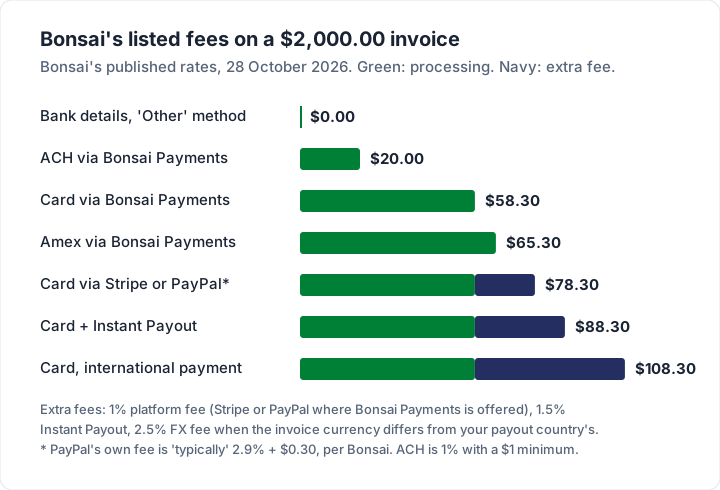
Here are Bonsai's listed fees on a single $2,000.00 invoice, depending on how it is paid, at the rates above:
| How the $2,000.00 is paid | Bonsai's fees | You receive |
|---|---|---|
| Bank details via the “Other” method | $0.00 | $2,000.00 (less any bank charges) |
| ACH through Bonsai Payments (1%) | $20.00 | $1,980.00 |
| Card through Bonsai Payments (2.9% + $0.30) | $58.30 | $1,941.70 |
| Amex through Bonsai Payments (3.25% + $0.30) | $65.30 | $1,934.70 |
| Card through Stripe, where Bonsai Payments is available (+1%) | $78.30 | $1,921.70 |
| Card, with an Instant Payout (+1.5%) | $88.30 | $1,911.70 |
| Card, international payment (+2.5% FX) | $108.30 | $1,891.70 |
We worked the extra fees as a percentage of the $2,000.00 invoice. Bonsai describes the platform fee as “added to the payout amount”, so check your payout statement for the exact figure.
On a year of ten such invoices paid by card internationally, that is $1,083.00 in fees. A bank transfer to your own account usually costs less on any tool. For the same arithmetic on Square, PayPal and Stripe, see what card payments on an invoice cost.
Thinking of passing the card fee on to the client? Whether you may depends on where you and your client are. Rules vary, so see the official guidance where you work and ask an accountant or lawyer. This is not legal or tax advice.
Bonsai branding on invoices, and how to remove it#
Bonsai lists “Remove Bonsai branding” as a Premium feature, so on Essentials your invoices and client-facing pages carry some Bonsai branding. Its pricing page does not describe exactly where that branding appears, so send yourself a test invoice during the trial and look at the email, the invoice page and the PDF.
Premium costs $14 per user a month more than Essentials billed monthly ($39 against $25), or $10 more billed annually ($29 against $19). Over two years on the annual price, that is $240 extra per user to drop the branding, and Premium also adds the accounting integrations and reports.
Free Bonsai invoice templates, and other free templates#
Bonsai's site lists free “Invoice templates” under its resources, alongside contract and proposal templates. A template is a starting layout you fill in yourself; it does not include Bonsai's payments, reminders or tracking.
Whatever template you use, a freelance invoice needs the same essentials: your details and the client's, a unique invoice number, the date and due date, clear line items, the total and how to pay. Our guide to the freelance invoicing workflow covers each step from first invoice to follow-up.
If you want a template that is also a working invoice, Charming's invoice templates are 60 designs, including Creative Studio, Photographer, Retainer and Timesheet, usable free with your logo, colours and fonts.
Do you need a client-management tool, or just invoices?#
Bonsai suits you when you would use the rest of it: proposals that turn into contracts, contracts that turn into invoices, time tracked against projects, and a portal where clients find everything. Before a large deposit depends on any payment provider, ask how long a payout can take and when a payment may be reviewed. If you bill builds by milestone, our guide to billing a website build by milestone shows how to structure the invoices.
A simple test: if you send proposals and contracts most weeks, a tool like Bonsai Essentials keeps them beside your invoices. If your clients sign a short agreement once and then pay invoices by bank transfer, an invoicing-only tool may cover what you use. For contract-based billing, see invoicing work done under a contract. If it is a CRM you are weighing up, CRM with invoicing compares HubSpot, Bigin, Nutshell and Dubsado on how each one invoices.
What about HoneyBook?#
HoneyBook is the other name freelancers compare with Bonsai, especially photographers and planners. We could not confirm HoneyBook's current prices on its own site on 28 October 2026, so we give no HoneyBook prices or features here. Check honeybook.com directly before you compare.
For creatives choosing between these tools, our guide to how photographers should invoice covers what those invoices need, whichever tool sends them.
Where Charming fits, and where it does not#
Charming Invoices is the “just invoices” option. Here is what it does, checked in our code on 28 October 2026:
- Free plan with unlimited invoices and clients, for 1 business, with your logo, colours, 30 fonts and 60 templates.
- Deposits and retainer invoices on every plan.
- Overdue and viewed status. An issued invoice shows as Overdue once its due date passes, and a “Viewed by the client” note appears when the client opens it.
- A PDF and a private link, no client account. You issue the invoice, then download the PDF, print it or copy its private link and send it however you like. The client opens the invoice and PDF without signing up.
- Your bank details and payment link on the invoice. Charming takes no payments, so it charges no processing, platform or FX fee. Your own payment provider charges its own fee if the client pays through it.
- 16 currencies, one per business at a time. You can switch it on any plan; billing in two currencies side by side means a second business, which needs a paid plan. Some currency symbols print as ISO codes.
- On paid plans: recurring invoices as ready-to-review drafts each cycle (they are never issued or sent automatically), saved line items and AI-drafted line items.
The catches, plainly. Charming does not email invoices or send reminders; you send them from your own email. It has no proposals, contracts, e-signatures, client portal, scheduling, time tracker or CRM, and takes no card payments. Payment tracking is manual: you mark an invoice paid. It has no accounting integrations and no mobile app. If you need those, Bonsai is the better fit.
Free invoices carry a “Sent with Charming Invoices” line, which is hidden by default on paid plans: Individual is $29 once; Team is $79 once with up to 5 teammates; Pro is $12 a month or $99 a year. Lifetime plans are final sale. Compare them on the pricing page, or see invoicing for photographers, videographers and designers. If invoices are all you need, create a free invoice.
Questions people ask#
Can you send invoices on Bonsai's Basic plan?#
Not according to its pricing page on 28 October 2026. Basic lists time tracking, tasks, projects, CRM and “Unlimited clients”. “Invoices & Payments” appears from Essentials, at $25 per user a month or $19 billed annually.
Does Bonsai charge a fee to send an invoice?#
No separate sending fee is listed. You pay the plan, plus a payment fee when the client pays online: 2.9% + $0.30 by card or 1% by ACH through Bonsai Payments, with possible platform, Instant Payout and FX fees on top.
How do I avoid Bonsai's FX fee?#
Bonsai's help centre says to send the invoice in your own payout country's currency: USD if your payout country is the US, GBP if it is the UK, and so on. The fee is 2.5% of the invoice when the currencies differ.
Can clients pay a Bonsai invoice by bank transfer for free?#
If you enable the “Other” payment option and add your bank details, Bonsai says there is no fee, but the invoice is not marked paid automatically; you mark it yourself. ACH through Bonsai Payments costs 1% ($1 minimum).
Is Bonsai part of Zoom?#
Bonsai's pricing page footer reads “Bonsai, a Zoom company”, and its invoicing feature page is hosted on zoom.com, as of 28 October 2026.
The short version#
Bonsai sends invoices from the Essentials plan ($25 per user a month, or $19 billed annually), removes its branding on Premium ($39, or $29), and charges 2.9% + $0.30 on a card payment through Bonsai Payments. Further listed fees: 1% for Stripe or PayPal where Bonsai Payments is available, 1.5% for Instant Payouts and 2.5% FX when your invoice currency differs from your payout country's. On a $2,000.00 invoice that ranges from $0.00 by bank details to $108.30 by card internationally. Pay for Bonsai if you will use its proposals, contracts and portal; if you only need invoices, an invoicing-only tool may be enough.
Sources, all read 28 October 2026: Bonsai pricing; Bonsai help, online payment methods and fees; Bonsai help, FX fees; Bonsai invoicing features on zoom.com.