Invoice2go review: plans, limits and alternatives

Nnabuike Okoroafor ·
On this page · 11 sections
Disclosure: We make Charming Invoices, an invoicing app, and it is one of the alternatives covered here. This review is neutral: every Invoice2go fact comes from Invoice2go’s own pricing page, its app store listings and its owner’s press release, read on 23 October 2026 and linked, and we say plainly where Invoice2go is the better choice.
Invoice to go, Invoice 2 Go, Invoice2go: however you type it, you are probably looking at the same app. It has been on the App Store since 2012, it is built for invoicing from a phone, and it is now owned by BILL. The questions people bring to it are practical. How many invoices does each plan allow? What does a card payment cost? Is there a free version, and does it work on a computer?
This Invoice2go review answers those from the vendor’s own pages. It covers the three plans and their yearly invoice caps, card and bank fees, the 30-day trial and what happens when a subscription lapses, desktop use, a worked cost example and the alternatives. It is not a star-rated test; we did not score the app.
Invoice2go in short#
- It is a mobile-first invoice and estimate app with a web version, owned by BILL (Bill.com), which completed its acquisition of Invoice2go on 1 September 2021.
- There is no free plan. Its App Store listing says “A subscription is required to use Invoice2go”, after a 30-day free trial.
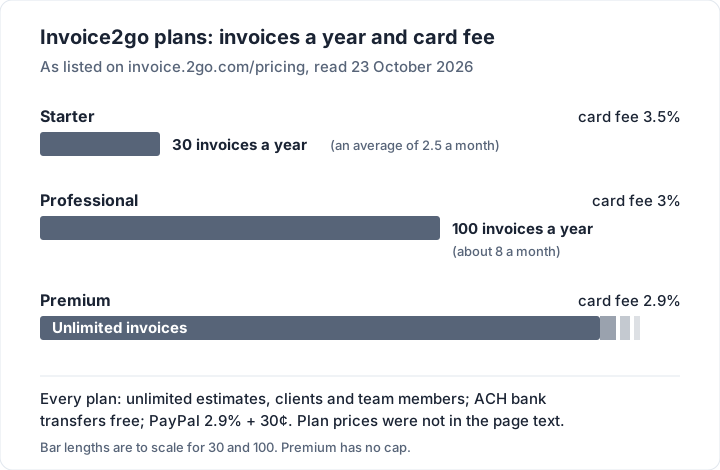
- Each plan has a yearly invoice cap. Starter allows 30 invoices a year, Professional 100 a year, and Premium is unlimited.
- Card fees fall as the plan rises: 3.5% on Starter, 3% on Professional and 2.9% on Premium. Bank transfers (ACH) are free on every plan.
- Plan prices were not in the readable text of its pricing page on 23 October 2026. We say below what we could and could not read.
- It suits tradespeople and service businesses who quote and invoice on site, want card payments and a business bank account in the same app, and send enough invoices to justify the plan.
- Another tool may fit better if you send more than 30 invoices a year and want to stay on the entry plan, want a free plan with no time limit, or invoice from a desk and are paid by bank transfer.
Where to log in: the official sign-in is at invoice.2go.com/login, which forwarded to account.2go.com when we checked on 23 October 2026. On a phone, sign in inside the app. Type the address yourself rather than following a search ad; another app on the App Store is called “Invoice On The Go”, which is not the same product.
What Invoice2go is#
Invoice2go describes itself on Google Play as “your office in your back pocket”. Its pricing page and store listings put these features on every plan, as of 23 October 2026:
- Invoices and estimates. Estimates convert into invoices “with a tap”, and the pricing page lists unlimited estimates on all three plans.
- Templates and branding. The App Store listing mentions “8 professional invoice templates”, your logo, and matching the invoice colour to it. The pricing page adds “accreditation badges, banners and watermarks”.
- Reminders and tracking. Automatic reminders for upcoming and overdue invoices, and notifications when a client opens or pays.
- Payments. Card payments, PayPal, and free ACH bank transfers, plus a no-fee business bank account and Visa debit card (banking services, the page says, are provided by TransPecos Banks, SSB).
- Running the job. Projects, expenses, appointments and scheduling, and a time-tracking timer.
- Team members. Unlimited team members on every plan, within the same company.
Recurring invoices, accounting integrations and reports are where the plans start to differ, covered next. If the difference between an estimate and an invoice is new to you, our guide to invoices, estimates and quotes explains when you need each.
Invoice2go plans, invoice caps and card fees#
Here is what Invoice2go’s pricing page lists for each plan, read on 23 October 2026. The old address, invoice2go.com/pricing, now redirects there.
| Starter | Professional | Premium | |
|---|---|---|---|
| Invoices | 30 a year | 100 a year | Unlimited |
| Card payment fee | 3.5% | 3% | 2.9% |
| PayPal payments | 2.9% + 30¢ | 2.9% + 30¢ | 2.9% + 30¢ |
| Bank transfers (ACH) | Free | Free | Free |
| Estimates, clients, team members | Unlimited | Unlimited | Unlimited |
| Recurring invoices | No | No | Yes |
| QuickBooks, Xero and other accounting sync | No | Yes | Yes |
| Reports | No | Yes | Yes |
| Phone support | No | No | Yes |
The page describes Premium as being for “businesses with more than $100k/year in revenue”. Email and chat support are on every plan.
What we could not read: the plan prices#
The pricing page has a Monthly and an Annual switch and a list of currencies, but the prices themselves are drawn in by script, and they did not appear in the page text we could read on 23 October 2026. We are not going to guess them. Two other official sources say this much:
- The App Store listing shows the app as “Free” with in-app purchases. Its in-app purchase list names items from $7.95 to $44.95, including plan names the pricing page no longer uses (Standard, Unlimited) and a “Starter Package - 12 month” at $9.99, with no billing period beside most of them. That list cannot tell you what a plan costs today.
- The pricing FAQ says there are no set-up fees or add-on costs: “the only fee you will encounter is card payment fees.”
So open the pricing page in a browser, choose your currency and billing period, and read the price there, or check the subscription screen in the app before the trial ends. Our contractor software comparison met the same gap when it read the page on 22 October 2026.
How the caps work#
The caps are yearly, not monthly. A plan with 30 invoices a year suits a business that sends two or three a month; a busy spring can use a large share of it. The pricing FAQ says “You can upgrade your plan at any time to get more invoices”, from Manage subscription in the app or under Account and settings on the web.
Estimates do not count towards the cap: the comparison table lists them as unlimited on every plan.
Free trial, refunds and what happens when you stop paying#
The trial is 30 days and needs a card. The pricing FAQ says “you’ll need to provide credit card details to start the free trial, but we won’t charge any subscription fees if you cancel the trial within 30 days.” The Google Play listing says the same: “Try Invoice 2go for free for 30 days. After that choose one of our three plans”.
There is a 30-day money-back promise. The pricing page says: “Not the right fit? Cancel within 30 days and get a 100% refund.” If you subscribe through the App Store, the listing adds that payment is charged to your Apple account and renews automatically “unless turned off in Account Settings at least 24 hours before end of current period”, so a refund there may go through Apple.
A lapsed account is read-only. In the FAQ’s words, after the expiry date the account is “automatically deactivated”. You can still view your invoice, client and item lists, but “you will not be able to view or edit individual documents or view detailed reports” until you renew. The FAQ says you “may still export all of your account information from our web platform” in that state.
Export a copy while you are still subscribed anyway. It is your record, and it is easier to do before the account changes state.
What Invoice2go does well#
- Quoting and invoicing on site. Estimates convert into invoices from a phone, with photos and documents kept on the project. For trades who price at the door, that is the core job, and it is done in one app. Our guide to quote and invoice software compares nine other tools that do both.
- Payments and banking in one place. Card, PayPal and free ACH transfers, plus its own bank account and debit card. Google Play adds that Invoice2go Money can pay out “24 hours” after a card payment instead of waiting for normal card processing.
- No per-seat pricing. The pricing page lists unlimited team members on every plan.
- Card fees that fall with volume. At 2.9%, Premium’s listed card fee is in line with Stripe’s standard “2.9% + 30¢” for a US domestic card (Stripe pricing, 23 October 2026), without the 30¢.
- Branding. Logos, colours, badges and banners, as listed on its pricing page and App Store listing.
What to check before you pick a plan#
Count your invoices, not your revenue. The caps are per invoice, so a sole trader who does many small jobs should count last year’s invoices before choosing between 30, 100 and unlimited. Plan on your busiest year, not an average one.
Your costs depend on card payments. Invoice2go’s pricing FAQ says card fees are the fee you will meet. If most clients pay by card, Starter’s 3.5% comes to $35.00 on every $1,000.00 collected; clients who pay by ACH transfer, which the page lists as free, add no fee.
Recurring invoices are on Premium. If you bill a retainer or a monthly service, the pricing page lists that feature on the top plan only.
Check the renewal price before the trial ends. Read the price for your currency and billing period in the app’s subscription screen, and note the renewal date. As of 23 October 2026 the App Store listing shows 4.8 stars from about 56,000 ratings, and the Google Play listing shows 4.5 stars from about 31,400 reviews and over 1 million downloads. Our guide to how to choose invoicing software lists the questions worth asking any provider.
Invoice2go on desktop, Mac and iPad#
On a computer, use the web app. Invoice2go’s pricing FAQ gives upgrade steps for “Web” alongside iOS and Android, and says account data can be exported “from our web platform”. The App Store listing says your information “is automatically synced and available on your iPhone, iPad, and computer”.
On a Mac, that means the browser. The App Store’s compatibility list on 23 October 2026 named iPhone, iPad, iPod touch and Apple Vision, and did not list Mac. There is no separate desktop download on the pages we read. For native Mac apps and web apps compared, see invoicing software for Mac.
On an iPad, use the iOS app. It requires iPadOS 15.0 or later.
More than one account: if you run more than one Invoice2go account (each needs its own email), the FAQ says switching between accounts “is not available on our web app”; it works in the phone apps.
Worked example: 40 invoices a year#
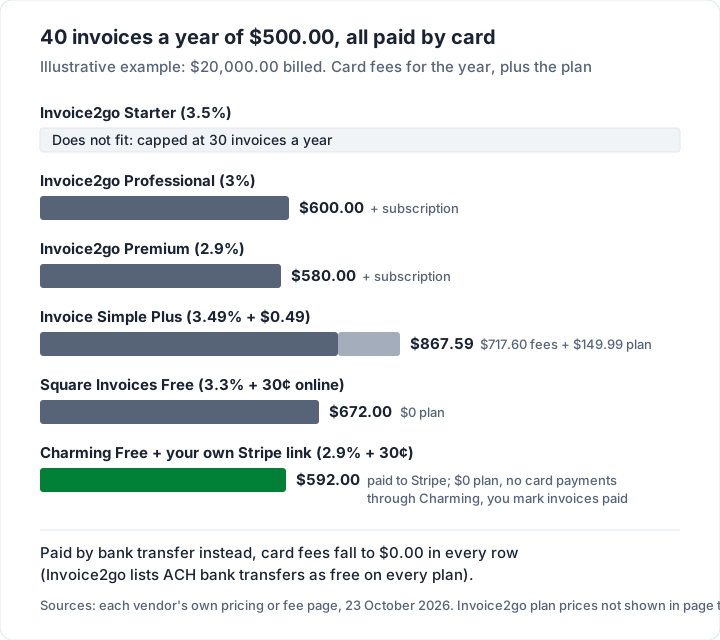
Here is an illustrative business: 40 invoices a year, averaging $500.00 each, $20,000.00 in total, every one paid by card. Starter is out, because 40 is over its 30-invoice cap. The fees are each vendor’s listed standard US rate, read on 23 October 2026.
| Option | Card fee per $500.00 | Card fees, 40 invoices | Plan cost for the year |
|---|---|---|---|
| Invoice2go Starter (3.5%) | — | Does not fit (30 a year) | — |
| Invoice2go Professional (3%) | $15.00 | $600.00 | Not shown in page text |
| Invoice2go Premium (2.9%) | $14.50 | $580.00 | Not shown in page text |
| Invoice Simple Plus (3.49% + $0.49) | $17.94 | $717.60 | $149.99 |
| Square Invoices Free (3.3% + 30¢ online) | $16.80 | $672.00 | $0 |
| Charming Free + your own Stripe payment link (2.9% + 30¢) | $14.80 | $592.00, paid to Stripe | $0 |
Three things to take from it:
- The cap decides the plan before the price does. At 40 invoices a year, Professional is the cheapest Invoice2go plan that fits.
- Card fees are the larger cost. On $20,000.00 of card payments, every option costs $580.00 or more in fees. The same clients paying by bank transfer cost $0.00 in Invoice2go fees, because ACH is free on every plan.
- Invoice Simple’s cap is monthly. Its Plus plan allows 10 invoices a month; 40 a year fits unless one month goes over 10. Its fees are from its Stripe fees help article, and our Invoice Simple review covers its plans.
For more fee arithmetic across processors, see our invoice payment fee comparison.
Invoice2go alternatives#
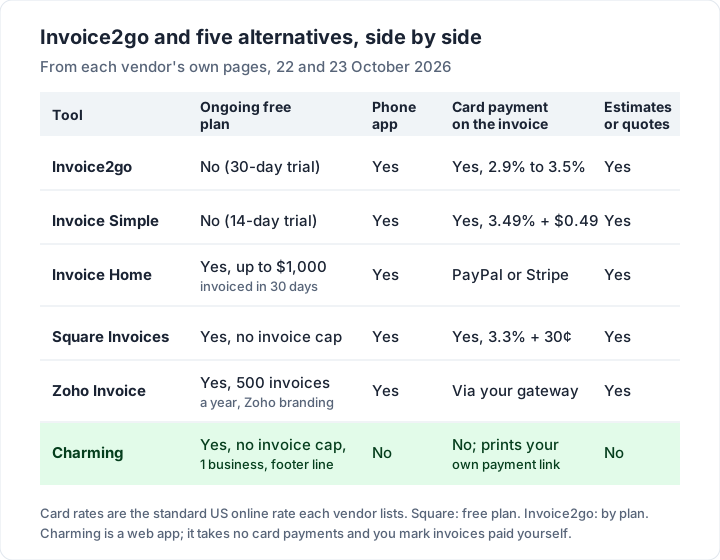
If you want a different invoice cap, trial or card fee, these tools are worth comparing. Each fact is from the vendor’s own page, read on 22 or 23 October 2026. “Free plan” means ongoing free use, not a trial. For smaller phone apps, Tiny Invoice, Moon Invoice, Bookipi and Brisk compared sets out their free limits and prices.
| Tool | Free plan and its main limit | Phone app | Card payment on the invoice | Estimates or quotes |
|---|---|---|---|---|
| Invoice2go (reference) | None; 30-day trial | Yes | 3.5%, 3% or 2.9% by plan | Yes |
| Invoice Simple | None; 14-day trial | Yes | 3.49% + $0.49 | Yes |
| Invoice Home | Up to $1,000 invoiced in 30 days | Yes | Through PayPal or Stripe | Yes |
| Square Invoices | No invoice cap | Yes | 3.3% + 30¢ online on Free | Yes |
| Zoho Invoice | 500 invoices a year, “Powered by Zoho Invoice” branding | Yes | Through a gateway you connect | Yes |
| Charming Invoices | No invoice cap, 1 business | No | No; prints your own payment link | No |
Square’s rate is from its invoices pricing page, and Zoho’s limits from its pricing page, both re-read on 23 October 2026. For each free plan’s listed limits in one place, see the best free invoicing software, and for phone-first options, our round-up of free invoicing apps for iPhone and Android. If what you really wanted was a free online template, our look at Skynova’s invoice template covers that kind of tool. If you run a garage, auto repair invoice software sets Invoice2go beside shop-management systems such as Tekmetric and Shopmonkey.
Invoice2go vs QuickBooks#
They do different jobs. QuickBooks Online is accounting software with invoicing inside it; Invoice2go is an invoicing, estimating and payments app that syncs to QuickBooks or Xero on Professional and Premium. If your accountant wants your books in QuickBooks, keep QuickBooks and decide whether you also need a phone-first invoicing app. Our guide to QuickBooks invoices covers QuickBooks’ side.
Invoice2go vs Charming Invoices#
Charming is a web app for branded invoices, and it is a fair alternative only for some Invoice2go users. What Charming does:
- No invoice cap on Free. Unlimited invoices and clients for 1 business, at $0 forever, with no card and no trial clock.
- Design on every plan. All 60 templates, your logo, any brand colour, 30 fonts and a letterhead.
- PDF and a private link. Issue the invoice, then download the PDF, print it or copy a private link your client opens without an account, and send it however you like. A “Viewed” mark shows when they open it, and overdue invoices are flagged.
- Your own payment details. Bank details and one payment link per business (for example from Stripe, PayPal or Square), printed on every invoice. While the invoice is unpaid, the client’s page shows an “Open payment link” button to your link.
And the catches, next to those benefits:
- No mobile app from an app store. Charming runs in a browser. If you invoice standing in a client’s kitchen, Invoice2go is built for that and Charming is not.
- No card payments through Charming. The client pays you through your bank or your payment-link provider, at that provider’s fees, and you mark the invoice paid yourself.
- No estimates or quotes, no time tracking, no expenses and no accounting sync. Invoice2go has all four.
- Free invoices carry a small “Sent with Charming Invoices” line, and Free is 1 business. Recurring invoices need a paid plan. Individual is $29 once; Team is $79 once for up to 5 teammates; Pro is $12 a month or $99 a year.
- No invoice emails or reminders. Charming does not send anything to your client; you send the PDF or link from your own email, and set a calendar reminder for the due date.
- Lifetime plans are final sale. If you are unsure, stay on Free. Every plan is on the pricing page.
If you send a handful of invoices a year and are paid by bank transfer, you may not need an app at all: our free Word and Excel invoice templates need no sign-up, and the Excel files add up the totals for you. For building and renovation jobs, our contractor invoice template shows one filled in, with labour, materials and a deposit.
Invoice2go questions#
Is Invoice2go free?#
No. The app is a free download with a 30-day trial that needs a card, and its App Store listing says “A subscription is required to use Invoice2go”. After the trial you choose Starter, Professional or Premium.
How much does Invoice2go cost?#
Its pricing page did not show plan prices in readable text on 23 October 2026, so we cannot quote them. What it does list: Starter allows 30 invoices a year with a 3.5% card fee, Professional 100 a year at 3%, and Premium unlimited at 2.9%. Check the price for your currency and billing period on the pricing page or in the app.
How do I log in to Invoice2go?#
Go to invoice.2go.com/login, or sign in inside the iOS or Android app. When we checked on 23 October 2026, the login page forwarded to account.2go.com.
Does Invoice2go work on a PC or Mac?#
Yes, through the web app in a browser. The App Store did not list a Mac version on 23 October 2026.
Who owns Invoice2go?#
BILL (Bill.com), which completed the acquisition on 1 September 2021, according to its press release.
What happens if I stop paying?#
The account is deactivated: you can see your lists but not open or edit documents, and the FAQ says you can still export your account information from the web platform.
The short version#
Invoice2go is a capable mobile-first app for quoting, invoicing and taking payments, with unlimited estimates and team members on every plan. Its plans are defined by yearly invoice caps (30, 100, unlimited) and card fees (3.5%, 3%, 2.9%), the trial is 30 days with a card, and the prices did not show in the pricing page text we could read. It is worth paying for if you quote and take cards on site. If you invoice from a desk and are paid by bank transfer, create a free invoice with Charming and see a finished one in your own brand before you decide.