Skynova invoice: free templates, pricing and limits

Nnabuike Okoroafor ·
On this page · 11 sections
Disclosure: We make Charming Invoices, an invoicing app, and it is one of the alternatives covered here. Every Skynova fact comes from Skynova’s own pages, and we say plainly where Skynova is the better choice.
How we read Skynova’s pages: our fetch tool could not load skynova.com directly on 23 October 2026, so every Skynova fact below comes from the Internet Archive’s saved copies of Skynova’s own pages, and each one carries the date of the copy we read. We did not use third-party summaries. Prices and terms may have changed since those dates: open the live page before you sign up.
You searched for a Skynova invoice because you need to bill someone, probably today, and “free invoice template” sounded like the quickest way to do it. Skynova’s template is quick to start. You type into a ready-made invoice in the browser, the totals add themselves up, and there is a save button. This post covers what saving involves and what the paid plan costs.
This post answers that from Skynova’s own template page, pricing page, help pages and terms of service. It covers what is free, the price, the fees on online payments, how to make an invoice in Skynova, what it includes, and other free options.
Skynova in short#
- It is a web-based invoicing and small-business app. Its homepage title reads “Online Invoicing for Small Business :: Skynova.com / Aynax.com” (archived 18 September 2026), and its terms name the company as Skynova Inc.
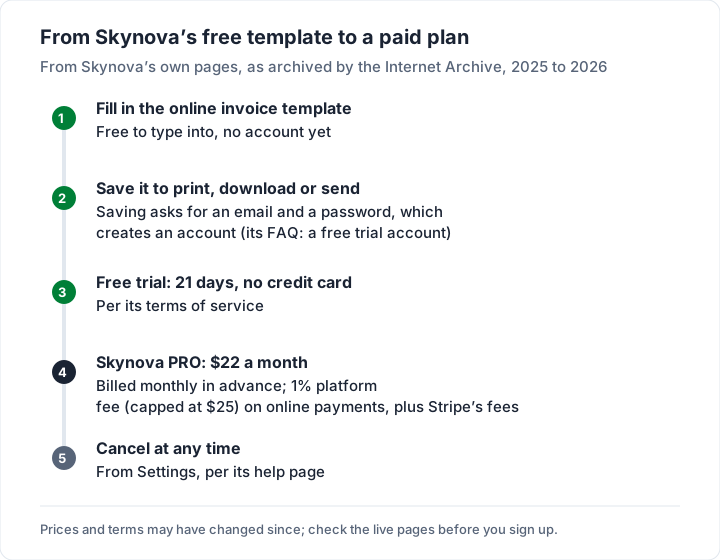
- The template is free to fill in, and saving it starts a trial. To print, download or send an invoice you save it, which creates an account, and Skynova’s help page calls that “a free trial account”.
- The trial is 21 days, with no card, according to its terms of service.
- The paid plan is Skynova PRO at $22 a month, the only plan on its pricing page (archived 18 September 2026), billed monthly in advance under its terms.
- Online payments carry a platform fee. The terms list a 1% platform fee per payment, capped at $25, on top of Stripe’s own fees.
- It suits small businesses that want invoices, estimates, contracts, purchase orders and dozens of other documents in one subscription.
- Consider other options if you want an ongoing free plan, a full phone app, or a one-off template you keep as a file.
Is Skynova’s invoice template free?#
The template and a 21-day trial are free. Here is the wording, page by page.
The template page (titled “Invoice Template :: Free Printable Invoice :: Skynova.com”; the most recent copy we could read was archived on 12 September 2025) says: “To create a free invoice, just fill out the template below. To print, download or send your invoice for free, click the save button.” The save box then explains the next step: “To print, download or send your invoice, you first have to save it. To save your invoice, enter your e-mail address and a password below - and click Save.” The button is labelled “Save Invoice & Create Free Account”.
The help page (archived 13 July 2026) says what that account is: “To create a free trial account, go to either the Invoice Template page or the Sign Up page.”
The sign-up page (archived 4 April 2026) is headed “Sign Up for Skynova FREE” and says “To create a free account on Skynova enter your e-mail address and a password below.”
The terms of service (archived 18 September 2026) set the length: “You can create a free trial account without the use of a credit card. The free trial lasts twenty-one (21) days. A valid credit card, however, is required to pay your monthly charges if you decide to sign up for a paid plan when the trial is over.”
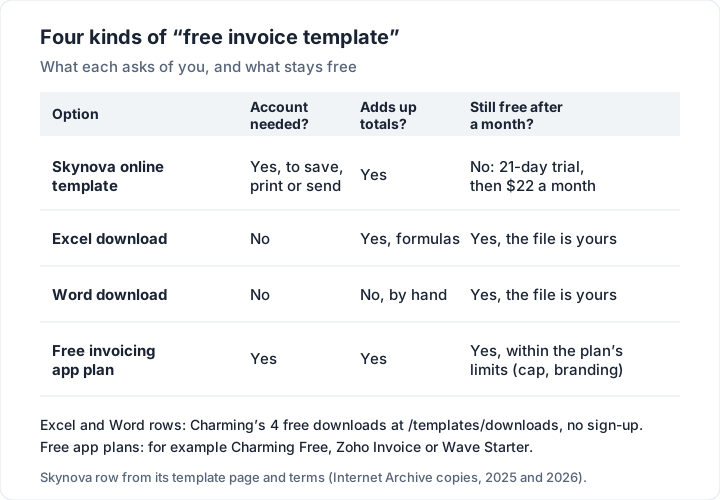
The pages use “free account” and “free trial account” for the same thing. Read together, the free part is the template and a 21-day trial. We found no ongoing free plan on the pages we could read, and the pricing page lists only Skynova PRO. If you only need one invoice, that can still work: fill it in, save it, and download the PDF during the trial.
Skynova pricing and plans#
Skynova’s pricing page, in the Internet Archive’s copy of 18 September 2026, shows one plan: Skynova PRO, $22 a month, with a “Try It Free” button. It lists what is included:
| Included in Skynova PRO (pricing page) | |
|---|---|
| Money | Invoices, expenses, profit and loss, bookkeeping, receipts, recurring invoices |
| Selling | Estimates, quotes, bids, business proposals |
| Agreements | Contracts, e-signatures |
| Running the work | Customers, timesheets |
| Extras | 20+ more add-ons included |
Skynova’s product page (archived the same day) puts it slightly differently: “When you sign up for Skynova, you get the four modules below” (invoices, expenses, profit and loss, customers), and “we have 30+ other business modules you can combine to fit your needs”. Those modules include sales orders, deposit requests, retainers, credit notes, purchase orders, packing slips, a mileage log and a booking tool. The pricing page says “20+” add-ons and the product page “30+”; check the live pricing page for which modules a PRO subscription includes before you rely on one.
What the terms say about billing (archived 18 September 2026):
- Monthly, in advance. “A paid account is billed in advance on a monthly basis on the same day each month”.
- Upgrading ends the trial and bills at once. “Upgrading from your free trial account to any Skynova fee-paying accounts will end your free trial. You will be billed for your first month immediately upon upgrading.”
- Tax is extra. “All fees are exclusive of all taxes or duties”.
The terms also cover refunds and renewal pricing; read the live terms before you upgrade, as you would with any subscription.
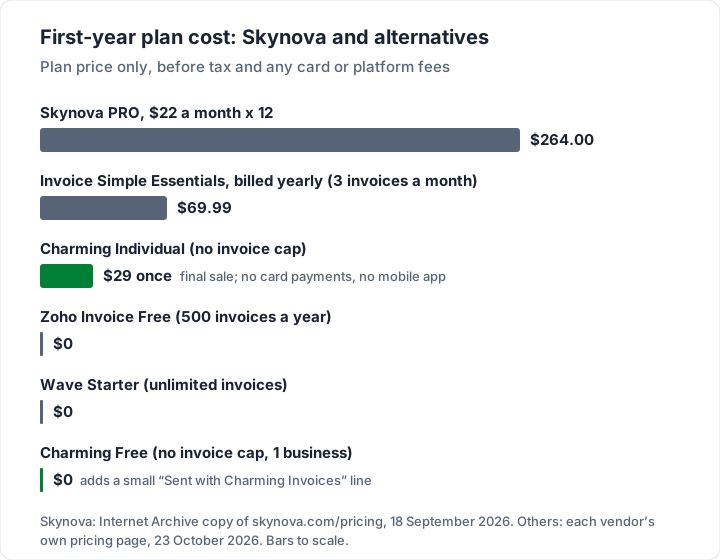
At $22 a month, a year of Skynova PRO is $264.00 before tax.
Skynova payment fees: the 1% platform fee#
If you let clients pay online, the terms of service (archived 18 September 2026) describe two layers of fees.
Stripe’s fee. “Skynova uses Stripe, Inc. (‘Stripe’) to provide payment processing services. If you enable online payments, you will be required to create a Stripe account or connect an existing one.” Stripe’s fees are agreed directly between you and Stripe.
Skynova’s platform fee. “Skynova will charge you a platform fee equal to 1% of the gross amount of each successfully processed payment (the ‘Platform Fee’), capped at $25 per payment.” The terms add that it applies to card and ACH payments and is calculated on the total charged including taxes and tips.
Here is what that adds up to on three card payments, at Stripe’s standard US card rate of 2.9% + 30¢ (Stripe pricing, read 23 October 2026). The invoice amounts are illustrative.
| Invoice paid by card | Skynova platform fee (1%, max $25) | Stripe fee (2.9% + 30¢) | Total fees | You receive |
|---|---|---|---|---|
| $500.00 | $5.00 | $14.80 | $19.80 | $480.20 |
| $1,000.00 | $10.00 | $29.30 | $39.30 | $960.70 |
| $3,000.00 | $25.00 (capped) | $87.30 | $112.30 | $2,887.70 |
Skynova’s help page (archived 13 July 2026) describes online payments through PayPal, and the terms (18 September 2026) describe Stripe. Check the Online Payment settings in the account to see which applies to you. For how card fees compare across processors, see our invoice payment fee comparison.
Bank transfer paid outside the app carries neither fee. If your clients will pay that way, print your bank details in the notes, as Skynova’s own guide suggests for payment instructions.
How to make an invoice in Skynova#
Skynova’s guide, “How to Make a Simple Invoice in 5 Steps” (Internet Archive copy of 15 May 2026), walks through its template. In short:
- Add both parties. Your name and business name in “Your Name”, your client’s in “Customer Name”, then addresses, phone numbers and emails. To add a logo, click “Show Customization Options” and tick “Logo”.
- Set the invoice number. You choose the first number; after that, the guide says, “our software will automatically increment your invoice number” and will not let you save a duplicate. It suggests a new business might start at #401 rather than #001.
- Add the dates. “Invoice Date” is the day you create the invoice, then a “Due Date”. The guide suggests putting the payment window and any late-fee terms in “Notes”.
- Add the line items. Pick Hours, Service, Days or Product from the Item menu, then a description, unit price and quantity. Its own example: a writer at $30 an hour who works 8 hours one day and 4 the next bills $360; a photographer billing a $350 shoot and $150 of editing bills $500.
- Add details, tax and discounts. Extra detail goes in “Notes”. Tax is switched on with “Sales Tax” under the customization options. A discount is a line item with the Item type “Discount”, which is subtracted from the total.
Then save, which (as above) creates the trial account, and print, download the PDF or send the invoice by email. Skynova’s help page lists the statuses an invoice can have: Draft, Sent, Viewed, Paid and Partial.
On tax, the guide itself advises that “it’s important to consult an accounting professional to determine if you will need to incorporate a sales tax into your invoice.” That is good advice whatever tool you use; this post is general information, not tax advice. Whatever app you use, our guide to how to make an invoice covers what every invoice needs.
What Skynova does well#
- Many document types under one subscription. Estimates, quotes, bids, proposals, contracts, e-signatures, purchase orders, packing slips and credit notes sit beside invoices. If you need several of these, one $22 plan may beat several separate tools.
- More than one tax rate. Its help page says you can create named tax rates and “To charge multiple tax rates, click inside the tax column and select all the tax rates that apply”.
- Estimates that become invoices. “Convert to invoice” turns a saved estimate into an editable invoice.
- Partial payments and a Viewed status. You record payments against an invoice, and an invoice shows as Viewed once the client opens it.
- A trial without a card. Twenty-one days is longer than many trials, and the terms say no card is needed to start.
What to check before you choose Skynova#
- Whether you want a subscription. The pages we read list one plan, Skynova PRO at $22 a month after the 21-day trial.
- How clients will pay. Online payments carry the 1% platform fee plus Stripe’s fees; bank transfer paid outside the app carries neither.
- Phone use. Its help page says the App Store app is for scanning receipts into the Bookkeeping module, and for everything else recommends adding a link to skynova.com to your phone’s home screen.
- Which modules you need. Check the live pricing page for what a PRO subscription includes.
- Your records. Whatever app you use, download the PDFs you need before you close an account.
Other free invoice options#
If the reason you searched was “free”, these options have a free plan or free files with no trial end date, or a trial of their own. Each is checked on the vendor’s own page; the Charming rows are checked in our own product.
| Option | What stays free | Main limit | Card payments |
|---|---|---|---|
| Skynova (reference) | Template and a 21-day trial | Then $22 a month | Stripe fees plus 1% (max $25) |
| Charming Free plan | Unlimited invoices and clients | 1 business; a small “Sent with Charming Invoices” line | Not through Charming; print your own payment link |
| Charming Word and Excel downloads | Free files, no sign-up | Word files do not calculate; no sending or tracking | None |
| Zoho Invoice | Up to 500 invoices a year | “Powered by Zoho Invoice” branding | Through a gateway you connect |
| Wave Starter | Unlimited invoices | Outside the US and Canada, no sending through Wave (help centre) | 2.9% + $0.60 per card |
| Invoice Home | Up to $1,000 invoiced in 30 days | Over that, a paid plan | PayPal or Stripe |
| Invoice Simple | A 14-day trial only | Essentials $6.99 a month for 3 invoices a month | 3.49% + $0.49 |
| Invoice2go | A 30-day trial only | 30 invoices a year on Starter | 3.5% on Starter |
Zoho’s limits are from its pricing page, Wave’s from its pricing page and Invoice Simple’s from its pricing page, all read on 23 October 2026; Invoice Home’s are from our review, dated 22 October 2026. For every free plan’s limits in one place, see the best free invoicing software.
If you only need a template#
A template is a file you keep, with no account and no trial. Our guides to a blank invoice template, an invoice template in Word and an Excel invoice template walk through each format. The Excel files at our free downloads page add up line amounts, subtotal, discount, one tax rate and the balance due by formula; the Word files are laid out for you but the totals are typed by hand. For a trade example, our contractor invoice template shows the same files filled in for a building job.
Where Charming fits, and where it does not#
Charming is a web app for branded invoices. It overlaps with the invoicing part of Skynova, not with its 30-plus modules. What Charming does:
- A free plan with no invoice cap. Unlimited invoices and clients for 1 business, at $0 forever, with no card, no trial clock and no expiry.
- Design on every plan. All 60 templates, your logo, any brand colour, 30 fonts and a letterhead.
- Sharing and follow-up. A PDF to download or print and a private link your client opens without an account, which you send however you like, a “Viewed” mark when they open it, and an Overdue status once the due date passes.
- Free files without an account. The 4 Word and Excel downloads above.
And Charming’s own limits, next to those benefits:
- One tax rate per invoice. Skynova lets you apply several; Charming calculates a subtotal, a discount and one tax rate.
- No estimates, quotes, contracts, e-signatures, purchase orders or bookkeeping. Skynova has all of these. If you need them, Skynova or another suite is the better fit.
- No card payments through Charming. You print bank details and your own payment link (from Stripe, PayPal or Square), the client pays you directly at that provider’s fees, and you mark the invoice paid yourself. Charming takes no platform fee because it takes no payments.
- No email sending or reminders. Charming does not email invoices or reminders to your client; you send the PDF or link yourself.
- No app-store mobile app. Charming runs in a browser.
- Free invoices carry a small “Sent with Charming Invoices” line, and Free is 1 business. Individual hides the line by default for $29 once; lifetime plans are final sale. Every plan is on the pricing page.
Skynova questions#
Is Skynova really free?#
The online template is free to fill in, and saving it creates a free trial account that lasts 21 days with no card, according to Skynova’s terms (archived 18 September 2026). After that, its pricing page lists Skynova PRO at $22 a month.
How much is Skynova?#
Skynova PRO was $22 a month on its pricing page as archived on 18 September 2026, billed monthly in advance, with tax extra. Online payments add a 1% platform fee (capped at $25 a payment) plus Stripe’s fees.
Can I use Skynova’s invoice template without signing up?#
You can fill it in, but its template page says “To print, download or send your invoice, you first have to save it”, and saving asks for an email and a password.
Is Skynova the same as Aynax?#
Skynova’s homepage title reads “Skynova.com / Aynax.com”, and the receipt app its help page points to is listed on the App Store under the name Aynax. Skynova’s pages that we read do not explain the history beyond that.
Does Skynova have an app?#
Its help page says the App Store app scans receipts into the Bookkeeping module, and suggests a home-screen link to the website for everything else.
How do I cancel Skynova?#
Its help page says: Settings, then Close Account, then “Cancel Paid Plan”. You can cancel the paid plan and keep the account, or close the account entirely. Download anything you need first.
The short version#
Skynova’s invoice template is free to fill in. Saving it starts a 21-day trial with no card, and Skynova PRO is $22 a month, billed monthly, with a 1% platform fee on online payments. It suits you if you want invoices plus estimates, contracts and dozens of other documents in one place. If you want an invoice tool with an ongoing free plan, download one of our free Word or Excel templates with no sign-up, or create a free invoice with Charming in your own brand, download the PDF and send it your way.