Quicken invoicing: how it works in each Quicken app

Nnabuike Okoroafor ·
On this page · 13 sections
Disclosure: We make Charming Invoices, an invoicing app that competes with Quicken for some readers. It appears once in this guide, with its limits. Every Quicken feature and limit below comes from Quicken’s own product and help pages, read on 28 October 2026 and linked, and we say where Quicken is the better choice.
You already track your money in Quicken, and now a client needs an invoice. Can Quicken send it? Yes, but which steps you follow depends on which Quicken you have. “Quicken” today is a family of apps, and three of them invoice in different ways: a cloud app, a Windows desktop program and a Mac desktop program.
This guide shows how Quicken invoicing works in each one, the limits Quicken’s own help pages state, how its plans are billed, and when a dedicated invoicing tool may fit better.
In short#
- Three Quicken apps send invoices: Quicken Business & Personal (web and mobile), Quicken Classic Business & Personal for Windows and Quicken Classic Business & Personal for Mac. Quicken Simplifi is for personal finances.
- Clients can pay online, through Stripe in Business & Personal and Classic for Mac, and through PayPal links in Classic for Windows.
- Invoicing is built for the US. Quicken’s Mac help says “Invoicing is only available for U.S. accounts. Multi-currency is not supported.”
- One tax rate per invoice in Business & Personal, per its help page.
- Prices on Quicken’s site are first-year offers that renew “at the then-current rates”, so check the renewal price before you buy.
- Quicken suits someone who wants personal and business money in one app. A dedicated invoicing tool suits someone who mainly sends invoices, or bills outside the US.
Which Quicken can send invoices?#
Quicken’s plans and pricing page describes Simplifi as personal finance software, and says self-employed people and small business owners should “choose Quicken Business & Personal for everything in Simplifi, plus tools to manage business income and expenses, invoicing, profitability, and business taxes”. The two Classic Business & Personal desktop programs also invoice. Here is how the three compare, as of 28 October 2026.
| Business & Personal | Classic B&P for Windows | Classic B&P for Mac | |
|---|---|---|---|
| Where it runs | Web browser and mobile app | Desktop program | Desktop program |
| Where your data lives | Quicken’s cloud | Stored locally | Stored locally |
| How clients pay online | Stripe (card or bank) | PayPal links | Stripe (card or ACH) |
| Businesses | Up to 10 | Not stated on the invoicing pages | Not stated on the invoicing pages |
| Main source | Product page and help | Product page | Product page and help |
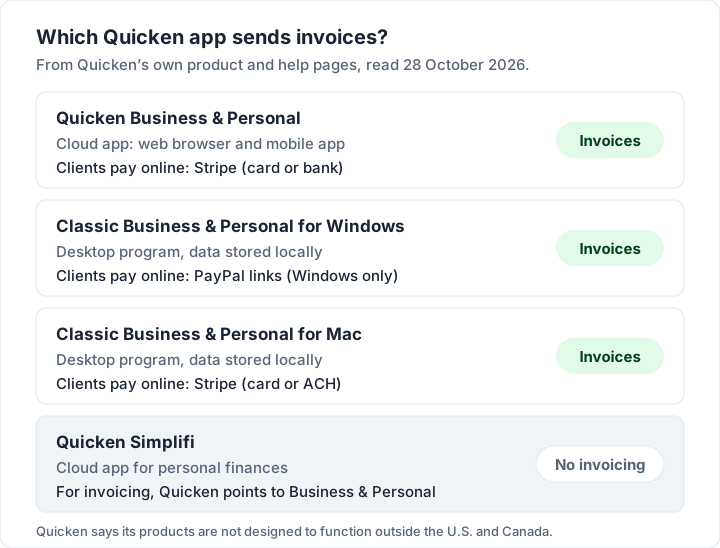
Quicken’s Business & Personal page calls it “secure, cloud-based accounting software that works on the web and with a mobile app”, and lists “Send automated, trackable invoices to unlimited clients” and “Manage up to 10 businesses for no additional cost”. The Classic pages describe “secure desktop software with your data stored locally.”
How to send an invoice in Quicken Business & Personal#
These steps follow Quicken’s help page Creating and Managing Invoices, which is headed “Available in Quicken Business & Personal”. First set up your business information and the client.
- Open your invoices. In the left panel, select Sales & Billing, then Invoices, then + Invoice.
- Pick the client and project. Use the Client & Project dropdown and choose a project under the right client.
- Set the number and dates. Enter the Invoice #, Issue Date and Due Date.
- Add your items. Select + Add Item and choose an item, or New Item to create one. Drag lines to reorder them.
- Add tax and any discount. Tick Taxable on each taxable line and choose the rate in the Tax dropdown. The help page notes “only one rate per invoice is allowed”. A discount can be a dollar amount or a percentage.
- Preview, then send. Check the Preview tab, then Send to... and confirm the email address, subject and message. To skip email and print it yourself, choose Mark as Sent (No Email).
Editing later is allowed, with one catch from the same page: “If the invoice has already been sent, you'll need to resend it after editing.” The Unpaid view lists past-due invoices so you can follow up.
The help centre also has pages for estimates, sales receipts, partial payments, credit memos and refunds. If you are not sure when a credit memo is the right document, our guide on when to issue a credit note explains the difference.
Invoicing in Quicken Classic for Mac#
On the Mac, invoicing lives in the desktop program. Quicken’s Mac help on invoicing says: “From the Business tab at the top of the main window, select Invoices.” Its page on creating invoices gives the steps: choose a client, set the invoice date and terms, add items with a category, apply any discount and tax, and then “Click Save as Draft, Save, or Save and Send...”.
Three details are worth knowing:
- Terms set the due date. The Terms menu offers Net 15, Net 30, Net 60 and Due Upon Receipt, and Quicken calculates the due date from the invoice date and terms. You can type a different due date. For what each term means in practice, see what Net 30 actually means.
- Numbering carries on. “If your invoice number format ends with a number, Quicken Classic for Mac increments it for the next invoice.”
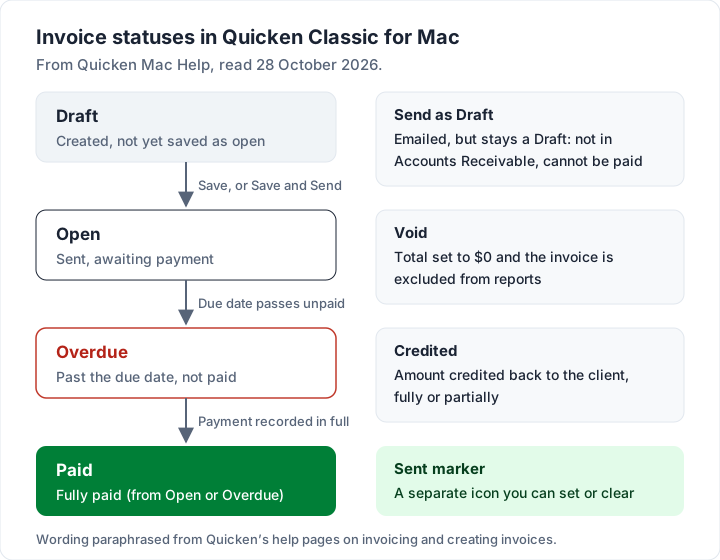
- A draft you email is still a draft. The help page explains that Send as Draft emails it without opening it: “Draft invoices don't appear in Accounts Receivable and can't be paid.” Use Save and Send when you want the client to pay it.
Statuses run from Draft to Open, Overdue and Paid, with Void and Credited for invoices you cancel or credit. A separate Sent column shows whether you sent each one. The help page says you can clear that icon “if a send fails” or set it yourself if you deliver the invoice another way. For why Accounts Receivable matters, see our explainer on accounts receivable vs accounts payable.
Quicken’s Mac help also covers adding a business logo (PNG or JPG), billable expenses, Stripe payments and exporting invoices to a CSV file. The Classic for Mac product page says: “Create and send invoices in minutes with customizable, branded templates.” If you are weighing other Mac options, our guide to invoicing software for Mac compares native and web apps.
Invoicing in Quicken Classic for Windows#
The Classic Business & Personal product page says: “Create custom invoices and get paid faster by enabling PayPal* links. Track status to ensure on-time payments.” The page’s footnote for the asterisk reads “* Windows only”. It also lists “Access built-in Schedule C and E tax reports.”
We did not find a current Windows help page on invoicing to read, so we do not describe the Windows steps here. Classic for Windows is a desktop program you install, and the page says you download it after purchase from your Quicken.com account. If you are comparing desktop programs more broadly, our round-up of desktop invoice software covers free options and how to back them up.
Getting paid: Stripe, PayPal links and partial payments#
Business & Personal and Classic for Mac use Stripe. Quicken’s help page Online Payments with Stripe says clients can pay “using credit cards, debit cards, or bank transfers (ACH)”, and that when a client pays through Stripe, Business & Personal “automatically records the payment and marks the invoice as paid”. Each business connects its own Stripe account. On the Mac, Quicken’s Stripe page says you choose ACH, card or both on each invoice, and the client gets a View & Pay button.
Stripe charges its own fee, which comes off before the money reaches your bank. Quicken’s help shows this with its own example: “A client pays a $1,000 invoice by card. Stripe fee is $29.30.” Quicken then records $1,000.00 as income, $29.30 as a Stripe fee and $970.70 as the deposit. For how Stripe invoicing works on its own, and its fees, see how a Stripe invoice works.
Classic for Windows uses PayPal links, per its product page. Payments by bank transfer or check, outside Stripe or PayPal, you record yourself.
Limits listed on Quicken’s own pages#
These come from Quicken’s own pages, as of 28 October 2026. This is general information, not legal or tax advice.
| Limit | What Quicken’s page says | Source |
|---|---|---|
| US accounts only (Mac) | “Invoicing is only available for U.S. accounts.” | Mac help: Invoicing |
| One currency (Mac) | “Multi-currency is not supported.” | Mac help: Invoicing |
| US and Canada (all products) | “Quicken products are not designed to function outside the U.S. and Canada.” | Pricing page footnote |
| One tax rate per invoice (B&P) | “only one rate per invoice is allowed” | B&P help: invoices |
| Edits after sending (B&P) | “you'll need to resend it after editing” | B&P help: invoices |
| Emailed drafts (Mac) | “Draft invoices don't appear in Accounts Receivable and can't be paid.” | Mac help: Invoicing |
If some of your clients pay in euros or pounds, check the currency line first: per its help page, Quicken’s Mac app invoices in US dollars.
The tax-rate limit matters if one job mixes items taxed at different rates. Rules on which rate applies vary by place, so check your tax authority’s page and ask an accountant.
What Quicken costs: how its plans are billed#
We do not quote Quicken’s prices in this guide, because the prices on its pages were first-year offers when we checked. The footnote on its plans and pricing page says, as of 28 October 2026: “All offers are for the first year only when you order directly from Quicken by November 26, 2026, 11:59 PT.” It continues: “Upon the end of your membership term, the subscription will automatically renew at the then-current rates, unless you or we terminate this agreement.”
Three things to check, as with any subscription:
- Check the renewal price as well as the offer price. The page says the offers are for the first year.
- It is billed once a year. The same page says “Subscription billed annually.”
- Renewal is automatic. Put the renewal date in your calendar if you want to review it first.
A worked example: one invoice, four payment terms#
Here is an illustrative invoice from a sample bookkeeper, dated 3 November 2026, with a 10% discount. Tax is left out because rates vary.
| Description | Qty | Rate | Amount |
|---|---|---|---|
| Monthly bookkeeping, hours | 6 | $85.00 | $510.00 |
| Quarterly cash-flow report | 1 | $240.00 | $240.00 |
| Subtotal | $750.00 | ||
| Discount (10%) | −$75.00 | ||
| Total | $675.00 |
In Classic for Mac, the Terms you pick set the due date from that invoice date:
| Terms | Due date |
|---|---|
| Due Upon Receipt | 3 November 2026 |
| Net 15 | 18 November 2026 |
| Net 30 | 3 December 2026 |
| Net 60 | 2 January 2027 |
Now say the same client also buys an item taxed at a different rate from the bookkeeping. In Business & Personal, with “only one rate per invoice”, one way round it is to bill that item on a second invoice. Two invoices for one job is workable, but it is worth knowing before you quote the client.
Quicken vs QuickBooks for invoicing#
Quicken and QuickBooks are different products, and they invoice differently. Quicken pairs invoicing with personal finances and budgeting. QuickBooks is accounting software for a business, with invoicing as one part. If your accountant works in QuickBooks, read how QuickBooks invoicing works before you choose. The Quicken invoicing pages we read do not mention syncing invoices with QuickBooks.
When a dedicated invoicing app fits better#
Quicken is the better fit if you want your personal and business money in one app: bank downloads, budgets, Schedule C and E reports, mileage and invoicing together. It is also the better fit if you want clients to pay by card from the invoice, or you need estimates, sales receipts and credit memos (Business & Personal). Charming does none of those.
A dedicated invoicing app fits better if you bill clients outside the US, need a currency other than the US dollar, or only want to send and chase invoices without a yearly subscription. Our eight questions to ask any invoicing app help you compare. For other routes, see how invoicing works in Xero, what the Zoho Invoice free plan includes and how Wave invoicing works.
Where Charming fits, and its limits#
Charming is invoicing only, in your browser.
- What it does: unlimited invoices and clients on the free plan for 1 business; 60 templates with your logo, colours and fonts; a PDF to download or print and a private link, which you send however you like; partial payments; overdue status; and a CSV export. Each business invoices in 1 of 16 currencies, so a business that bills in euros can be set up in euros.
- The limits: no currency conversion, and one currency per business. One tax rate per invoice, the same as Quicken Business & Personal. No card payments through Charming, so you mark invoices paid yourself. No personal finance, budgeting, bank feeds, bookkeeping, estimates, integrations, or Quicken sync or import. No desktop or mobile app. It does not email invoices or send reminders: you send the PDF or link from your own email. Free invoices carry a small “Sent with Charming Invoices” line, which paid plans hide by default. AI drafting is on paid plans only.
- Paid plans: Individual at $29 once, Team at $79 once (up to 5 teammates) and Pro at $12 a month or $99 a year. Lifetime plans are final sale. See the pricing page for what each adds.
If Quicken already runs your money and you invoice US clients in dollars, keep invoicing there. If you want invoicing on its own, create a free invoice and compare it with your next Quicken invoice, or browse our free invoice templates first.
Quicken invoicing questions#
Can Quicken send invoices?#
Yes, in Quicken Business & Personal, Quicken Classic Business & Personal for Windows and Quicken Classic Business & Personal for Mac, as of 28 October 2026. Quicken points people who need invoicing from Simplifi to Business & Personal.
Does Quicken have invoice templates and a logo option?#
Yes. The Classic for Mac product page mentions “customizable, branded templates”, and the Mac help explains adding a PNG or JPG business logo, which appears on new invoices and estimates. The Windows product page mentions “custom invoices”.
Can Quicken invoice in other currencies?#
Not on the Mac, per Quicken’s help: “Multi-currency is not supported.” Quicken also says its products are not designed to function outside the US and Canada.
Is Quicken invoicing free?#
No. Invoicing comes with the paid Business & Personal products, Quicken’s cloud app and the Classic desktop programs, billed annually. The prices on Quicken’s site are first-year offers that then renew at the current rate, so check both before you buy.
Can clients pay a Quicken invoice online?#
Yes, through Stripe (card or bank) in Business & Personal and Classic for Mac, and through PayPal links in Classic for Windows. Stripe’s fee comes off each payment.
The short version#
Quicken invoicing depends on your Quicken. Business & Personal invoices from the web and mobile app with Stripe payments; Classic for Windows uses PayPal links; Classic for Mac invoices from the Business tab with Stripe. Quicken says its products are not designed to function outside the US and Canada, Mac invoicing is for US accounts with no multi-currency, and Business & Personal allows one tax rate per invoice. If you want personal and business money in one place, Quicken is a sensible choice. If you mainly send invoices, or bill outside the US, compare it with a tool built only for invoicing.