Sage invoicing: which Sage product to use and what it costs

Nnabuike Okoroafor ·
On this page · 11 sections
Disclosure: We make Charming Invoices, an invoicing app, so Sage is a competitor. Every Sage price, plan limit, step and quote below comes from Sage’s own product, pricing and help pages, read on 28 October 2026 and linked. Charming has no Sage integration of any kind, and we say plainly where Sage is the better choice.
General information, not legal or tax advice. Where this guide mentions VAT or tax filing, it names Sage’s feature labels and links the official page. Those rules vary by country and change; check the official page and ask an accountant before you rely on any of it.
You want to send an invoice “in Sage”, and the first thing you hit is that Sage is not one product. There is Sage Accounting, Sage 50, Sage Intacct and, if you are in the US, a cloud app that Sage has retired. Which one you would invoice from depends on where your business is and what else you need from the software.
This guide sorts that out first. Then it covers how to create and email a sales invoice in Sage Accounting, templates and logos, reminders and payments, what each UK plan costs over two years with the current offer worked out, Sage 50 in brief, what US users of the retired app can do, and when Sage is more than you need.
Sage invoicing in short#
- In the UK, you invoice from Sage Accounting. All 3 plans (Start, Standard and Plus) list “Create and send unlimited sales invoices” and “Automatic invoice chasing”.
- Quotes are not on the cheapest plan. “Send quotes and estimates” is ticked on Standard and Plus only, per Sage’s UK pricing page.
- UK prices, as of 28 October 2026: £20, £43 or £59 a month excluding VAT, with an offer of 90% off for the first 6 months.
- In the US, the cloud app is gone. Sage says Sage Business Cloud Accounting (US) was retired on December 31, 2024, and points US users to Sage 50.
- Sage is accounting software. Invoicing sits next to bank reconciliation, VAT returns and payroll. If you need those, that is what the price buys. If you only send invoices, a lighter tool may be enough.
Which Sage product do you invoice from?#
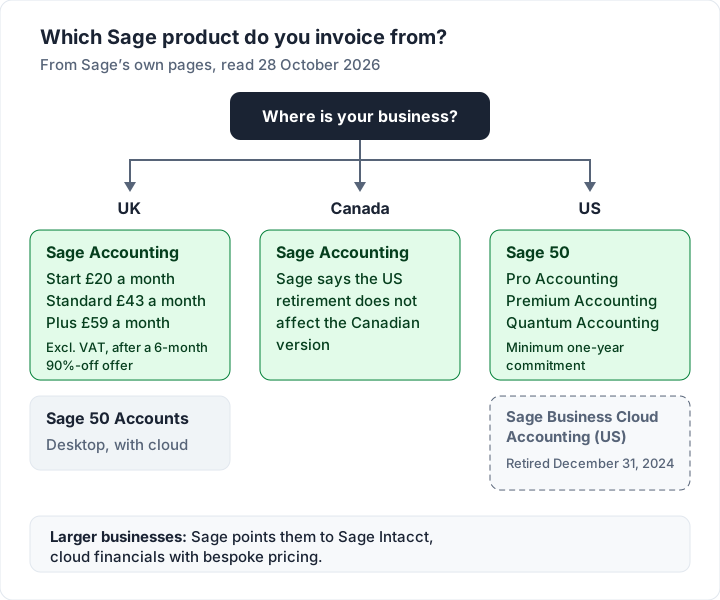
Sage sells different products in different countries, and they are not interchangeable. This table sums up what Sage’s own pages say, as of 28 October 2026.
| Where you are | Sage product | What it is | Invoicing |
|---|---|---|---|
| UK | Sage Accounting | Cloud accounting with payroll, 3 plans | Unlimited sales invoices on every plan; quotes on Standard and Plus |
| UK | Sage 50 Accounts | “Desktop accounting software with cloud connectivity” | Sales invoices inside a fuller accounts package |
| Canada | Sage Accounting | Cloud accounting; Sage says the US retirement does not affect it | Check Sage Canada’s own pages for plans |
| US | Sage 50 | Pro, Premium and Quantum Accounting plans | “Manage your sales invoices by customer ID.” |
| US (retired) | Sage Business Cloud Accounting | Retired December 31, 2024 | No longer available |
| Larger firms | Sage Intacct | Cloud financials with “Bespoke pricing” | Part of a mid-market finance system |
If you ran Peachtree in the US, Sage’s Sage 50 page puts the history in one line: “Trusted by businesses for decades as Peachtree — now Sage 50.”
What happened to Sage One?#
Some searches still say Sage One. Sage’s UK pricing page answers this in its own FAQ: “Yes, Sage One became Sage Accounting in 2016”. If you see Sage One in an old guide, read it as Sage Accounting and check that the steps still match.
How to send an invoice in Sage Accounting#
The steps below come from Sage’s UK knowledge base article A quick start guide to creating a sales invoice (product: Sage Accounting), read on 28 October 2026.
- From Sales, select Sales invoices.
- On the right-hand side, select New Invoice.
- Select your customer from the list, or Add new customer if needed.
- Complete the mandatory fields, which are marked with an asterisk.
- Fill in the Description; a new line appears as you type, for the next item.
- Select Preview to see how the invoice looks.
- Select Save, or Save and Email to send it to the customer straight away.
On Accounting Start, Sage’s Start quick start guide uses a shorter path (Sales, then New Invoice) and adds a useful tip: “Use the Notes to add your business's bank details.” It also offers Save as Draft, which, in Sage’s words, “saves the invoice but doesn't update your customer accounts or ledger accounts.”
What the email to your customer contains#
When you choose to email it, Sage’s article Email a sales invoice says the window fills in for you:
- Recipients: the customer’s main contact, which you can overwrite, plus up to five recipients in total.
- Subject: built from the customer’s name, the invoice number, the amount and the due date.
- Link and PDF: “We send a hosted invoice, where your customer can open an online link to the invoice.” You can tick Attach PDF to send a PDF as well.
- Message: taken from the Document emails section of your settings, which you can overwrite or ask Copilot (Sage’s AI assistant) to draft.
The same article notes that quick entry invoices are not emailed; create a full sales invoice if you want to send it from Sage.
Templates, logo and invoice layouts#
Sage’s UK invoicing page puts it simply: “Choose a template, customise with your logos and details.” Sage’s quick start guide points to its own article on customising sales documents, and Preview shows the result before you send. Sage 50 handles invoice layouts in its own way, so follow the Sage 50 help for your version.
If you searched for a “Sage invoice template” because you want a file to fill in, Sage’s templates live inside its software. A blank file is a different thing: we keep free invoice templates for Excel, Word and PDF that need no account.
Reminders, recurring invoices and getting paid#
Sage’s UK invoicing page says its software “automates reminders and recurring invoices”, and the pricing page lists “Automatic invoice chasing” on all three plans. If you are deciding between repeat invoices and a subscription, here is how recurring invoices work in general.
For payments, Sage’s UK pages list several routes:
- Card, ACH or PayPal: “Enable payments via credit card, ACH, or PayPal to give your customers more ways to pay.”
- GoCardless and Stripe: listed among the Sage Accounting features on the same page.
- Not buy now, pay later: Sage’s FAQ says its solutions “do not support specific options like 'Buy Now, Pay Later' (BNPL)”.
Payment providers charge their own fees on top of the Sage plan. Check the provider’s pricing page before you switch it on; our guide to what card payments on an invoice cost shows how those fees usually work.
What Sage Accounting costs in the UK#
These are the prices on Sage’s UK Sage Accounting page, as of 28 October 2026, excluding VAT. The page says: “Prices start at £2 then £20 per month (excluding VAT).”
| Plan | Users | Offer price, months 1 to 6 | Then | Quotes and estimates |
|---|---|---|---|---|
| Start | 1 | £2 a month | £20 a month | No |
| Standard | 3 | £4.30 a month | £43 a month | Yes |
| Plus | Unlimited | £5.90 a month | £59 a month | Yes |
The footnote reads: “*Get 90% off for 6 months, then £20/£43/£59 + VAT/mo (tier depending). Terms and conditions apply.” If you would rather not take the offer, the page also says: “Try before you buy. Skip the offer and get 1 month free on Start, Standard, or Plus”.
Which features sit behind Standard and Plus#
Invoicing itself is on every plan. These are the invoicing-related rows from Sage’s comparison table that change by plan (ticks and crosses read from the page on 28 October 2026):
| Feature, in Sage’s words | Start | Standard | Plus |
|---|---|---|---|
| Create and send unlimited sales invoices | Yes | Yes | Yes |
| Automatic invoice chasing | Yes | Yes | Yes |
| Offer more ways to pay | Yes | Yes | Yes |
| Send quotes and estimates | No | Yes | Yes |
| Manage suppliers and invoices | No | Yes | Yes |
| Forecast cashflow | No | Yes | Yes |
| Snap and scan receipts and invoices | Not included | 30 included | 100 included |
| Multi-currency banking | No | No | Yes |
The extra receipt captures cost £0.20 each on Standard and Plus, per the same table. If quotes are a must, Start is not enough; our guide to tools that do quotes and invoices compares other options.
Worked example: two years of Sage Accounting#
Here is what each plan costs at its regular monthly price, excluding VAT, with the current offer shown beside it rather than mixed into the totals. The offer may change; this is the arithmetic on 28 October 2026.
| Plan | Regular price | One year at the regular price | Two years at the regular price | Year 1 with the 90% offer |
|---|---|---|---|---|
| Start | £20 a month | 12 × £20 = £240.00 | £480.00 | 6 × £2 + 6 × £20 = £132.00 |
| Standard | £43 a month | 12 × £43 = £516.00 | £1,032.00 | 6 × £4.30 + 6 × £43 = £283.80 |
| Plus | £59 a month | 12 × £59 = £708.00 | £1,416.00 | 6 × £5.90 + 6 × £59 = £389.40 |
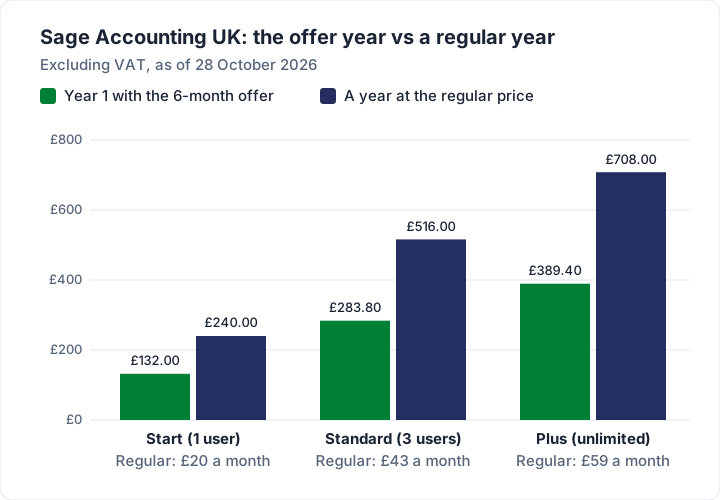
The pattern matters more than the totals. The offer makes year 1 cheaper; every year after it is the full monthly price for 12 months. For comparison, if you skipped the offer and took the free month instead, Start would be 11 paid months at £20, or £220.00, in year 1.
Sage 50 invoicing in brief#
In the UK, Sage describes Sage 50 Accounts as “Desktop accounting software with cloud connectivity, giving you a complete view of your business finances and inventory.” The same page says it is for “small businesses with advanced needs” and lists advanced stock management. Its invoicing, from layouts to emailing invoices, is set up inside the program, so follow Sage 50’s own help for your version.
In the US, Sage’s Sage 50 page lists three plans: Pro Accounting (“Essential cloud accounting for one user”), Premium Accounting (1 to 5 users) and Quantum Accounting. On invoicing it says: “Manage your sales invoices by customer ID.” and that you can “send automated payment reminders”. The page also states: “Minimum one-year commitment required.”
We have not quoted Sage 50 US prices here; check the live page for the current figure for your plan.
If you came here looking for software that installs on one computer, our guide to desktop invoice software covers the wider choice.
If you used Sage Business Cloud Accounting in the US#
Sage’s US page for the product is now titled “Sage Business Cloud Accounting has been retired”. Its notice reads:
“As of December 31, 2024, Sage Business Cloud Accounting (SBCA) (US) has been retired. Support and access to all editions ends on January 31, 2025. This retirement applies only to SBCA (US) and does not impact any other Sage products or SBCA in any other countries.”
The page follows with: “Looking for an alternative? Explore Sage 50”. For Canada, a Sage reply on the Sage Community Hub says: “This does not affect the Canadian version of Sage Accounting.”
So if a guide walks you through invoicing in Sage’s US cloud app, it describes a product Sage has retired. Your options are Sage 50 (which Sage suggests), another accounting app such as those in our guides on how invoicing works in Xero and how QuickBooks invoicing works, or a separate invoicing app if invoices were all you used it for. If you track personal and business money together, how Quicken invoicing works covers the Quicken apps that send invoices.
When Sage is more than you need#
Sage Accounting is built around the books. Its feature list includes “Reconcile transactions”, “Calculate and submit VAT” and payroll on every plan. Bookkeeping software works from your bank feed and your ledger; invoicing is one output of it. Our guide to invoices in accounting explains how invoices fit into receivables and the rest of the books.
Sage is the better fit when:
- you are VAT-registered and want VAT returns, bank reconciliation and invoicing in one place (Sage lists “Making Tax Digital ready” on all three UK plans; see what HMRC lists for a UK VAT invoice for the invoice side);
- you run payroll: Sage says all 3 UK plans include Sage Payroll, covering 1 employee on Start and Standard and 5 on Plus, then £1.85 per employee a month;
- you need quotes that convert to invoices and can pay for Standard;
- your accountant already works in Sage.
A lighter tool may be enough when you send invoices, track who has paid and hand records to an accountant once a year, and do not need bookkeeping, VAT returns or payroll in the same place. Our eight questions to ask any invoicing app can help you decide which camp you are in.
Where Charming fits, and where it does not#
Charming Invoices is an invoicing app, not accounting software. To be clear: it has no Sage integration. It does not import from Sage or sync with it, and it does no bookkeeping, bank feeds, VAT returns, payroll or quotes. It takes no card payments. If you need any of that, stay with Sage or another accounting package.
What it does, checked in our code on 28 October 2026:
- Unlimited invoices and clients on the free plan, for 1 business, with your logo, colours and fonts across all 60 templates.
- Invoices in 16 currencies, set per business (invoice currency only; no multi-currency banking).
- A PDF and a private link. Issue the invoice, then download the PDF, print it or copy a link your client opens without an account, and send it however you like. Overdue invoices are flagged. It does not email invoices or send reminders; set a calendar reminder or use your own email.
- Client statements and a CSV export of your invoices, which you can hand to your accountant. There is no import.
The catches: payment tracking is manual, so you mark each invoice paid yourself; free invoices carry a small “Sent with Charming Invoices” line; recurring invoice drafts and more than 1 business need a paid plan. Paid plans hide that line by default: Individual is $29 once, Team is $79 once with up to 5 teammates, and Pro is $12 a month or $99 a year. The lifetime plans are final sale. Prices are in US dollars; see the pricing page. If that fits, create a free invoice.
Questions about Sage invoicing#
Is Sage invoicing free?#
Not on Sage Accounting UK, as of 28 October 2026: the plans start at £20 a month excluding VAT after the 6-month offer, or with 1 month free if you skip the offer. If you want free invoicing without the accounting, see what the Zoho Invoice free plan includes, or Charming’s free plan above.
Can Sage send quotes and estimates?#
Yes, on Sage Accounting Standard and Plus. Sage’s UK pricing table shows “Send quotes and estimates” as not included on Start. The invoicing page says you can “Convert quotes into invoices instantly”.
Can I import invoices into Sage from Excel?#
Sage’s UK invoicing FAQ says you can import existing invoices and historical data “with simple CSV templates or with 1-1 support”. The exact steps differ between Sage Accounting and Sage 50, so follow the help for your product.
Can Sage do a pro forma invoice?#
Check your product’s help for its exact wording before you send one. If you are new to the document, here is what a proforma invoice is and when it is used.
Is that “Sage invoice” email real?#
Emails that look like a supplier’s invoice are a common scam. Do not click the link or open the attachment; log in to your Sage account directly, or call the sender on a number you already have. Our guide to invoice scams lists the warning signs.
The short version#
Sage invoicing depends on where you are. In the UK it means Sage Accounting, where every plan sends unlimited invoices and chases them automatically, quotes start on Standard, and the plans cost £20, £43 or £59 a month excluding VAT after a 6-month offer. In the US, Sage’s cloud app was retired at the end of 2024 and Sage points you to Sage 50. Choose Sage when you need the books, VAT and payroll in one place; choose a lighter invoicing app when invoices are all you need.
Sources, all read 28 October 2026: Sage Accounting UK, plans and pricing; Sage UK invoicing software; Sage KB: A quick start guide to creating a sales invoice; Sage KB: Quick start guide to creating a sales invoice (Accounting Start); Sage KB: Email a sales invoice; Sage Business Cloud Accounting (US) retirement; Sage 50 US; Sage US accounting software; Sage Community Hub, Sage Accounting Canada status.