Invoice currency: billing a client in another currency

Nnabuike Okoroafor ·
On this page · 12 sections
You have landed a client in another country, the work is done, and now the invoice asks a question your local clients never did: which currency? Bill in your own and the client may push back. Bill in theirs and the amount that reaches your bank can shrink before they pay.
This guide covers the invoice currency decision: your choices, what each costs in a worked example, how to show the currency, who pays conversion and transfer fees, and what to do when the money lands short. It ends with how Charming handles multi-currency invoicing, and what it does not do.
General information, not tax or legal advice. For how foreign-currency income is taxed or reported where you live, ask an accountant.
Invoice currency in short#
- Agree the currency before you start, in the quote or contract, not for the first time on the invoice.
- Name it with its three-letter code (USD, EUR, GBP) on the total, not just a symbol: “$” alone is used by many currencies.
- One currency per invoice. Every line, the total and the amount due are in the same currency.
- Whoever bills or pays in a currency that is not their own carries the exchange-rate risk, as the worked example below shows.
- Say who pays transfer and conversion fees in your terms, and put payment details on the invoice that can actually receive that currency.
- In Charming, currency is set per business and can be changed on any plan; an issued invoice keeps its currency. There is no conversion and no per-invoice picker.
For the rest of the job of billing a client, see invoicing as a freelancer, end to end.
What invoice currency means#
The invoice currency is the currency the amounts on an invoice are written in, and the one the client is asked to pay in. It is not necessarily the currency of your bank account or the client’s: a business in the US can bill a German client in euros, and the client can pay euros that are converted on the way in.
When you bill a client abroad you have three practical choices:
| Option | Example | Who carries the exchange-rate risk |
|---|---|---|
| Your own currency | A US studio bills a German publisher in USD | The client: what they pay in their currency moves with the rate |
| The client’s currency | The US studio bills the German publisher in EUR | You: what you receive in your currency moves with the rate |
| A third, widely used currency | A studio in Kenya bills a client in Germany in USD | Both sides, unless one of them banks in that currency |
Pick one with the client and settle it in the contract like any other term.
Which currency to invoice in: yours or the client’s#
The difference between the options is easiest to see with one invoice billed both ways. Here is an invented example.
Pellham Studio, a US illustration studio, bills Kaltwasser Verlag GmbH, a publisher in Germany:
| Line item | Qty | Unit price | Amount |
|---|---|---|---|
| Editorial illustrations, spring catalogue | 6 | 280.00 | 1,680.00 |
| Cover illustration | 1 | 1,180.00 | 1,180.00 |
| Total due (EUR) | 2,860.00 |
The invoice is dated Monday 2 November 2026 on 30-day terms, so it is due Wednesday 2 December 2026. The client pays on Friday 27 November 2026. There is no tax line in this example: this post does not cover the tax treatment of cross-border services, which is a question for an accountant.
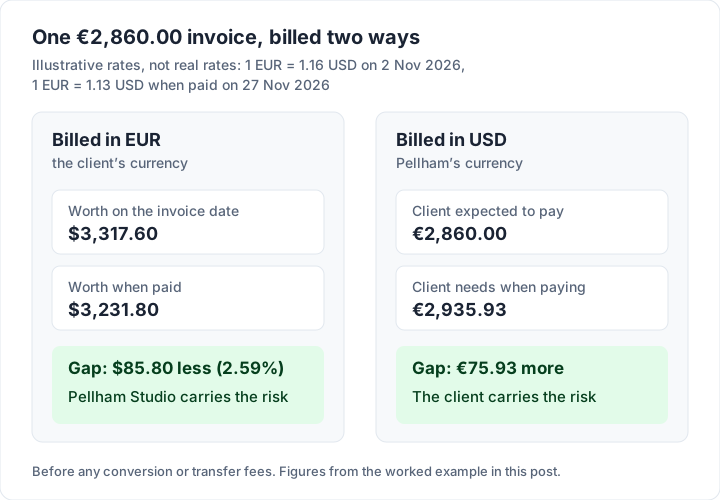
The exchange rates below are illustrative, not real rates. Say 1 EUR = 1.16 USD on the invoice date and 1 EUR = 1.13 USD on the payment date.
Billed in euros (the client’s currency). The client pays exactly €2,860.00. To Pellham, that was worth 2,860.00 × 1.16 = $3,317.60 on the invoice date, but 2,860.00 × 1.13 = $3,231.80 when it was paid: $85.80 less (2.59%), before any conversion or transfer fees. Had the rate moved the other way, to 1.19, the same invoice would have been worth $3,403.40, or $85.80 more. Billing in the client’s currency means Pellham carries that swing.
Billed in dollars (Pellham’s currency). Pellham bills $3,317.60, the euro amount at the invoice-date rate. Pellham receives $3,317.60 whatever happens. But at 1.13 the client now needs 3,317.60 ÷ 1.13 = €2,935.93 to pay it, €75.93 more than the €2,860.00 they expected. The risk has moved to the client.
When each choice tends to make sense#
- Your currency keeps your income predictable and your books simple. It suits work where you set the price, or where the client is used to paying suppliers abroad.
- The client’s currency is easier for the client to approve and pay, and their accounts team may prefer it. It suits ongoing work for a client who would otherwise ask for a discount to cover their own conversion. If you translate for agencies abroad, invoicing translation work covers that case.
- A third currency such as USD or EUR can be the practical answer when neither side’s local currency is easy to pay or receive.
Whichever you choose, short payment terms give the rate less time to move. Hedging and currency products are outside this post’s scope; ask your bank or an accountant.
How to show the currency on an invoice#
Symbols are where currency mix-ups start. “$” is used for US, Canadian, Australian, New Zealand and Singapore dollars, among others, and “kr” for several Nordic currencies. A clear invoice leaves no room for that.
One commenter in a real estate photography forum, billing a client in another country, wrote the currency into the amount itself (from public online discussions; not a Charming customer):
“The remaining unpaid balance is now $90 USD for the first two videos, which were not part of his original dispute.”
That habit, symbol plus code, is what to copy. On the invoice:
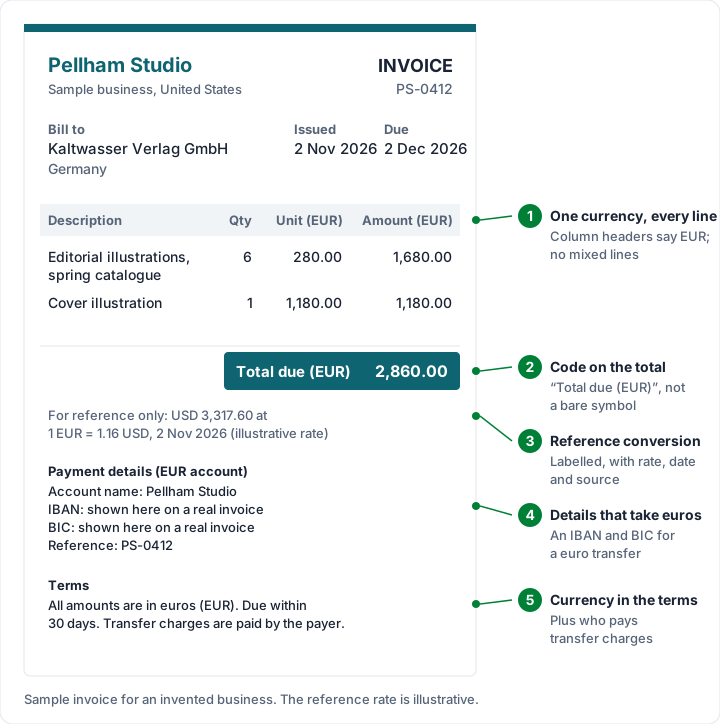
- Put the code on the total: “Total due (EUR) 2,860.00” or “EUR 2,860.00”.
- Use one currency on every line. Never mix a euro fee with a dollar expense on one invoice; convert the expense at the rate you agreed, or bill it separately.
- State the currency in your terms, for example “All amounts are in euros (EUR).”
- If you show a converted figure, label it as a reference (see the next section).
- Give payment details that can receive that currency (see the section on fees).
For a full invoice to a client abroad from a different angle (a UK illustrator billing a German publisher), see Example 8 in our invoice examples. For how to change labels, layout and wording on your own invoice, see customizing an invoice.
Showing a converted amount for reference#
A client may want to see the amount in their own currency, or you may want to show what it is worth in yours. That works, as long as it cannot be mistaken for the amount due.
- Keep the amount due in the agreed currency. The reference figure is information, not a second price.
- Label it: “For reference only: USD 3,317.60 at 1 EUR = 1.16 USD.”
- Give the rate, the date and the source of the rate, so the client can check it.
Showing the rate and its source is a courtesy that builds trust: your client can check the figure against a published rate without doing the sums from scratch.
Who pays currency conversion and transfer fees#
Moving money across borders can involve charges from the banks or payment providers involved, and a conversion spread built into the exchange rate. So the amount that lands can be less than the invoice total.
Agree it in writing. One way to word it in your terms: “Please pay the full invoice amount; any bank or transfer charges are the payer’s responsibility.” Whatever you agree, put it in the contract and repeat it on the invoice.
Check the provider’s own fee page. Fees vary by provider and change, so quote them from the source on the day. As one example, PayPal’s US business fees page (“Last Updated: October 1, 2026”, read 28 October 2026) says that for transactions “involving a currency conversion by PayPal, the transaction exchange rate will also include a currency conversion spread”, and lists “All other transactions” at “3.00%, or such other amount as may be disclosed to you during the transaction.” Its table lists 4.00% for some other transaction types. Read PayPal’s business fees page for which applies to you, and see how a PayPal invoice works. Stripe’s fees, including its currency conversion charge, are in what Stripe Invoicing costs, and what card payments on an invoice cost compares the card processors.
Give payment details for the right currency. A euro invoice needs details that can receive euros; for a bank transfer in euros, that usually means an IBAN and a BIC. For the formats by region, see how to list bank details on an invoice.
When the payment arrives in a different amount#
Even with everything agreed, the money that lands may not match the invoice to the cent, because a fee was taken or the rate moved. A simple approach for your own records is to record the payment against the invoice in the invoice’s currency, so the invoice reads as paid, and to note the amount that actually arrived in your bank alongside it. If the client has paid short because of a fee they agreed to cover, ask for the difference in writing. Our guide on how to match payments to invoices has a section on payments in another currency.
Tax and reporting: ask an accountant#
How foreign-currency income is taxed and reported depends on where you are, so this section only points to official sources. Two pointers, not advice:
- US filers. The IRS page “Foreign currency and currency exchange rates” (page last reviewed or updated 22 May 2026, read 28 October 2026) says: “You must express the amounts you report on your U.S. tax return in U.S. dollars.” The same page explains how to translate foreign currency; ask an accountant how it applies to you.
- UK VAT-registered businesses. HMRC’s VAT guidance has a section on VAT invoices issued in another currency. See what HMRC lists for a UK VAT invoice, which quotes the guidance and links it.
Multi-currency invoicing in invoicing apps#
Some invoicing apps let you pick a currency on each invoice; others, Charming included, set it per business. Two questions matter more than which model an app uses:
- Does it convert anything? Check whether the app looks up exchange rates or only prints the amount in the currency you chose, before you rely on a converted total in a report.
- Does it keep currencies apart in totals? A dashboard that adds €2,860.00 to $1,500.00 and shows “4,360.00” is not a meaningful total. Look for totals that are split by currency or that say what they leave out.
Invoicing in another currency with Charming#
We make Charming Invoices, so here is exactly how it handles currency, checked in our code on 28 October 2026, with the limits next to each feature.
16 currencies. USD, EUR, GBP, CAD, AUD, NZD, CHF, JPY, INR, NGN, ZAR, KES, GHS, AED, SGD and SEK.
Currency is a business setting. You choose it on the Business settings page, in the “Currency” field (“Used as the default currency for new invoices.”). There is no currency picker on the invoice itself.
You can switch it on any plan, including Free. For a one-off client abroad on the free plan, Pellham could do this:
- Change the business currency from USD to “EUR — Euro” and save.
- Create the Kaltwasser invoice and issue it.
- Change the business currency back to USD.
The issued invoice keeps euros, because an issued invoice is a frozen snapshot.
The catch: drafts follow the business currency. A draft takes the business’s currency each time it is saved, even if its edit screen still shows the old currency. A duplicated invoice takes the business’s currency of the day too. So after you change the business currency, check the currency on any draft before you issue it, and do not leave other drafts open across a switch.
For a regular second currency, use a second business. Paid plans allow unlimited businesses, each with its own currency, bank details, branding and numbering; see running more than one business from one login. Individual is $29 once, Team $79 once, Pro $12 a month or $99 a year; lifetime plans are final sale. Free has 1 business.
What prints. On the PDF and the private link, amounts print with the currency’s symbol, for example €2,860.00, CA$2,860.00, CHF 2,860.00 or ¥2,860 (yen prints in whole yen, so enter whole-yen prices). A symbol is not a code, so add “All amounts are in euros (EUR)” to the terms or footer notes, or turn on the template’s “Amount in words” switch, which ends with the code: “Two thousand eight hundred sixty and 00/100 EUR” (English only).
Totals stay separated by currency. After Pellham switches back to USD:
- The invoices list sums only USD and says so: “1 invoice in other currencies is not included in these USD totals.”
- The dashboard tiles also sum only the business’s current currency, without a note.
- Client statements never add different currencies together. If a client has invoices in more than one currency, the statement groups them under headings such as “Invoices in EUR”.
- The CSV export has a “Currency” column, and each amount is in its invoice’s own currency.
- Recording a payment happens in the invoice’s currency (“Amount (EUR)”). There is no field for what arrived in dollars, so write it in the payment’s “Note (optional)”.
Payment details come from the business. Bank details and the payment link are business settings, copied onto each invoice. If yours are US details, add the euro account to the invoice’s terms or footer notes.
What Charming does not do: convert currencies, look up exchange rates, or let you pick a currency per invoice. It does not take card payments: your client pays you directly, and you mark the invoice paid yourself. Free invoices carry a small “Sent with Charming Invoices” line; paid plans hide it by default. Charming is a web app with no integrations.
If that fits your client abroad, create a free invoice and switch the currency before you start, or compare the plans on the pricing page.
Invoice currency questions#
Can I invoice in a different currency from my bank account?#
Yes. The invoice currency is what you agree with the client. If your account cannot receive that currency, the payment is converted on the way in, at the bank’s or provider’s rate and fees, or you can use an account that holds the currency. Check your bank’s or provider’s own fee page.
What currency should an invoice to a client abroad be in?#
The one you agreed with the client. Your own currency gives you predictable income; the client’s makes paying easier for them. The worked example above shows what each choice puts at risk.
Do I have to show an exchange rate on an invoice?#
That depends on the tax rules that apply to the invoice, so check your tax authority’s guidance or ask an accountant. If you choose to show a converted amount, label it as a reference and give the rate, date and source.
What is a multi-currency invoice?#
The phrase usually means invoicing in more than one currency across your clients, not mixing currencies on one invoice. Each invoice should be in one currency; “multi-currency” describes the app or the business, which handles several.
Can a UK company invoice in euros?#
Agree the currency with the client first. If you are VAT-registered, HMRC’s VAT guidance has its own section on VAT invoices in another currency; see what HMRC lists for a UK VAT invoice, and ask an accountant about your case.
The short version#
Agree the currency before the work starts, write its code on the total, keep one currency per invoice, and say who pays transfer and conversion fees. Whoever bills or pays outside their own currency carries the exchange-rate swing: on Pellham’s €2,860.00 invoice, $85.80 one way or €75.93 the other, at illustrative rates. Record payments in the invoice’s currency and keep the amount that landed alongside it, and leave tax questions to an accountant.