Joist invoices: plans, fees and free options (October 2026)

Nnabuike Okoroafor ·
On this page · 11 sections
We make Charming Invoices, an invoicing app that competes with Joist for some contractors. We have tried to be fair: this post says where Joist is the better fit, and every Joist fact comes from joist.com or Joist's own help centre, read on 28 October 2026. Prices and plans change, so check Joist's pricing page before you buy.
You finish a job, the homeowner is standing in the driveway, and you want the invoice out before you start the van. Joist is built for exactly that moment. Its plan line-up has changed in 2026, and you want to know what Joist invoices actually cost and whether you still need them.
This guide covers what Joist invoices do, every plan and price as listed on 28 October 2026, the “is there a free version?” question in Joist's own words, what Joist Payments lists as its fee on a sample job, two years of cost side by side, and where an invoices-only app is enough.
Joist invoices in short#
- Joist is an estimate-to-invoice app for contractors. You build an estimate, convert it to an invoice in one tap, and take payment by card, bank transfer or financing through Joist Payments.
- There is no free plan. Joist's FAQ says: “Joist’s free plan is no longer available, but all users can try Joist with the 14-day free trial”. No credit card is needed for the trial.
- Four plans as of 28 October 2026: Basics $10 a month (up to 5 documents a month), Pro $17 a month (unlimited documents, your logo), Elite $32 a month (change orders, licence and insurance, reports) and the new Run plan at $100 a month (jobs and scheduling), shown at an introductory $70 with no end date given. Yearly billing gives two months free.
- Card payments cost up to 3.49% + $0.49 per transaction in the US; ACH bank transfers cost 1%, capped at $15.
- Joist is the better fit if you quote on site, want clients to pay by card or tap on the spot, or offer financing. If you only need to send invoices that clients pay by bank transfer, a free invoicing app can do that part.
What Joist invoices do#
Joist's invoices page describes a contractor's workflow from estimate to payment. As of 28 October 2026, it lists:
- Estimate to invoice in one tap. “When the job is done, convert the estimate into an invoice instantly.” Pricing and job details carry over. If you are unsure which document comes first, see invoice vs estimate vs quote.
- Itemised, branded invoices with your logo, line items, taxes, discounts and totals, plus photos or files attached.
- Status tracking: “See when invoices are sent, viewed, overdue, or paid”.
- Automatic reminders for upcoming or late payments, and a notification when the client pays.
- AI drafting: “Type or speak job details and get a full invoice draft”, and a note improver that tidies rough job notes.
- Mobile invoicing from a phone or tablet, plus the web.
- Payment from the invoice “via secure link or QR code”, and deposits or milestone payments through payment schedules.
- Licence, insurance and website links on the invoice, saved project templates, and invoice reports you can export.
Estimates are where Joist differs most from an invoices-only app. If you are choosing between tools that do both, our comparison of tools that do quotes and invoices sets Joist beside eight others.
Joist plans and prices, October 2026#
Here is what Joist's pricing page showed on 28 October 2026. Basics showed a struck-through $12 next to $10, and Run showed a struck-through $100 next to an “Introductory Price: 30% off!” banner.
| Plan | Billed monthly | Billed yearly (per month) | What the plan card adds |
|---|---|---|---|
| Basics | $10 a month | $8.34 | Up to 5 documents a month, online payments, estimates to invoices, AI tools, homeowner financing |
| Pro | $17 a month | $14.17 | Unlimited documents and clients, your logo, line items and document photos, client activity, work orders |
| Elite | $32 a month | $26.67 | Licence and insurance details, change orders, business and sales reports, Joist Reviews, social integrations |
| Run (new) | $100 a month regular; shown at $70, introductory | $58.33 (introductory) | Jobs, scheduled visits, jobs linked to estimates, invoices and clients |
Each plan includes everything in the plan above it. An AI Receptionist add-on, which answers missed calls and captures leads, is listed at $49 a month.
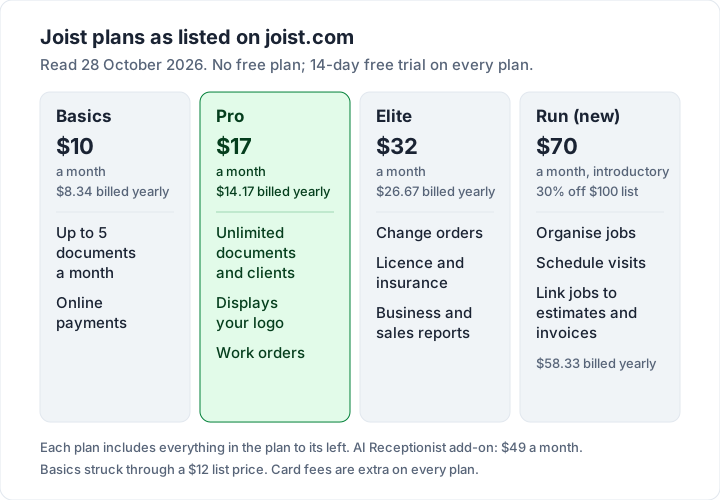
Three details on the plan cards matter more than the headline price:
- Basics is capped at 5 documents a month. That is Joist's word, “documents”. The page does not say whether estimates and invoices count together, so if you send an estimate and an invoice for each job, check with Joist before assuming 5 jobs.
- “Display your logo” first appears on the Pro card, not on Basics. If a branded invoice matters, Pro at $17 a month is the realistic starting price.
- Run's price is introductory. The page shows $70 as 30% off $100 and does not say how long the offer lasts.
Joist's FAQ also says monthly plans are not locked in: “if you choose a monthly plan, you aren’t locked into a long-term contract”. The detailed comparison grid lists QuickBooks sync, Tap to Pay in person, deposit and milestone payments, passing processing fees to clients and homeowner financing, but the per-plan ticks are images we could not read reliably, so check the grid yourself for any feature you depend on.
Is there a free version of Joist?#
No. Joist's pricing FAQ answers it directly: “Joist’s free plan is no longer available, but all users can try Joist with the 14-day free trial, risk free, at no cost. The free trial gives you access to all Joist Run features through our web and app platforms.”
So the trial shows you the top plan, Run, and at the end you choose a paid plan. The page says no credit card is required to start. It does not describe what happens to accounts that joined on the old free plan; if that is you, ask Joist support rather than relying on a third-party summary.
Our guide to what to check before choosing a free invoicing app covers the questions to ask before you commit to any tool, free or paid.
What Joist Payments costs on a sample job#
Joist's help article on transaction fees for Joist Payments with Stripe lists fees “effective as of August 2025”. As of 28 October 2026, for the US:
| How the client pays | Percentage | Fixed fee |
|---|---|---|
| Credit or debit card | Up to 3.49% | $0.49 |
| ACH bank transfer | 1%, capped at $15 | $0 |
| Apple Pay and Google Pay | 3.49% | $0.49 |
| Klarna (buy now, pay later) | 4.99% | $0.49 |
| Mobile check deposit | 1%, capped at $15 | $0 |
In Canada the same article lists 2.90% + 0.30 CAD for cards. Joist's payments page also lists PayPal and Venmo at 3.49% + $.49, through Joist Payments with PayPal.
Here is the fee on two illustrative jobs, at the top card rate:
| Invoice total | Card (3.49% + $0.49) | ACH (1%, $15 cap) | Klarna (4.99% + $0.49) |
|---|---|---|---|
| $1,200.00 | $42.37 | $12.00 | $60.37 |
| $3,000.00 | $105.19 | $15.00 | $150.19 |
On the $3,000.00 job, the client paying by bank transfer instead of card saves you $90.19. The fee comes out before the money reaches you. Two more lines from the same article: “If a payment transaction is not complete, no fee is charged”, and “If you issue a refund, the transaction fee is not returned to you.”
Joist also lets you cover the fee or pass it to the client; its help centre has an article titled “Cover the transaction fee with Joist Payments”. Before you add a card surcharge to any invoice, read passing the fee to the client: where to check first. Rules on surcharges vary by place and card network, so check the official pages and ask an accountant or lawyer if you are unsure. This is general information, not legal or tax advice.
Joist's deposit and milestone payments let you collect part of a job up front. If you bill large jobs in stages, see deposit invoices: how they actually work and how progress billing works for the difference between a payment schedule and true progress billing.
Two years of Joist against the alternatives#
Here is two years at the prices listed on 28 October 2026, with the arithmetic shown. Card fees are extra in every case.
| Option | Calculation | Two-year cost |
|---|---|---|
| Joist Basics, monthly | $10 × 24 | $240 |
| Joist Basics, yearly | $8.34 × 24 | $200.16 |
| Joist Pro, monthly | $17 × 24 | $408 |
| Joist Pro, yearly | $14.17 × 24 | $340.08 |
| Joist Elite, monthly | $32 × 24 | $768 |
| Joist Run, monthly, at the regular price | $100 × 24 | $2,400 |
| Charming Free | $0 | $0 |
| Charming Individual (lifetime) | $29 once | $29 |
| Charming Pro, yearly | $99 × 2 | $198 |
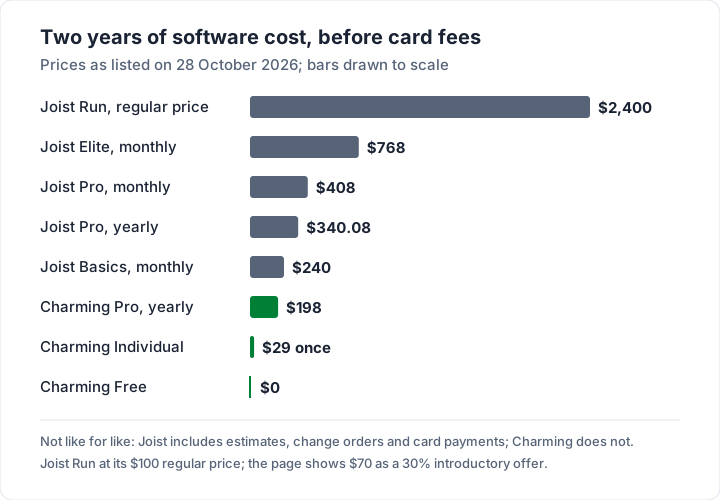
The comparison is not like for like. Joist includes estimates, change orders and built-in card payments that Charming does not have, so the gap is the price of those features. Whether they are worth $408 over two years depends on how you quote and how your clients pay. We explain the thinking behind a one-time price in why we built a lifetime plan.
Where Joist is the better fit#
Joist does several things an invoices-only app does not. It is the better choice if:
- You quote on site. Estimates, digital signatures and one-tap conversion to an invoice keep the whole job in one record.
- Clients pay by card on the spot. Joist's payments page lists Tap to Pay for in-person payment and QR codes on printed invoices.
- You offer homeowner financing or buy now, pay later through Klarna.
- Jobs change mid-way. Change orders on Elite and above record the extra work and price.
- You want a native mobile app for the phone in your pocket, plus the web.
- Your bookkeeper uses QuickBooks and you want a sync rather than an export.
Alternatives to Joist for invoicing#
If you are comparing Joist with other tools, these are the ones contractors often look at. We have covered each in depth, so the links go to those posts rather than re-pricing them here:
- Square Invoices: free to send unlimited invoices, with fees when clients pay. See how Square invoices work.
- Invoice2go: contractor-friendly, with invoice caps on its lower plans. See Invoice2go plans and invoice caps.
- Jobber and Housecall Pro: heavier field-service tools with scheduling and dispatch, priced per user. See contractor invoicing apps compared. For those two head to head, see Jobber vs Housecall Pro.
- An invoices-only app if you do not need estimates in the same tool. Several, including ours, work in a phone browser; see invoicing from a phone for what that is like day to day.
Where Charming fits, and where it does not#
Charming Invoices is an invoices-only app. Here is what it does and does not do, checked in our code on 28 October 2026.
What it does not do, plainly: no email sending or reminders, no estimates or quotes, no change orders, no scheduling, no card payments or Tap to Pay, no financing, no QuickBooks sync (there is a CSV export instead) and no native mobile app. It runs in the browser, including on a phone, and does not work offline.
What it does:
- Unlimited invoices and clients on the free plan, for 1 business, with your logo, colours and fonts and all 60 templates, including Contractor and Progress Billing. Your logo prints on every plan, including Free.
- 12 trade starter kits of common line items, such as the electrician invoice template. Prices are left at $0 on purpose, so you enter your own.
- Deposits, progress billing and retainage shown on the invoice. Retainage is printed, not tracked as a separate amount owed.
- A PDF to download or print and a private link the client opens without an account, which you send however you like, plus a “Viewed” marker and an Overdue status once the due date passes.
- Your bank details and one payment link per business print on every invoice, with an “Open payment link” button on the private page while it is unpaid.
The catches: clients cannot pay by card through Charming, and payment tracking is manual, so you mark invoices paid yourself. Free invoices carry a small “Sent with Charming Invoices” line. AI drafting is on paid plans only. The paid plans are Individual at $29 once, Team at $79 once (up to 5 teammates) and Pro at $12 a month or $99 a year; the lifetime plans are final sale.
If your clients mostly pay by bank transfer and you quote by phone or message, that may be all you need. Check what a contractor invoice should show, compare plans on the pricing page, or create a free invoice.
Questions people ask about Joist#
Is the Joist invoice app free?#
No. As of 28 October 2026, Joist's pricing page says the free plan “is no longer available” and offers a 14-day free trial with no credit card. The cheapest plan is Basics at $10 a month, or $8.34 a month billed yearly, with up to 5 documents a month.
Can I use Joist for both estimates and invoices?#
Yes. Every plan card lists “Estimates to Invoices”, and Joist's invoices page describes converting an approved estimate into an invoice in one tap.
Does Joist work offline?#
Joist's pricing and feature pages describe “Anywhere access on mobile & web” but do not say how the app behaves without a signal. Check Joist's help centre before relying on it on a site with no coverage.
Can I export my Joist invoices?#
Joist's invoices page says you can “View and export reports”, and the plan grid lists QuickBooks sync. For a full export of every invoice before switching, check Joist's help centre for the current options.
How much does Joist take when a client pays by card?#
Up to 3.49% + $0.49 per US card payment, per Joist's fee article (effective August 2025). On a $1,200.00 invoice that is up to $42.37. ACH costs 1%, capped at $15.
The short version#
Joist invoices are built around the contractor's day: estimate on site, convert in one tap, get paid by card, ACH, financing or tap. As of 28 October 2026 there is no free plan, Basics is $10 a month for up to 5 documents, Pro is $17 a month for unlimited documents and your logo, and card payments cost up to 3.49% + $0.49. If you use the estimates and on-site payments, Joist earns its price. If you only need invoices that clients pay by bank transfer, an invoices-only app does that part for less.
Sources, all read 28 October 2026: Joist pricing; Joist invoices; Joist payments; Joist Help Center, transaction fees for Joist Payments with Stripe.