AIA invoice: how G702 and G703 pay applications work

Nnabuike Okoroafor ·
On this page · 12 sections
A general contractor or an owner's representative has told you to “bill on AIA”, or your subcontract says pay applications go in on G702 and G703. You search for an AIA invoice template and find pages of free downloads, most of them on sites that have nothing to do with construction. Before you fill one in, it helps to know what those forms actually are and who is allowed to sell them.
There is no free official AIA invoice template. The G702 and G703 are licensed documents sold by AIA Contract Documents, and this page does not supply them: Charming Invoices cannot produce G702 or G703 forms, and we will not show a copy or a look-alike. What this page does is explain, in AIA's own published words, what the two documents are for, how an application for payment differs from an ordinary invoice, where to get the real forms, and what a plain progress invoice can and cannot stand in for.
General information, not legal or tax advice. Your contract decides which forms you must use. AIA, G702 and G703 are trademarks of The American Institute of Architects. Charming Invoices is not affiliated with or endorsed by the AIA, and does not supply AIA documents.
In short#
- An “AIA invoice” is a pay application, usually the G702 (application and certificate for payment) with the G703 (continuation sheet).
- The forms are licensed. You buy them from AIA Contract Documents, use software that provides them, or use the version your owner or general contractor supplies.
- A spreadsheet that imitates the layout is not an AIA document, and AIA's own notice says each form “may not be reproduced or excerpted from without the express written permission of the AIA.”
- If your contract does not name AIA documents, a clear progress invoice with a contract summary is often what the client actually wants. Ask before you assume either way.
What an AIA invoice is: the G702 and the G703#
AIA publishes a summary page and an instructions page for the G702 on its help centre. The quotes in this section come from those pages (summary and instructions), read as of 28 October 2026.
On what the G702 does, the summary page says:
“AIA Document G702–1992 serves as both the contractor’s application and the architect’s certification.”
That is the key difference from an everyday invoice. A G702 is not only your request for money: it is also the place where the architect confirms how much is due.
On the G703, the same page says:
“AIA Document G703-1992 breaks the contract sum into portions of the work in accordance with a schedule of values prepared by the contractor as required by the general conditions.”
So the G703 carries the detail and the G702 carries the summary. The schedule of values behind both is yours to prepare, and AIA adds a note on that point: “The AIA does not publish a standard schedule of values form.” If you have not built one before, how progress billing works walks through an example schedule of values and three invoices billed against it.
AIA also says who the pair is designed for:
“These documents are designed to be used on a Project where a Contractor has a direct Agreement with the Owner.”
That matters if you are a subcontractor. Your general contractor may still ask you for G702 and G703, or for its own pay application form. Whatever the paperwork, your subcontract is what sets it.
What the forms ask you to show#
AIA's summary of what goes into the pair is one sentence, and it is worth reading in full:
“The forms require the contractor to show the status of the contract sum to date, including the total dollar amount of the work completed and stored to date, the amount of retainage (if any), the total of previous payments, a summary of change orders, and the amount of current payment requested.”
Broken into a list, still in AIA's words, that is:
- the total dollar amount of the work completed and stored to date
- the amount of retainage (if any)
- the total of previous payments
- a summary of change orders
- the amount of current payment requested
We are deliberately not going further than that. The layout of the forms, their lines and their columns belong to a copyrighted document, and the place to learn them is the licensed form and its instructions. If retainage itself is new to you, retainage in plain language explains what it is and why it needs its own release invoice.
Who signs, certifies and pays#
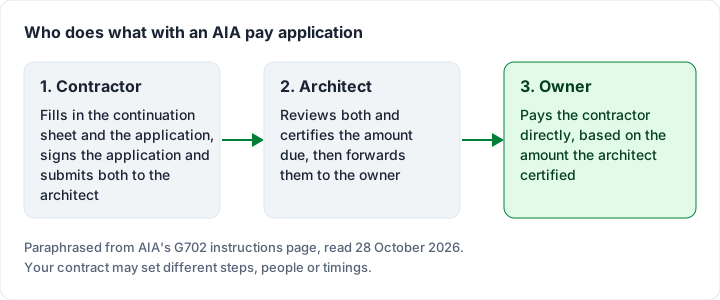
AIA's instructions page sets out a sequence for its forms. On submission:
“The Contractor should sign G702®, have it notarized, and submit it, together with G703, to the Architect.”
The architect then reviews the pair and completes the certificate. On payment, the instructions say:
“The Owner should make payment directly to the Contractor based on the amount certified by the Architect on AIA Document G702®, Application and Certificate for Payment.”
Two practical points follow from that sequence:
- The amount you are paid is the certified amount. Your application is a request; the certificate decides the figure the owner pays on. A plain invoice has no certification step at all.
- The approval step affects anyone relying on the invoice. If you factor your receivables, questions to ask a factoring company includes one about how the factor verifies a pay application that must be approved first.
Whether a notary, a particular deadline or extra documents (such as lien waivers) are required on your project is set by your contract and the law where the work is done. We are not going to state it here: ask the owner or general contractor what the pay application package must contain, and a construction lawyer if the terms are unclear.
Is there a free AIA invoice template?#
No, not an official one. AIA sells its documents, and its instructions page is direct about copying:
“This document is a copyrighted work and may not be reproduced or excerpted from without the express written permission of the AIA.”
Both AIA help pages carry a purchase link introduced with “To purchase a one-time use license for this document, visit the link below:”, and they also point to an unlimited-access subscription. We are not quoting prices: check them on AIA's own site on the day you buy.
That leaves three routes when a contract names AIA documents:
- Buy the forms from AIA Contract Documents, as a one-time licence or through a subscription.
- Use construction billing software that provides them (some examples are in the tools section below).
- Use the version your owner or general contractor supplies, if they send you a pay application package to complete.
A spreadsheet laid out like the AIA forms is not an AIA document. AIA also notes that its documents may need changing for local rules: “AIA Contract Documents may require modification to comply with state or local laws. Users are encouraged to consult an attorney before completing or modifying a document.”
Application for payment vs invoice: the difference#
People search for “application for payment vs invoice” because the two look alike: both ask for money against work done. They are different documents with different jobs. This comparison is in business terms, as the two are commonly used; your contract may define them differently.
| Application for payment (such as AIA G702 and G703) | Invoice | |
|---|---|---|
| What it is | A request for payment that someone must review and certify before it is paid | A request for payment, payable on its terms once sent |
| Who checks it | The architect (or another party the contract names) certifies the amount | The client's accounts team checks it against the agreement |
| Basis | A schedule of values, reported against the whole contract sum | The work, goods or stage being billed |
| Format | Set by the contract, often licensed forms | Usually your own layout, with the fields any invoice needs |
| Amount paid | The certified amount, which can differ from the amount applied for | The invoice total, unless the client disputes it |
| Typical projects | Construction contracts where an architect certifies payment | Almost everything else |
Some owners ask for both: a pay application for certification and an invoice for their accounts system. If you are unsure how a contract invoice works in general, invoicing work done under a contract covers it, and the main invoice types shows where progress invoices sit among the others.
When an owner asks for AIA billing, and when a progress invoice is enough#
The rule of thumb is simple and has nothing to do with law: if the contract names AIA documents, use them. Read the payment section of your agreement or subcontract. If it says pay applications are submitted on G702 and G703, a different layout may simply be sent back, and the payment waits.
A plain progress invoice is often enough when:
- The contract does not name a form, only stage payments or a schedule of values.
- There is no architect certifying payment, for example a homeowner renovation or a direct commercial fit-out.
- The client has said so in writing. A short email asking “Is a progress invoice with a contract summary acceptable?” settles it.
For smaller jobs billed once, a construction invoice example with a deposit may be all the paperwork you need. Change orders agreed after the original contract still need their own lines; if one was missed on an earlier invoice, how to bill an undercharge explains supplementary invoices.
A plain progress invoice next to an AIA pay application#
Here is what each item on AIA's list looks like on a general progress invoice, and on Charming's Progress Billing template specifically. The left column is AIA's list from the synopsis quoted above; the other two describe ordinary invoicing, not the forms.
| AIA's listed item | On a plain progress invoice | On Charming's Progress Billing template |
|---|---|---|
| Work completed and stored to date | A “completed to date” figure in a contract summary | Completed to date with a percentage, for the contract as a whole. No stored-materials figure and no per-line columns |
| Retainage (if any) | A retainage line that reduces the amount due | Retainage withheld on this invoice, and “Retainage held” for this invoice only |
| Total of previous payments | Often shown as previously billed, which is not the same as paid | “Previously billed”: the work value of earlier invoices, which you type or roll forward |
| Summary of change orders | Change orders as their own line items | Line items and section headings; no change order summary |
| Current payment requested | The amount due | “Due this period” |
Two details are worth repeating. “Previously billed” is not the same as “previous payments”: a client can be billed and not yet have paid. And retainage on a plain invoice is shown per invoice unless you keep a running total yourself; how to show retainage on an invoice covers the wording. If the owner gives you an application or PO reference, what a PO number on an invoice is for explains where it goes.
Worked example: one monthly progress invoice#
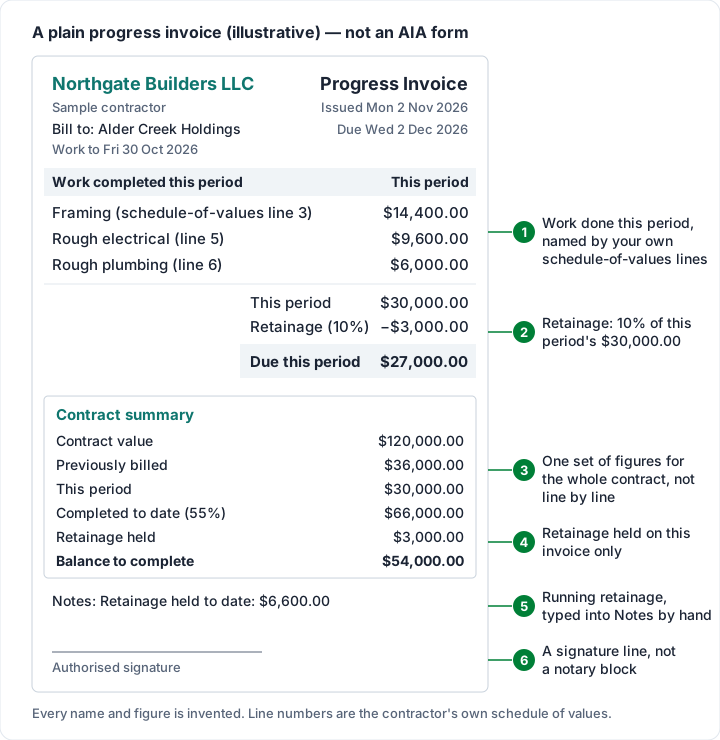
Here is one progress invoice, with every figure invented and every sum checked. Northgate Builders LLC bills Alder Creek Holdings on a contract worth $120,000.00 with 10% retainage. No tax is shown: this is illustrative, and tax depends on your state and your contract.
- Previous progress invoice: Thursday 1 October 2026, work billed $36,000.00, retainage held $3,600.00.
- This invoice: work to Friday 30 October 2026, issued Monday 2 November 2026, due Wednesday 2 December 2026 (Net 30).
| Work completed this period | Amount |
|---|---|
| Framing (schedule-of-values line 3) | $14,400.00 |
| Rough electrical (line 5) | $9,600.00 |
| Rough plumbing (line 6) | $6,000.00 |
| This period | $30,000.00 |
| Retainage (10%) | −$3,000.00 |
| Due this period | $27,000.00 |
The arithmetic: $14,400.00 + $9,600.00 + $6,000.00 = $30,000.00. Retainage is 10% of that, $3,000.00, which leaves $27,000.00 due. The line numbers are the contractor's own schedule-of-values numbering, not lines on any AIA form.
The contract summary on the same invoice:
| Contract summary | Amount |
|---|---|
| Contract value | $120,000.00 |
| Previously billed | $36,000.00 |
| This period | $30,000.00 |
| Completed to date (55%) | $66,000.00 |
| Retainage held (this invoice) | $3,000.00 |
| Balance to complete | $54,000.00 |
Completed to date is $36,000.00 + $30,000.00 = $66,000.00, which is 55% of $120,000.00, and the balance to complete is $120,000.00 − $66,000.00 = $54,000.00. Retainage held across both invoices is $3,600.00 + $3,000.00 = $6,600.00, and that running figure goes in the notes, because the summary shows this invoice's retainage only.
Tools that produce AIA pay applications#
If your contracts regularly call for AIA documents, construction billing software is usually the better tool than a general invoicing app. A few options, described only by what their own pages said as of 28 October 2026 (we have not tested them, and we state no prices):
- AIA Contract Documents. Besides the forms, AIA's G702 instructions page links to guidance on completing payment applications in its online service.
- GCPay. Describes itself as “cloud-based construction software for managing pay applications, lien waivers, electronic payments and more”, and its site menu lists “Official AIA Documents”.
- Siteline. Its homepage title calls it “Pay App & Construction Billing Software for Subcontractors”.
- Procore Invoice Management. Procore describes it as “invoicing software for contractors and developers”.
Check each vendor's current pages and pricing yourself, and ask whether it provides licensed AIA forms or its own layout. For general invoicing apps used by trades, contractor invoicing apps compared covers the wider field.
Progress invoices in Charming, and what it does not do#
Charming Invoices is general invoicing software. For progress billing where AIA forms are not required, this is what it does, checked in the code:
- A Progress Billing template, 1 of 60 templates on every plan, including Free. It titles the document “Progress Invoice”, heads the line items “Work completed this period” and labels the total “Due this period”.
- A contract summary beside the totals: contract value, previously billed, this period, completed to date with its percentage, retainage held and balance to complete. Completed to date, the percentage and the balance are worked out from your lines, so they cannot disagree with them.
- Percent complete fills the line for you. Enter a “% complete to date” and Charming works out the amount this period must bill.
- Figures roll forward. Duplicating an issued or paid progress invoice adds its work to previously billed, so the copy starts as the next stage. Duplicating a draft or a void copies the figures unchanged.
- Retainage by percentage, withheld on the work before tax; any tax stays due on the full period.
- Renamable labels, so “Contract summary” can read “Application summary” and “PO number” can read “Application no.”. A rename applies to every invoice that business issues from then on.
The limits, plainly:
- No AIA documents. Charming cannot produce G702 or G703, and renaming labels does not make an invoice an AIA document.
- No per-line schedule-of-values columns. The summary is contract-level. Line items can carry schedule-of-values descriptions and section headings, but there is no per-line previous, this period, stored materials, percentage or balance column.
- “Retainage held” shows this invoice only. Charming does not total retainage across a contract, does not count it in outstanding or statement figures, and has no retainage release flow: bill the release on a separate invoice with a line such as “Retainage release”.
- A signature line, not a certificate. The template prints an “Authorised signature” line. There is no notary block, no architect's certificate and no e-signature.
- Only the invoice PDF. Charming does not email it for you: you download the PDF or copy its private link and send it yourself, with lien waivers or a schedule-of-values spreadsheet alongside.
- No card payments through Charming. You record what the client pays and mark it paid yourself.
- Free invoices carry a “Sent with Charming Invoices” footer line. Paid plans hide it by default: Individual is $29 once, Team $79 once, and Pro $12 a month or $99 a year. The lifetime plans are final sale. See the pricing page.
If your clients accept a progress invoice, create a free invoice, choose the Progress Billing template and try the worked example above with your own contract figures.
AIA invoice questions#
What is an AIA invoice?#
It is the common name for an AIA pay application: the G702 Application and Certificate for Payment, usually with the G703 Continuation Sheet. AIA describes the G702 as both the contractor's application and the architect's certification, so it is a request for payment that is checked and certified before the owner pays.
Where do I get AIA G702 and G703 forms?#
From AIA Contract Documents, which sells a one-time use licence and subscriptions, or through construction billing software that provides them, or from your owner or general contractor if they supply a package. The help pages linked above carry AIA's own purchase links.
Is there a free AIA invoice template in Excel?#
Not an official one. A spreadsheet laid out like the AIA forms is not an AIA document. AIA's notice on its G702 instructions page reads: “This document is a copyrighted work and may not be reproduced or excerpted from without the express written permission of the AIA.” If your contract does not require AIA forms, a plain progress invoice with a contract summary may be acceptable; ask your client.
What is the difference between a pay application and an invoice?#
A pay application is reviewed and certified before it is paid, and the owner pays the certified amount. An invoice is payable on its terms once sent. Some owners ask for both: the pay application for certification and an invoice for their accounts team.
Does a G702 need to be notarized?#
AIA's instructions for its form say: “The Contractor should sign G702®, have it notarized, and submit it, together with G703, to the Architect.” Whether your project requires a notary is set by your contract, so check it with the owner or general contractor.