Pest control invoice: template, samples and service plans

Nnabuike Okoroafor ·
On this page · 12 sections
A pest control visit is quick to do and easy to question afterwards. The homeowner was at work when you sprayed the perimeter. The restaurant manager who signed for the visit has gone home. A month later someone in accounts looks at a bill for “pest service” and asks what it was for. A good pest control invoice answers that before anyone asks: where you went, what you treated, which visit of the plan it was, and what the client owes.
This guide covers what to put on a pest control invoice, how to describe the treatment without turning the invoice into a chemical log, how service plans and re-services show on the bill, and two filled-in samples with real arithmetic: a quarterly home visit and a monthly restaurant account. All names and prices in the samples are invented to show the layout, not suggested rates. There are free Word and Excel files at the end, and a plain answer on when you need field-service software instead.
General information, not legal or tax advice. This post does not summarise pesticide rules, licensing or sales tax; where it mentions them, it points you to the official contact instead.
In short#
- List the service address, the visit date and what you treated, not just “pest service”. The client should be able to check each line.
- Show plan visits as plan visits: “visit 2 of 4” tells a quarterly client where they are in the year.
- Put a re-service on the invoice at $0.00 when it is covered by your guarantee, so the client sees it was honoured.
- The invoice is not your application record. What records you keep after a treatment is a question for your pesticide state lead agency.
- Sales tax on pest control varies by state and by service. Check with your state’s revenue department before you add a tax line.
- A free template works for a handful of clients; routing, scheduling and chemical logs need field-service software.
What a pest control invoice should include#
The basics are the same as any invoice. If you want the full field-by-field list, the field-by-field invoice checklist is the reference. This table shows what changes for pest control:
| Field | What to put | Why it matters for pest control |
|---|---|---|
| Your business details | Name, address, phone, email | Plus your licence or certification number if your state or a commercial client wants it on paperwork |
| Client and billing address | Who pays and where the bill goes | A landlord or a head office may pay for a site elsewhere |
| Service address | Where the work was done | The client checks the right property was treated |
| Invoice number and dates | Invoice date, due date, and the date of each visit | The visit date is what a client will query first |
| Plan or agreement reference | Service agreement or work order number | Commercial clients match it to their purchase order |
| Line items | Each service, with quantity, unit and price | Inspection, treatment, stations and add-ons on separate lines |
| Treatment notes | Target pests and areas treated | Shows what the money bought, without copying your full service report |
| Guarantee and re-service | A $0.00 line, or a note | Shows a callback was covered by the plan |
| Totals and tax | Subtotal, any tax, total due | Only add tax after checking your state’s rules |
| Terms and how to pay | Due date, accepted methods, any late fee | See late fee wording for your invoice if you charge one |
Whether a licence number has to appear on your invoices is a question for your state lead agency, covered in the next section. If a client asks for it, print it.
On pricing lines, the rule from contractor invoicing holds: labour and materials on separate lines when the client needs to see both. Itemising labour and materials covers that in more depth.
Describing the treatment on the invoice#
A client who can see what they paid for has less reason to query the bill, and a pest control invoice can show that in one short note: the target pests, the areas treated and anything you removed or installed. Product names are your choice. Some operators print them; others put them on the service report and write “product details on request”.
How much to put on the invoice itself is a judgement call, and how much detail to show on an invoice goes through the trade-offs. A useful test: could the client’s accounts team approve the bill from the invoice alone, without phoning you?
The invoice is not your application record. An invoice is a bill. Your service report is what you leave with the client about the visit. The records you may have to keep after applying a pesticide are a third document, and what they must contain is set by rules that this post does not try to summarise.
For those rules, the US Environmental Protection Agency’s own contact page sends you to your state. On its page about contacting EPA on pesticide regulation, the row headed “State Regulations” says, in full:
Contact your pesticide state lead agency
Source: EPA, Contacting EPA about Regulating Pesticides Issues, “Last updated on August 18, 2026”, read on 28 October 2026. The words “pesticide state lead agency” link to a directory of state pesticide agencies run by the National Pesticide Information Center, which is the directory EPA links to.
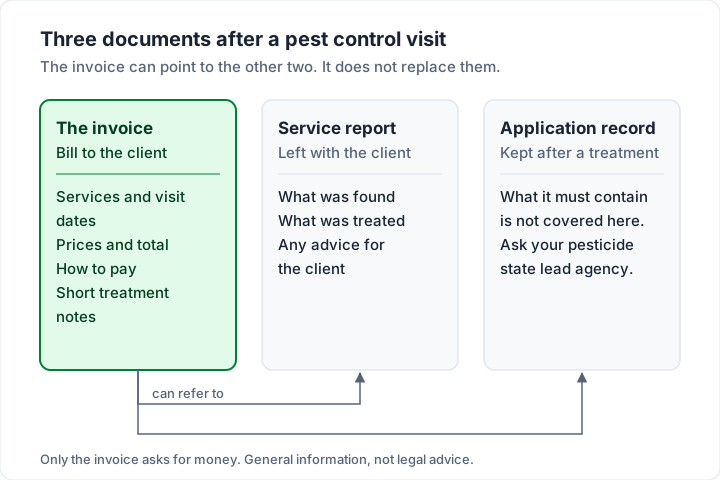
The same goes for anything about safety or re-entry: that belongs to the product label and your state lead agency, not to a note on an invoice.
Service plans, re-services and guarantees on the invoice#
A lot of pest control work is a plan rather than a one-off job: an initial service, then quarterly or monthly visits, often with a promise to come back between visits at no charge if the pests do. The invoice has to make that structure visible.
- Initial service. Bill it as its own line, priced as you sold it, and name it “Initial service” so the next invoice does not look like a price rise.
- Plan visits. One line per visit, with the plan name and the visit number: “General pest service, quarterly plan — visit 2 of 4”.
- Re-services under guarantee. Add the callback as its own line at $0.00 with the date and the reason. It costs the client nothing and shows the guarantee working, which is the reason they bought a plan.
- Prepaid annual plans. Invoice the whole year once, as one line with a quantity of 4 visits, then send each later visit with a $0.00 line or a service report instead of a new bill. Four visits at $135.00 is a $540.00 invoice.
- Add-ons. Anything outside the plan (a wasp nest, an extra room, a one-off rodent job) gets its own priced line, so the plan price stays the plan price.
Missed visits and locked gates are the same problem for every recurring trade; billing missed visits and lockouts covers how to word them. For the mechanics of billing the same client on a schedule, see how recurring invoices work.
Pest control invoice sample 1: a quarterly home visit#
Greenline Pest Solutions (invented) services the home of Dana Whitfield (invented) on a quarterly general pest plan. The second visit of the year is on Tuesday 13 October 2026. The technician also checks four rodent bait stations and removes a wasp nest from the garage eave. Two weeks earlier, on Tuesday 29 September 2026, Greenline came back for ants in the kitchen under the plan guarantee.
Invoice date Tuesday 13 October 2026, due Wednesday 28 October 2026 (Net 15).
| Line item | Qty | Rate | Amount |
|---|---|---|---|
| General pest service, quarterly plan — visit 2 of 4: exterior perimeter, interior as needed | 1 | $135.00 | $135.00 |
| Rodent bait station check and refill | 4 stations | $12.50 | $50.00 |
| Wasp nest removal, garage eave | 1 | $85.00 | $85.00 |
| Re-service under plan guarantee, 29 Sep 2026 (ants, kitchen) | 1 | $0.00 | $0.00 |
| Total due | $270.00 |
Notes on the invoice: “Treated: ants, spiders (perimeter); wasps (garage eave). Product details on your service report or on request.” The sample shows no sales tax; whether your state taxes pest control is a question for your state’s revenue department.
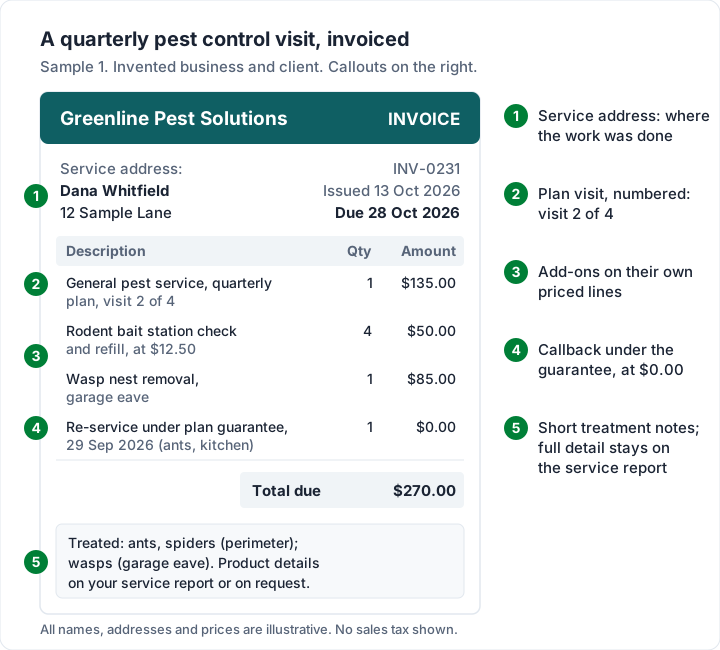
Three things make this invoice easy to pay. The plan visit is numbered, so the client knows two more are coming. The add-ons are priced separately, so the plan price is not muddied. And the callback is on the page, so the client remembers the guarantee when the plan comes up for renewal.
Pest control invoice sample 2: a monthly restaurant account#
Commercial accounts are billed differently. A restaurant or warehouse often wants one invoice a month covering every visit, with its own agreement or purchase order number, sent to an accounts team that was not there when you came.
Greenline services Harbor Street Diner LLC (invented) under service agreement SA-2026-014 (illustrative). It visits on Tuesday 6 October and Tuesday 20 October 2026, and invoices the month on Monday 2 November 2026, due Wednesday 2 December 2026 (Net 30).
| Line item | Qty | Rate | Amount |
|---|---|---|---|
| Commercial pest service visit — 6 Oct and 20 Oct 2026 | 2 visits | $95.00 | $190.00 |
| Fly light service and glue board replacement | 3 units | $18.00 | $54.00 |
| Rodent monitoring stations, checked and logged | 12 stations | $4.00 | $48.00 |
| Total due | $292.00 |
The agreement number goes in the reference field, where the client’s accounts team will look for it; where to put the PO number on an invoice explains why it matters to their approval process. If the account covers several sites, group the lines under a heading per site, or send one invoice per site if that is how the client pays.
If a commercial client is on Net 30, what Net 30 actually means explains when the 30 days start. Once a commercial client has several invoices open, a quarterly statement of open invoices shows them everything outstanding on one page.
Sales tax on pest control: why one answer does not fit every state#
We do not list which states tax pest control, because the rules vary by state and by the kind of service, and they change. Check the current rule for your state before you charge, or decide not to charge, your clients.
What to do instead:
- Ask your state’s revenue department (or an accountant) whether your services are taxable, and whether materials are treated differently from labour.
- Ask about each kind of work you do, not pest control in general: a termite treatment, a rodent exclusion job and a quarterly plan may not be treated the same way.
- Write the answer down with the date and who told you, and recheck it each year.
If your state taxes some lines and not others, check that your invoicing tool can show that. Some, including Charming, apply one tax rate to the whole invoice.
Pest control invoice template: Word, Excel or an app#
If you send a handful of invoices a month, a template is enough. There is no pest-specific file on our site, but the general ones fit, and they are free with no sign-up on the Excel and Word invoice templates page:
| File | Best for | Watch out for |
|---|---|---|
| Service invoice template (Word) | One-off jobs and home visits: it has a description-of-work box for the service address, date and treatment | Word does not add up the totals; you type them |
| Invoice template (Word) | Simple invoices with a few lines | Same: no calculation |
| Invoice template (Excel) | Plan visits and commercial accounts: 15 lines, a reference cell and one tax rate | Formulas only work in Excel or a spreadsheet that keeps them |
| Hourly invoice template (Excel) | Work billed by the hour, such as an exclusion job | Not a fit for per-visit plans |
The closest trade page is the lawn care and landscaping invoice template, which shows a month of recurring visits on one invoice, the same pattern as a commercial pest account.
A template stops being enough when you retype the same client and the same plan line every quarter, lose track of which invoices are paid, or forget which visit of the plan you are on. That is the point to look at an invoicing app.
Pest control invoice software: what it does that an invoicing app does not#
Pest control businesses often need more than invoices. Field-service software is built around the day’s route: scheduling visits, dispatching technicians, tracking service agreements and, in tools made for the trade, recording what was applied where. As of 28 October 2026, here is how three of them describe themselves on their own pages:
- FieldRoutes: “Field Service software specializing in pest control and lawn” (its homepage).
- PestPac: “pest control software for routing, scheduling, CRM, and payments” (its homepage).
- Housecall Pro: its pest control page says it helps you “automate service plans, dispatch crews, and streamline billing”.
We have not compared their prices or plans here; check each vendor’s own pricing page. For two general field-service tools side by side, see our field-service invoicing software comparison, and for the wider market, contractor invoicing apps compared.
An invoicing app is the better fit when you run one or two vans, schedule in a calendar you already use, and your problem is the paperwork after the visit: invoices that look professional, plan visits that do not have to be retyped, and knowing who has paid. If you need routing, dispatch or chemical-use logs, you need field-service software, and an invoicing app will not replace it.
Pest control invoices in Charming Invoices#
Charming Invoices is an invoicing app, not field-service software. Here is what it does for a pest control business, checked in our code on 28 October 2026:
- Unlimited invoices and clients on the free plan, for 1 business, with no card and no expiry.
- Line items with a unit, such as “visit” or “station”, and a quantity to 3 decimals. Unit prices print at 2 decimals, so use whole-cent prices. A $0.00 line is allowed, so a re-service under guarantee shows exactly as in sample 1. Quantities and prices cannot be negative, so a credit is not shown as a minus line.
- Section headings with subtotals, when you switch on “Group lines by section” in your template, for a commercial account with several sites.
- Labels you can rename. Relabel “PO number” as “Service agreement” or “Work order”, and “Bill to” as “Service address” if your clients pay for the property you treat. A rename applies to every invoice that business issues from then on, and there is one reference field per invoice.
- Notes and terms on each invoice for treatment notes and your guarantee wording. They are free text: Charming does not log chemicals or produce application records.
- 60 invoice templates on every plan.
- Client statements as a PDF with ageing columns (current, 1-30, 31-60, 61-90 and 90+ days) for commercial accounts, which you download and send yourself.
- A PDF and a private link for each invoice. You issue the invoice, then download the PDF, print it or copy the link and send it however you like. An issued invoice past its due date shows as Overdue.
- Quarterly or monthly recurring invoices on the paid plans (Individual $29 once, Team $79 once, or Pro at $12 a month or $99 a year). Each one arrives as a draft for you to review before you issue it, so you can add the visit date and any add-ons. Saved line items, such as “Quarterly general pest service”, are on the paid plans too. Our guide to software that sends recurring invoices compares how other tools handle it.
The catches, plainly:
- No pest control starter kit and no pest control template page. You type your service lines once, or save them as reusable items on a paid plan.
- No email sending or reminders. Charming does not email invoices or reminders to your clients; set a calendar reminder for the due date and follow up from your own email.
- No routing, scheduling, dispatch, chemical-use logs, service-agreement e-signatures or mobile app. Charming is a web app for invoicing.
- One tax rate per invoice, with no per-line rates.
- No card payments through Charming. You can add bank details and one payment link of your own; the client pays you directly, and you record the payment and mark it paid. Payment tracking is manual.
- Free invoices carry a small “Sent with Charming Invoices” line in the footer. Paid plans hide it by default and can switch it back on. The lifetime plans are final sale.
If that fits how you work, create a free invoice and set up sample 1 with your own plan and prices.
Pest control invoice questions#
What should be on a pest control invoice?#
Your business details, the client’s name and billing address, the service address, an invoice number, the invoice and due dates, the date of each visit, each service on its own line with quantity and price, short treatment notes, the total and how to pay. Commercial clients usually want their agreement or PO number too.
How do I bill a quarterly pest control plan?#
Either invoice each visit as it happens, with a line such as “quarterly plan — visit 2 of 4”, or invoice the whole year up front as one prepaid line and send later visits with a $0.00 line or a service report. Add-ons go on their own priced lines either way.
Should I list the chemicals on the invoice?#
That is your choice for the invoice itself; many operators list the target pests and areas and keep product details on the service report. What you must record after an application is a separate question for your pesticide state lead agency.
Do I charge sales tax on pest control?#
It depends on your state and on the kind of service. Ask your state’s revenue department or an accountant, write down the answer, and recheck it each year.
What is the best pest control invoice software?#
It depends on what you need. If you need routing, dispatch and chemical logs, compare field-service tools built for the trade on their own pages. If you need clean invoices, plan visits and payment tracking for a small round, an invoicing app or a free template may be all you need. We do not rank them.
The short version#
A pest control invoice should show where you went, when, what you treated and which plan visit it was, with add-ons priced separately and any guarantee callback at $0.00. Keep the treatment notes short and leave your records to your service report and your state’s rules. Check sales tax with your state before you add it. Start with a free template, move to an invoicing app when retyping wears thin, and to field-service software when the route, not the paperwork, is the problem.