Invoice reminders: when to send them and what to say

Nnabuike Okoroafor ·
On this page · 13 sections
You sent the invoice three weeks ago. It is due on Wednesday. You have heard nothing, and you are not sure whether a reminder now would look organised or pushy. So you wait, the date passes, and the conversation you were hoping to avoid becomes a chase.
An invoice reminder sent before the due date is the easiest one you will ever write, because nothing has gone wrong yet. This guide covers the reminders that go out before and on the due date: how to time them to your payment terms (including the short-terms and due-on-receipt pitfalls), wording you can copy, what to do about part payments and disputes, and a worked example with real dates. Once an invoice is late, our follow-up sequence for unpaid invoices takes over.
In short#
- There are three kinds of invoice reminder: before the due date, on the due date, and after it. The first two are friendly notices; the third is a chase.
- Time the before-due reminder to your terms. A few days before is enough on short terms; a week suits Net 30 and longer. It should never land the day after the invoice.
- Due-on-receipt invoices have no “before”. The first reminder you can send is an overdue one, so make the invoice itself clear.
- Quote the balance, not the original total, once a client has paid part of an invoice.
- Stop reminding when there is a reason to: the invoice is paid, the client has raised a problem, or it has become a phone call.
What an invoice reminder is#
An invoice reminder is a short message to a client about an invoice they already have. It does not replace the invoice; it points back to it. The three kinds do different jobs:
| Reminder | When | Job | Tone |
|---|---|---|---|
| Before due | A few days to a week before the due date | Put the invoice back on the client's list in time for their payment run | Friendly, informational |
| On the due date | The due date itself | Confirm today is the day | Short, factual |
| Overdue | After the due date | Ask for payment that is now late | Polite, then firmer |
This post is about the first two. The difference between an invoice that is open, one that is overdue and one that is simply unpaid is covered in outstanding vs overdue vs unpaid.
Why remind before the due date#
Most invoices that go late are not refused. They are forgotten, filed, or caught behind a payment run that happened the day before your invoice reached the right inbox. A reminder a few days ahead catches those cases while there is still time to pay on time.
It also gives the client a chance to raise a problem early. A missing PO number, a question about a line item or a request to pay by a different method surfaces before the due date, not three weeks after it.
And it removes the awkwardness of chasing, because a before-due reminder is not a chase. It is a notice. In public discussions we read for our research (the people quoted are not Charming customers), people in a small-business forum said much the same about automating it:
I don't like confrontation either, so for me, it really helps to have an automated process that can do the nudging for you.
Another put it in terms of what actually changed:
On the tracking side, the thing that actually changed my collection rate wasn't tracking at all — it was making the follow-up automatic instead of a task I had to remember while doing the actual work.
Those are individual experiences, not a promise: a reminder cannot make a client pay. What it does is make sure the invoice is not forgotten. If asking for money is the hard part for you, how to chase a late payment covers the tone side.
A reminder schedule that fits your payment terms#
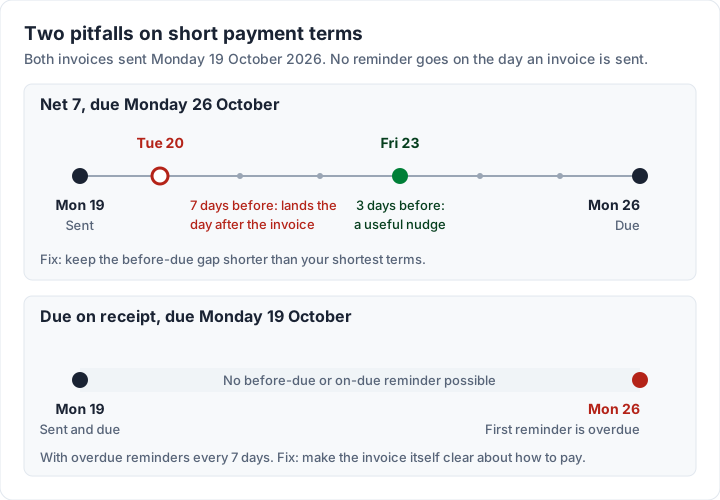
The right before-due timing depends on how long the client has to pay. A week's notice makes sense on a 30-day invoice; on a 7-day invoice, a week before the due date is the day you sent it.
Here is a sensible starting point for each common set of terms. These are suggestions, not rules, and the dates assume an invoice sent on Monday 19 October 2026:
| Terms | Due date | Before-due reminder | On-due reminder | First overdue reminder |
|---|---|---|---|---|
| Due on receipt | Monday 19 October 2026 | None possible | Not useful (same day as the invoice) | About a week later |
| Net 7 | Monday 26 October 2026 | 2 to 3 days before | Yes | A few days to a week after |
| Net 14 | Monday 2 November 2026 | 3 days before | Yes | About a week after |
| Net 30 | Wednesday 18 November 2026 | 5 to 7 days before | Yes | About a week after |
| Net 60 | Friday 18 December 2026 | 7 to 10 days before | Yes | About a week after |
Three rules make the table work:
- Keep the before-due gap shorter than your shortest terms. If you use one setting for every client, pick it for the invoices with the shortest terms. A 7-day setting on a Net 7 invoice fires straight after the invoice itself.
- Do not send anything on the same day as the invoice. A reminder that arrives an hour after the invoice reads as nagging.
- Due on receipt means the invoice is the reminder. There is no before-due window, so put the amount, the payment details and “Due on receipt” where they cannot be missed. What due on receipt really means covers how clients read those terms.
If you are not sure what your due dates are, the invoice due date calculator counts them for you, and what Net 30 actually means covers choosing terms in the first place. To plan every date on paper, print the late-payment follow-up schedule (A4, or US Letter): it starts with the before-due and due-date reminders, and has a table to write in the date of each step.
The before-due reminder: what to say#
A good before-due reminder is short, friendly and complete. It names the invoice, the amount still owed and the due date, and it makes paying easy. It does not apologise and it does not hint that anything is wrong.
Subject lines that work:
- “Invoice INV-0118 is due on 18 November”
- “Reminder: invoice INV-0118, due Wednesday”
- “Upcoming: invoice INV-0118 for $2,400.00”
Here are three sample versions you can adapt. The names and figures are invented.
Friendly and short:
Hi Dana, a quick heads-up that invoice INV-0118 for $2,400.00 is due on Wednesday 18 November. You can view it and the payment details here: [link to the invoice]. Thanks, Sam
For a client with an accounts team:
Hi Dana, ahead of your next payment run: invoice INV-0118 ($2,400.00, PO 4471) is due on Wednesday 18 November. If it needs to go to someone else for approval, could you let me know who, so I can send it straight to them? Thanks, Sam
With a payment link:
Hi Dana, just a reminder that invoice INV-0118 for $2,400.00 is due on Wednesday 18 November. You can pay by bank transfer using the details on the invoice, or by card here: [your payment link]. Thanks, Sam
Keep the payment details identical to the invoice; a reminder is a bad place to introduce new bank details, and clients are right to be wary of an email that does. How to list bank details on an invoice covers what to include. If you still need to send the invoice itself, start with how to send an invoice.
The due-date reminder: what to say#
On the due date, say less. The client already knows about the invoice; this is a one-line confirmation that today is the day.
Subject lines:
- “Invoice INV-0118 is due today”
- “Due today: invoice INV-0118”
Sample:
Hi Dana, invoice INV-0118 is due today. The balance is $2,400.00, and the payment details are on the invoice: [link to the invoice]. If it is already on its way, thank you. Sam
“If it is already on its way” does useful work. Payments sent today may not show up for a day or two, and the client should not feel chased for money already sent.
When it is late: hand over to the overdue sequence#
Once the due date passes, the message changes. An overdue reminder asks for money that is late, and it usually becomes firmer over two or three messages before it becomes a phone call. That sequence, with wording for each stage, is in our follow-up sequence for unpaid invoices. Those overdue emails, with the emails for sending an invoice, are also in a free Word file and a plain text file.
If your terms include a late fee, mention it in the first overdue reminder, not in the friendly ones; late fee wording for your invoice covers how to set one up, and the free late fee calculator shows what it comes to on a given invoice. UK businesses can read GOV.UK's page on late commercial payments for what the law there says about interest and debt recovery. This is general information, not legal advice.
Partial payments, disputes and other reasons to pause#
Reminders work well when nothing has changed since the invoice went out. When something has, adjust or stop.
- Part paid: remind for the balance, not the original total. A client who paid half and then receives a reminder for the full amount will either pay twice or write back annoyed. Record the payment first, then make sure the next reminder quotes what is left. When an invoice counts as paid covers the full-payment end.
- Disputed: if the client has questioned a line or the work, stop the reminders until it is resolved. A cheerful “due on Wednesday” email in the middle of a dispute does not help. See what to do when a client disputes an invoice.
- Already paid: if money has arrived, record it straight away so nothing else goes out. If you cannot be sure, a line such as “If you have already paid, thank you, and please ignore this” keeps the tone right.
- Agreed new date: if the client has asked for more time and you agreed, the reminders should follow the new date, not the old one. Confirm the new date in writing, and if your software cannot move one invoice's schedule, tell the client that an automatic reminder may still arrive and can be ignored.
- Long overdue: after several reminders, another email is unlikely to do what a phone call can. Stop the automatic messages and talk to them.
Email, text or call?#
Email is the default for invoice reminders because it leaves a record and lets the client forward it to whoever pays. A text message can work for clients you already text, for small amounts or for a same-day job, but keep it to one line and send the invoice link, not bank details. A phone call is for later: when an invoice is properly late, or when the client has gone quiet after an overdue reminder or two.
Whatever channel you use, keep to the same facts: invoice number, amount owed, due date, how to pay.
A worked example: one invoice, custom settings and a part payment#
Here is an illustrative case. The businesses are invented; the dates and arithmetic are real.
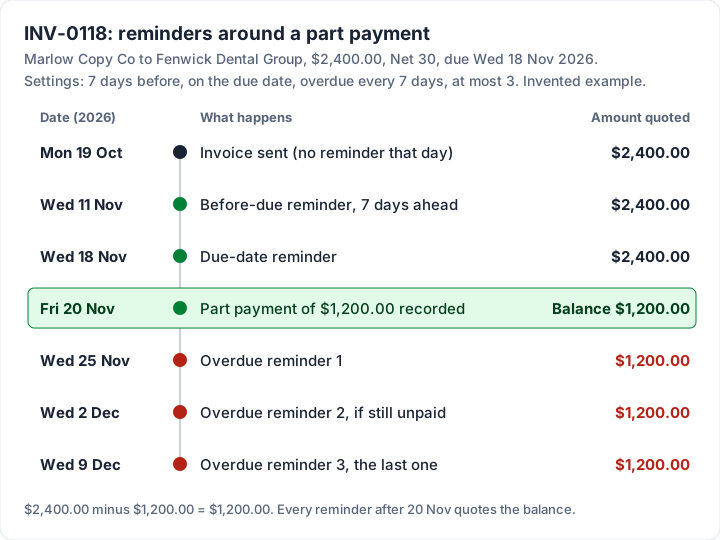
Marlow Copy Co invoices Fenwick Dental Group $2,400.00 for website copy, invoice INV-0118, on Monday 19 October 2026, on Net 30 terms. The due date is Wednesday 18 November 2026. Marlow's reminders are set to: 7 days before the due date, on the due date, then every 7 days while overdue, at most 3 overdue reminders.
| Date | What happens | Amount quoted |
|---|---|---|
| Monday 19 October 2026 | Invoice sent; no reminder that day | $2,400.00 |
| Wednesday 11 November 2026 | Before-due reminder, 7 days ahead | $2,400.00 outstanding |
| Wednesday 18 November 2026 | On-due reminder | $2,400.00 |
| Friday 20 November 2026 | Fenwick pays $1,200.00; Marlow records it | Balance $1,200.00 |
| Wednesday 25 November 2026 | Overdue reminder 1 | $1,200.00, not $2,400.00 |
| Wednesday 2 December 2026 | Overdue reminder 2, only if still unpaid | $1,200.00 |
| Wednesday 9 December 2026 | Overdue reminder 3, the last at these settings | $1,200.00 |
Three things to notice:
- The part payment changes the wording. Because Marlow recorded the $1,200.00 on the day it arrived, every later reminder quotes the $1,200.00 balance. Had Marlow not recorded it, the reminder on 25 November would still have asked for $2,400.00.
- The invoice is still overdue after the part payment. Half of it is late, and the reminders continue for that half.
- After 9 December, it is Marlow's call. The automatic reminders have done their job; anything further is a phone call or the later stages of an overdue follow-up.
If Fenwick pays the remaining $1,200.00 on, say, Monday 30 November and Marlow records it that day, the reminder planned for 2 December does not go, and nor does the one on 9 December. Fenwick would have received three reminders in all: one before the due date, one on it and one overdue reminder.
Reminders and Charming: what it does and does not do#
Charming Invoices does not send reminders for you, on any plan. It does not email invoices either: you issue the invoice, download the PDF or copy its private link, and send it from your own inbox. Reminders work the same way, with the wording above. Checked in our code on 2 November 2026, here is what it does help with:
- Due dates you can see. Every invoice has a due date, and an issued invoice past it shows as Overdue automatically, so the late ones stand out in your invoice list.
- The balance, kept up to date. Record each payment as it arrives (or mark the invoice paid), and the invoice and its private link show what is still owed. Quote that figure in your reminder, as in the part-payment example above.
- A link to paste into the reminder. The private link opens the invoice without an account, so a reminder can point back to it instead of attaching the PDF again. If you set up a payment link of your own, the invoice page shows an “Open payment link” button while it is unpaid.
- Viewed status. The invoice records when the client first opened its private link, which tells you whether a before-due reminder is a nudge or the first time they will see it.
The catches, plainly. Nothing goes out on its own: you set a calendar reminder for each date in the schedule above (the invoice due date calculator counts them) and send the message yourself. Payment tracking is manual: if a client pays and you do not record it, the invoice still shows money owed. Charming does not process card payments; the payment link is one you supply. On the free plan, the PDF and invoice page carry a small “Sent with Charming Invoices” line; paid plans hide it by default. Lifetime plans are final sale.
If you want the invoice itself ready before the reminders start, create a free invoice, download the PDF and send it your way, then put the before-due date in your calendar.
Questions people ask#
How do I write a friendly reminder for an invoice?#
Keep it to two or three sentences: the invoice number, the amount still owed, the due date and how to pay, with a link to the invoice. Send it before the due date, when there is nothing to apologise for and nothing to dispute.
How many days before the due date should I send a reminder?#
Two or three days on short terms such as Net 7, three on Net 14, and five to seven on Net 30 or longer. Never so many that the reminder lands the day after the invoice.
Is it rude to send a reminder before an invoice is due?#
No. A before-due reminder is a courtesy that helps the client pay on time, especially when their accounts team pays on a fixed run. Keep it short and factual, and it reads as organised, not pushy.
Can invoice reminders be automated?#
Yes. Most invoicing software can email reminders on a schedule. Charming does not: it flags overdue invoices, and you send the reminders yourself with the wording above, timed by a calendar reminder.
What should an invoice reminder email say?#
The invoice number, the amount still owed, the due date, how to pay and a link to the invoice. After a part payment, quote the balance, not the original total.
The short version#
Send one friendly reminder a few days before the due date and a short one on the day. Match the timing to your terms, so the first never lands the day after the invoice, and remember that due-on-receipt invoices have no before. Quote what is still owed, record payments as they arrive, and stop reminding when the client raises a problem. Once it is late, switch to a follow-up sequence for unpaid invoices.
Free downloads
No sign-up and no email address. More on the free templates page.
- Download .pdf: Late-payment follow-up schedule (A4)
Late-payment follow-up schedule (A4)
PDFPlan every reminder and follow-up from the due date, and write in the dates.
- Download .pdf: Late-payment follow-up schedule (US Letter)
Late-payment follow-up schedule (US Letter)
PDFPlan every reminder and follow-up from the due date, and write in the dates.
- Download .docx: Invoice email templates for Word
Invoice email templates for Word
Word .docxEmails to send an invoice in 12 situations, and a 4-step follow-up for one that is overdue.
- Download .txt: Invoice email templates as plain text
Invoice email templates as plain text
Text .txtThe same emails as a plain text file, the easiest version to copy into any email app.