Invoice email examples: 12 templates to copy and send

Nnabuike Okoroafor ·
On this page · 11 sections
The invoice is ready, and now you are staring at an empty email. The first one to a new client feels formal. The one after a deposit has to explain the deduction. The late one needs an apology, but how much? So you type “Please find attached the invoice” and hope for the best.
This post is a library of 12 invoice email examples, one per situation, each with a subject line and a short body to copy. It also explains “please find attached” (the line is fine) and when “attached” is the wrong word. For channels, PDFs and links, see how to send an invoice.
If this part feels uncomfortable, you are in company. In a small-business forum (one of the public discussions we read for our research; the people quoted here are not Charming customers), one contractor wrote:
Yes it's still really hard for me to ask, even after 15 years.
In short#
- Every invoice email carries four facts: what it is for, the amount, the due date and how to pay.
- The subject carries the invoice number and your business name, so it can be found weeks later.
- Each situation changes one sentence: a deposit, a balance, a PO number, a correction.
What every invoice email needs#
An example invoice email is short because the invoice does the detailed work. It needs five things:
- What it is for, in a few words: “the brand refresh”.
- The amount, with cents, exactly as on the invoice.
- The due date as a date, not only “Net 14”.
- How to pay, or where the payment details are.
- One human line, such as a thank-you (more on that below).
Every sample invoice email below uses the subject pattern “Invoice [number] from [business]”, plus context where needed. The sending guide has more invoice email subject lines.
Invoice email examples at a glance#
Every sample comes from one fictional studio, Wrenfield Design Studio (Elin Marsh), on 14-day terms.
| Situation | Subject line | The sentence that changes |
|---|---|---|
| First invoice to a new client | Invoice WDS-0033 from Wrenfield Design Studio | Where the payment details are |
| Repeat client | Invoice WDS-0035 — November social templates | “Same bank details as before” |
| Deposit before work starts | Deposit invoice WDS-0031 — brand refresh | When work starts once the deposit arrives |
| Milestone or progress payment | Invoice WDS-0036 — website build, stage 2 of 3 | Which stage, and what is left |
| Final balance after a deposit | Final invoice WDS-0039 — brand refresh | The deposit already received, deducted |
| Monthly retainer | Invoice WDS-0038 — December design support | The period covered |
| Accounts payable, with a PO | Invoice WDS-0037 from Wrenfield Design Studio — PO 4500-1182 | The PO number and who commissioned the work |
| Several invoices at once | Invoices WDS-0041 to WDS-0043 from Wrenfield Design Studio | A list with each number and amount |
| Sent late | Invoice WDS-0030 — 8 October workshop | One line of apology, then the facts |
| Corrected or replacement | Corrected invoice WDS-0040 (replaces WDS-0039) | Which number replaces which, and why |
| Resent on request | Invoice WDS-0033 from Wrenfield Design Studio (copy, as requested) | “As requested” and the original date |
| Link only, no attachment | Invoice WDS-0044 from Wrenfield Design Studio | “You can view and download it here”, not “attached” |
12 invoice email templates to copy#
Swap in your own details; every name below is invented. To keep all 12 and the overdue follow-ups in one place, download them as a Word file or as a plain text file, the easier one to paste into any email app.
1. First invoice to a new client#
Tell a new client where the payment details are and who to ask.
Subject: Invoice WDS-0033 from Wrenfield Design Studio
Hi Sofia,
Here is invoice WDS-0033 for the logo and packaging labels: $950.00, due Wednesday 18 November. The PDF is attached, and my bank details and the payment reference are at the bottom of it.
If your accounts team needs a supplier form, just reply. Thank you for choosing us for this one.
Elin, Wrenfield Design Studio
2. Repeat client#
Shorter reads as confident, not careless.
Subject: Invoice WDS-0035 — November social templates
Hi Ben,
Invoice WDS-0035 is attached: four social media templates at $120.00 each, $480.00 in total, due Friday 20 November. Same bank details as before.
Thanks, Elin
3. Deposit before work starts#
A deposit email should say what happens when the money arrives. One commenter in a wedding-photography forum described putting the deadline in the email itself:
I give a clear time notice for how long the client has to sign the contract and send out the deposit (1 week from receipt of the contract.) I make it clear in the email when I send it over …
For the document itself, see deposit and balance invoices.
Subject: Deposit invoice WDS-0031 — brand refresh
Hi Ben,
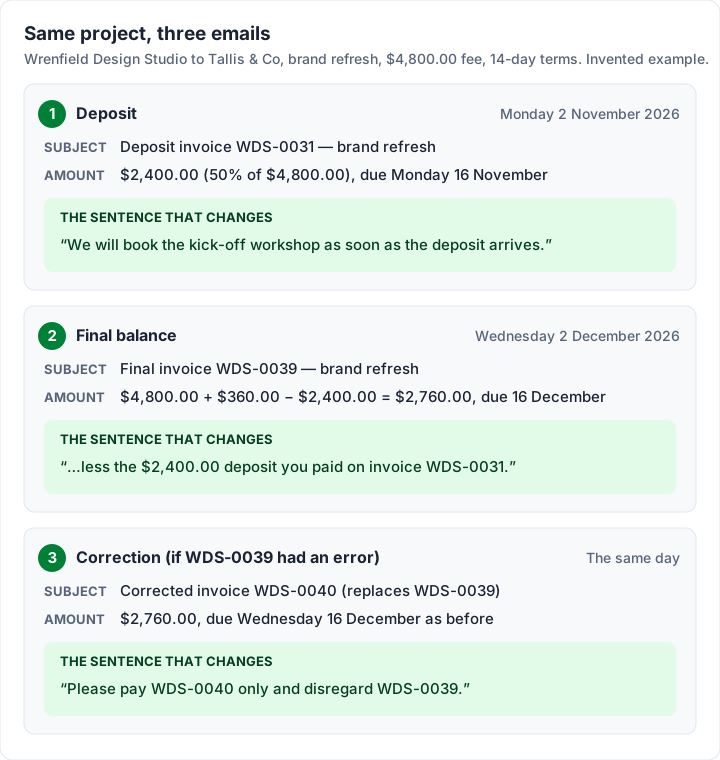
As agreed, here is the 50% deposit invoice for the brand refresh: WDS-0031, $2,400.00 of the $4,800.00 fee, due Monday 16 November. The PDF is attached.
We will book the kick-off workshop as soon as the deposit arrives. The balance will be invoiced when the final files are delivered.
Thank you, Elin, Wrenfield Design Studio
4. Milestone or progress payment#
Name the stage and what is left. Progress invoicing, with a worked example covers stage payments.
Subject: Invoice WDS-0036 — website build, stage 2 of 3
Hi Hana,
Stage 2 of the website build (the design sign-off) is complete, so here is invoice WDS-0036: $3,600.00, which is 40% of the $9,000.00 project fee, due Monday 23 November. The PDF is attached.
Stage 1 ($2,700.00) is paid, thank you. Stage 3, also $2,700.00, follows at launch.
Elin, Wrenfield Design Studio
5. Final invoice after a deposit#
The total of the work is not the amount owed, so show the deduction in the body. The arithmetic for the brand refresh:
| Line | Amount |
|---|---|
| Brand refresh, agreed fee | $4,800.00 |
| Extra revision round: 3 hours × $120.00 | $360.00 |
| Subtotal | $5,160.00 |
| Less deposit received (WDS-0031) | −$2,400.00 |
| Balance due | $2,760.00 |
Subject: Final invoice WDS-0039 — brand refresh
Hi Ben,
With the final files delivered, here is the final invoice for the brand refresh: WDS-0039, $2,760.00, due Wednesday 16 December. That is the $4,800.00 fee plus the extra revision round ($360.00), less the $2,400.00 deposit you paid on invoice WDS-0031. The PDF is attached.
It has been a pleasure working on this.
Elin, Wrenfield Design Studio
6. Monthly retainer or recurring invoice#
The important words are the period covered. For the agreement behind it, see retainer invoice.
Subject: Invoice WDS-0038 — December design support
Hi Dana,
Here is invoice WDS-0038 for December’s design support retainer (1 to 31 December): $1,250.00, due Tuesday 15 December. The PDF is attached.
Thanks, and speak at Thursday’s planning call.
Elin
7. To accounts payable, with a PO number#
An accounts team does not know you, so give them what they need to match the invoice: the PO number, who commissioned the work and the amount. See invoicing a company and where to put the PO number on an invoice.
Subject: Invoice WDS-0037 from Wrenfield Design Studio — PO 4500-1182
Hello,
Please find attached invoice WDS-0037 from Wrenfield Design Studio for $3,150.00 (21 hours at $150.00), due Tuesday 24 November, for the trade-show graphics commissioned by Tom Reyes. The purchase order number, 4500-1182, is shown on the invoice, with the payment details.
Please let me know if you need any other document.
Kind regards, Elin Marsh, Wrenfield Design Studio
8. Several invoices in one email#
List each invoice with its number and amount, and give the total. This is where “attached are the invoices” belongs.
Subject: Invoices WDS-0041 to WDS-0043 from Wrenfield Design Studio
Hi Sofia,
Attached are the invoices for this month’s three jobs, all due Friday 18 December:
- WDS-0041, menu board redesign: $320.00
- WDS-0042, winter packaging labels: $540.00
- WDS-0043, print-ready files for the shop sign: $215.00
That is $1,075.00 in total. Please use each invoice number as the reference for its payment.
Thank you, Elin
9. An invoice you are sending late#
One sentence of apology is enough, then the facts. Date the invoice the day you send it and name the date of the work, as our guide to the invoice date recommends.
Subject: Invoice WDS-0030 — 8 October workshop
Hi Ruth,
Apologies for the delay in sending this. Here is invoice WDS-0030 for the brand workshop on Thursday 8 October: $650.00, due Wednesday 11 November. The PDF is attached.
Thank you again for hosting us.
Elin, Wrenfield Design Studio
Give your normal terms from the day it arrives.
10. A corrected or replacement invoice#
Suppose WDS-0039 had shown 4 revision hours instead of 3: $480.00 instead of $360.00, so a balance of $2,880.00, not $2,760.00. The clean fix is to void it and send a new invoice, saying plainly which number replaces which so nobody pays both. See how to void an invoice.
Subject: Corrected invoice WDS-0040 (replaces WDS-0039)
Hi Ben,
Thank you for catching that. Invoice WDS-0039 showed 4 hours for the extra revision round instead of 3. I have cancelled it, and attached is the corrected invoice, WDS-0040, for $2,760.00, due Wednesday 16 December as before.
Please pay WDS-0040 only and disregard WDS-0039.
Elin
11. Resending an invoice on request#
Keep the original number and date. Do not issue a new invoice for the same work.
Subject: Invoice WDS-0033 from Wrenfield Design Studio (copy, as requested)
Hi Sofia,
As requested, here is invoice WDS-0033 again, sent on 4 November for $950.00 and due Wednesday 18 November. The PDF is attached.
Elin
12. When you send a link instead of a PDF#
With only a link, do not write “attached”: the client will look for a file that is not there.
Subject: Invoice WDS-0044 from Wrenfield Design Studio
Hi Dana,
You can view and download invoice WDS-0044 here: [link to the invoice]. It is for the January campaign artwork, $725.00, due Monday 21 December.
Thanks, Elin
“Please find attached the invoice”: what it means#
“Please find attached the invoice” means “the invoice is attached to this email”. It is a standard formula in business email, and there is nothing wrong with it.
The word order is flexible: “Please find attached the invoice” and “Please find the invoice attached” are both standard. “Attached is the invoice” takes “is” for one; “Attached are the invoices” takes “are” for several.
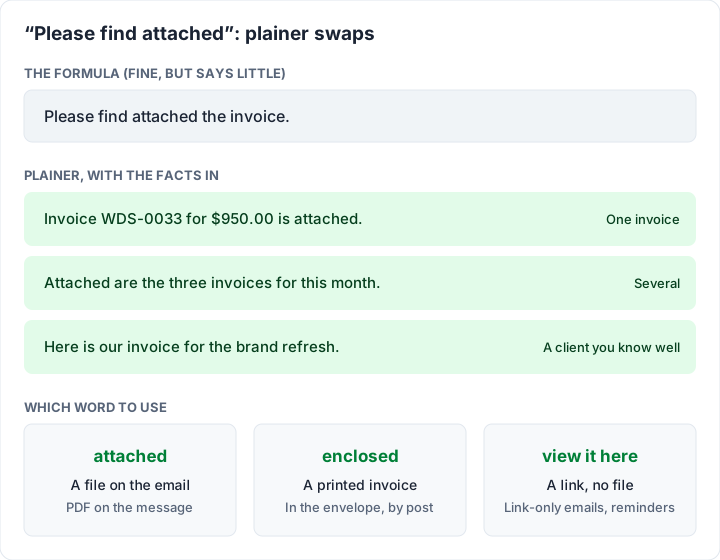
Its two weaknesses: it can read like a letter from a bank, and it carries no facts. “Invoice WDS-0033 for $950.00 is attached” does the same job and gives the number and amount. Plainer ways to say it, and when each fits:
| Instead of | Try | Fits when |
|---|---|---|
| Please find attached the invoice. | Invoice WDS-0033 for $950.00 is attached. | Almost always |
| Please find attached the invoices. | Attached are the three invoices for this month. | Several invoices |
| Please find attached our invoice for your payment. | Here is our invoice for the brand refresh. | A client you know well |
| Please find attached the invoice (with only a link) | You can view and download the invoice here. | Link-only emails |
“Enclosed” is for paper. It means “inside this envelope”. In an email it reads as old-fashioned rather than wrong.
Do not say “attached” when nothing is attached. This is the one real mistake. It happens in link-only emails, and in reminders from invoicing tools that link to the invoice instead of attaching it again.
The one human line#
Most of an invoice email is facts. One sentence about the work or the relationship changes how the whole email reads. One freelancer in a public discussion described doing exactly that:
I find what helps me is when I send it I also leave a note like "X coming on quite nicely now, I've been thinking about Y".
It might be a thank-you or a note about what comes next. What it should not be is an apology for invoicing: “sorry to bother you” tells the client the due date is negotiable. Asking for money without the awkwardness goes further into the tone.
Turning these into templates with variables#
In an invoicing tool that emails for you, or in your email app’s saved replies, write the wording once with placeholders. The first template becomes “Here is invoice [number] for [amount], due [due date]”, and you change the situation sentence per invoice.
Each tool names its placeholders differently, so check its help page for the exact names. If you send from your own inbox, keep the gaps in square brackets, as in the templates above, and fill them in from the invoice each time. The amount to quote is the amount due after any deposit, retainage or retainer credit: on the final brand-refresh invoice that is $2,760.00, not $5,160.00.
Before you press send#
- The right PDF. The number in the subject, body and file match.
- The amount matches the invoice, including any deposit deducted.
- The due date is a date, not just “Net 14”.
- The payment details are current. If your bank account changed, say so and expect the client to check with you: a sudden change of bank details is a known warning sign of fake invoices and invoice scams.
- It goes to the person who pays, often accounts payable, not your contact.
If the invoice is already late, these templates are the wrong tool: use the overdue invoice email, step by step.
Where Charming fits, and what it does not do#
Charming does not send the email for you. You issue the invoice, download the PDF or copy its private link, and send it from your own inbox with the wording above. That keeps every situation in this post in your hands, CC and several attachments included.
- The PDF is named after the invoice number (for example Invoice-WDS-0033.pdf), so it matches the subject line. Attach it and write “attached”.
- The private link opens the invoice without an account, and Charming records when it is viewed. Paste it in and use the link-only wording from template 12.
- No email sending, reminders, texts or portals. For follow-ups, set a calendar reminder for the due date and use the overdue invoice email from your own inbox.
- No card payments through Charming. Clients pay you directly, and you mark the invoice paid yourself.
- The footer line. On the free plan, the PDF and the invoice page carry “Sent with Charming Invoices”. Paid-plan PDFs hide it by default; see the pricing page. Lifetime plans are final sale, and Charming is a web app only.
Questions people ask#
How do I write an invoice email?#
Subject: “invoice”, the number and your business name. Body: what it is for, the amount, the due date, how to pay and one human line, with the PDF attached.
Is “please find attached” correct?#
Yes, in either word order. A plainer version with the number and amount does the same job and tells the reader more.
What do I write when sending an invoice to a client?#
The four facts and a thank-you, plus the situation sentence: how payment works for a first invoice, the deposit deducted for a final one, the PO number for a company.
What does “invoice enclosed” mean?#
That the invoice is in the same envelope, so it belongs in a printed letter. In an email, write “attached” for a file, or “view it here” for a link.
How do I apologise for sending an invoice late?#
In one sentence (“Apologies for the delay in sending this”), then the number, amount, due date and the date of the work, on your normal terms.
What do I say when I resend a corrected invoice?#
Name both numbers and what changed, and say which one to pay: “Please pay WDS-0040 only and disregard WDS-0039.”
Send the next one with the right sentence#
Most invoice emails are the same four facts with one sentence changed for the situation. Copy the template that matches, check the numbers, and keep “attached” for emails that carry a file. To make the invoice itself, create a free invoice, download the PDF and send it your way.
Free downloads
No sign-up and no email address. More on the free templates page.
- Download .docx: Invoice email templates for Word
Invoice email templates for Word
Word .docxEmails to send an invoice in 12 situations, and a 4-step follow-up for one that is overdue.
- Download .txt: Invoice email templates as plain text
Invoice email templates as plain text
Text .txtThe same emails as a plain text file, the easiest version to copy into any email app.