Draft invoice vs final invoice: what each one means

Nnabuike Okoroafor ·
On this page · 10 sections
Your invoicing app says “Draft” next to an invoice you finished on Friday. A client asks for “the final invoice” at the end of a job. Are those the same thing? Is the draft already a bill? Can the client pay it, and can you still change it?
They are two different ideas that people often blur. A draft invoice is an invoice you have not sent yet. A final invoice is the last invoice of a job, the one that bills the balance after any deposit or progress payments. One is a status; the other is a position in the job. A final invoice starts life as a draft too.
This guide defines both, shows what changes when a draft is sent, gives you a checklist for the moment before you press send, and walks one job from deposit to final invoice with real numbers. If you want the wider picture first, our guide to how an invoice works, from draft to paid covers the whole lifecycle. The businesses and figures below are invented examples.
In short#
- A draft invoice is an invoice you are still preparing. Nothing has gone to the client, so there is nothing for them to pay, and you can change or delete it freely.
- A sent (issued) invoice is the one your client receives. From then on it is a record: you correct it with a new document, not by quietly editing it.
- A final invoice is the last invoice of a job. It bills the full price and any agreed extras, takes off what the client already paid and asks for the balance.
- A final invoice is a draft until you send it. “Draft” and “final” answer different questions.
- Watch the dates: a draft keeps the dates it was started with. Check the issue and due dates on the day you send it.
What a draft invoice is#
A draft invoice, also called an invoice draft or a draft of an invoice, is an invoice that exists only on your side. You have filled in some or all of it (client, lines, dates, terms) but you have not issued it. The client has not seen it, and it does not ask anyone for money yet.
In invoicing software a draft typically has three properties:
- It is editable. You can change any line, price, date or term.
- It has no invoice number yet, or only a provisional one. Some tools assign the number at the moment of sending (Charming assigns it when you issue the invoice), so cancelled drafts never leave a gap in your sequence. Our guide to how to number invoices explains why gaps matter to some readers of your records.
- It can be deleted. Because nothing was issued, there is nothing to cancel.
A draft is a working document, not a bill. This post does not cover when a document counts as “issued” for tax purposes; ask an accountant if it matters for you. Our guide to invoice date vs due date covers the dates themselves.
If you searched “draft an invoice” meaning how to write one, that is a different question: our step-by-step guide to how to make an invoice covers it.
What a final invoice is#
A final invoice is the last invoice you send for a job or contract. It is a standard invoice whose job is to close the account: it shows the full agreed price, any extras or changes agreed along the way, everything the client has already paid (a deposit, a retainer, progress payments) and the balance still due.
It is not a special kind of document, just a name for where the invoice sits in the job. Our overview of which type of invoice to send puts it alongside deposit, progress and recurring invoices.
Three neighbours get confused with it:
- A final notice is a demand for an unpaid invoice, often the last reminder before you escalate. A final invoice bills the end of a job; a final notice chases money already owed. Calling your closing invoice a “final notice” sounds like a threat, so keep the two words apart.
- A proforma invoice comes before the work or shipment, as a preview of the bill. The real invoice follows it. Our guide to proforma invoice vs invoice covers turning one into the other.
- The last progress bill on a staged project is a final invoice too, usually with a contract summary and any retention released. Our guide to how progress billing works has the layout.
Draft vs sent vs final: one table#
The quickest way to keep the three ideas apart is to ask the same questions of each.
| Question | Draft invoice | Sent invoice | Final invoice |
|---|---|---|---|
| What kind of label is it? | A status | A status | A position in the job |
| Has the client seen it? | No | Yes | Only once it is sent |
| Does it have an invoice number? | Usually not yet | Yes | Yes, once sent |
| Can you edit it? | Yes, freely | No: correct it with a new document | Freely while a draft; not after sending |
| Can the client pay it? | Nothing to pay yet | Yes | Yes, the balance |
| How do you get rid of a mistake? | Delete it or fix it | Void it, or issue a credit note | Same as any sent invoice |
The last column is the one to remember. “Final” tells you what the invoice is for. “Draft” or “sent” tells you where it is in your workflow. Every final invoice goes through both.
Check a draft before you send it#
Sending is the moment the draft stops being yours to change. A two-minute check is cheaper than a correction afterwards.
- Client. The right client, with the right billing name and email, and a contact in their accounts team if they asked for one.
- Issue date. Today, or the date you are actually sending it. A draft started last week still carries last week's date.
- Due date. Your agreed terms counted from the real issue date, not from the day you started the draft.
- Lines and quantities. Every agreed item, every agreed extra, and nothing you said you would waive.
- Earlier payments. Any deposit or progress payment credited, with its invoice number so the client can match it.
- Totals. Subtotal, tax if you charge it, the credit for earlier payments and the amount due. Add them up once by hand.
- Payment details and terms. How to pay, and what happens if payment is late, if you state that.
- Preview. Look at the PDF exactly as the client will see it, on a phone as well as a desktop if you can.
Check the dates on an old draft#
Charming, and any tool that works the same way, fills in the issue date when you start the draft and leaves it alone when you issue it. So a draft that sits over a weekend goes out looking older than it is.
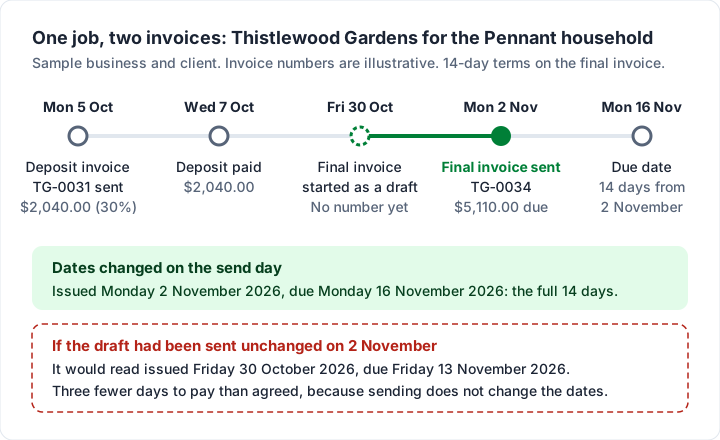
Start a draft on Friday 30 October 2026 with 14-day terms and the due date reads Friday 13 November 2026. Send it unchanged on Monday 2 November and your client gets an invoice that is already three days into its terms, due three days earlier than the 14 days you agreed. Change both dates before sending: issued Monday 2 November, due Monday 16 November 2026. In Charming the due date is its own field, so moving the issue date does not move it for you.
Why the sent version matters#
Once an invoice is sent, the version the client holds is the one everyone will refer back to. That cuts both ways. In a public online discussion about a client dispute (the people quoted in our research are not Charming customers), one commenter in a videography forum described a client producing an earlier invoice:
Then they tried to show me the original invoice and that backfired on them because the original invoice shows they would have owed me $1200 more than the final payment because I did things for free.
Keep every sent version, and make changes with a new document rather than by editing the old one. That way the paper trail tells one consistent story.
Worked example: one job from deposit to final invoice#
Thistlewood Gardens, a garden designer, agrees a project with the Pennant household. The invoice numbers TG-0031 and TG-0034 are illustrative, and no tax is charged, to keep the arithmetic plain.
The quote the client accepted:
| Line item | Qty | Rate | Amount |
|---|---|---|---|
| Garden design plan | 1 | $1,800.00 | $1,800.00 |
| Planting labour (days) | 4 | $650.00 | $2,600.00 |
| Plants and materials | 1 | $2,400.00 | $2,400.00 |
| Quoted total | $6,800.00 |
How the job was billed:
| Date | What happened | Amount |
|---|---|---|
| Monday 5 October 2026 | Deposit invoice TG-0031 sent, 30%, due on receipt | $2,040.00 |
| Wednesday 7 October 2026 | Deposit paid | $2,040.00 |
| During the job | Extra agreed: an additional irrigation zone | $350.00 |
| Friday 30 October 2026 | Final invoice started as a draft: no number yet | — |
| Monday 2 November 2026 | Final invoice TG-0034 sent, dates updated to the send day | $5,110.00 due |
| Monday 16 November 2026 | Due date, 14 days from 2 November | — |
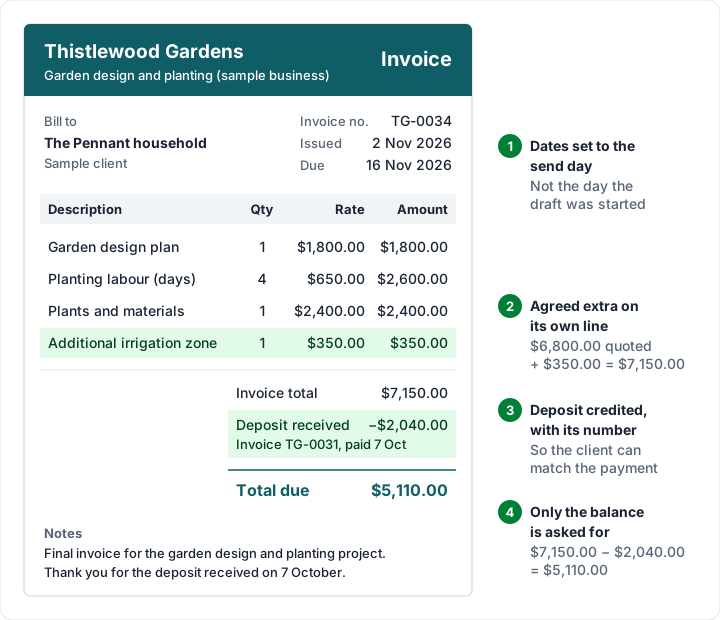
The final invoice itself adds the extra to the quoted total and takes off the deposit: $6,800.00 + $350.00 = $7,150.00, less the $2,040.00 deposit received, leaves $5,110.00 to pay.
What to put on a final invoice#
Everything a normal invoice carries, plus four things that make it read as the end of the job:
- The full job, not just the remainder. List every quoted line, so the client can see the whole price in one place.
- Agreed extras and changes, each on its own line with what it was. A surprise line at the end is the one most likely to be queried.
- Earlier payments as credits, each named: “Deposit received (invoice TG-0031, paid 7 October 2026)”. Our guide to how the deposit shows on the final invoice covers deposit invoices from the start.
- The balance as the total due, with the due date and how to pay.
A short line in the notes makes the purpose plain. For example: “Final invoice for the garden design and planting project. Thank you for the deposit received on 7 October.” If you email it, keep the covering note just as short; our invoice email templates to copy include one for a final invoice.
Final invoice and handing over the work#
Some freelancers hand over the finished files, keys or final edit when the final invoice is paid, not when it is sent. If that is your practice, say so in the quote or contract before the job starts, then repeat it in the final invoice's terms. Treat it as a business decision you agree in advance, so it does not read as a threat at the end.
When a “final” invoice turns out to be wrong#
Once sent, a final invoice is like any other issued invoice: you do not edit it in place. You have two standard routes:
- Void it and send a corrected one if the client has not paid any of it. The voided invoice keeps its number, marked as not payable, and the replacement gets the next number.
- Issue a credit note if you are reducing an invoice the client may already have paid, or partly paid. Our guide to when to issue a credit note has the details.
If you forgot an extra, send a separate invoice for it rather than reopening the final one. Our guide to when to delete, void or cancel an invoice has a flowchart for every case.
Drafts and final invoices in Charming, and the limits#
We make Charming Invoices, so here is exactly how drafts and final invoices work in it, checked in our code on 28 October 2026. All of it is on the free plan.
| What you do | What happens |
|---|---|
| Create an invoice | It is saved as a draft, and no invoice number is used until you issue it |
| Open a draft | You can edit every field and press “Save draft” |
| “Preview PDF” on a draft | The PDF is rendered live with your current design. It prints “DRAFT” in the “Invoice no.” slot, not a watermark across the page |
| “Issue invoice” | Claims the next invoice number, freezes the design and terms and stores the PDF. Charming does not email it: you download the PDF, print it or copy its private link, and send it however you like |
| Try to change an issued invoice | Refused: “This invoice has been issued and can no longer be changed or deleted” |
| “Delete draft” | “The draft and its line items are removed for good. No invoice number was ever assigned to it.” |
| “Void” | The invoice “stays on record with its number intact, but is marked as never payable. This cannot be undone.” |
| “Duplicate” | Creates a new draft with today's issue date and a due date 14 days on |
| Credit a deposit | “Add a deposit received”, then type the amount in “Deposit already received”; the PDF prints a “Deposit received” line and a “Total due” |
The limits, plainly:
- There is no “Final” status. Statuses are Draft, Issued, Partially paid, Overdue, Paid and Void. Write “Final invoice” in the notes or the first line description.
- The deposit is typed by hand. It is not linked to the deposit invoice, and it is capped at the invoice total. Put the deposit invoice's number in the notes so the client can match it.
- Issuing does not update the dates. The issue and due dates are whatever the draft says; change them before you issue it.
- Only owners and admins can void, and an invoice with a recorded payment cannot be voided.
- Drafts stay private. They never appear on client statements and are never flagged as overdue.
- Payments are tracked by hand. Charming does not take card payments and has no integrations; you record a payment or mark it paid when the money arrives. It is a web app only.
- Recurring invoices create drafts for you to review and issue, never sent automatically, on paid plans (from $29 once; lifetime plans are final sale).
- Free invoices carry a small “Sent with Charming Invoices” line. Paid plans hide it by default.
If that fits how you bill, create a free invoice: start the final invoice as a draft, preview it, fix the dates, then issue it, download the PDF and send it your way.
Questions people ask#
What is a draft invoice?#
An invoice you have started but not sent. It sits on your side only, can be changed or deleted, and usually has no invoice number until you send it.
Is a draft invoice valid?#
It has not been sent, so your client has nothing to pay yet. This post does not cover when a document counts as issued for tax; ask an accountant if it matters to you.
Can I send a draft to a client for approval?#
Better not. A draft PDF usually has no number, and in Charming it prints “DRAFT” where the number goes. If the client needs to agree the price first, send a quote or estimate (see invoice vs estimate vs quote), or a proforma invoice if they need something invoice-shaped. Send the real invoice once it is agreed.
What is a final invoice?#
The last invoice of a job or contract. It shows the full price and agreed extras, credits what the client already paid and asks for the balance.
What should a final invoice include?#
Everything a normal invoice includes, plus every line of the job, each agreed extra, each earlier payment as a named credit and the balance as the total due. The worked example above shows one.
Can you change a final invoice after sending it?#
Not in place. Void it and send a corrected one if nothing has been paid, or issue a credit note if it has been paid or partly paid. Send a separate invoice for anything you forgot to bill.
Is a final invoice the same as a final notice?#
No. A final invoice bills the end of a job. A final notice is a last reminder about an invoice that is already overdue.