Invoice terms and conditions: examples, notes and messages

Nnabuike Okoroafor ·
On this page · 10 sections
The invoice is ready apart from two empty boxes at the bottom: one says “Terms”, the other “Notes”. Then there is the email you send it with. You want the client to know when to pay, what the price covered and who to call if something looks wrong, without pasting a page of small print onto a one-page invoice.
This guide sorts that out. It shows where each kind of sentence belongs (terms, notes, payment details, the footer or the email), gives short example wording for the situations that come up most, and lists what to leave out. Every clause below is example wording in plain business language. None of it has been checked by a lawyer, and none of it is claimed to be enforceable, standard or complete.
General information, not legal or tax advice. This post does not cover the law on contracts, late fees, cancellations or consumer rights. Ask an accountant or lawyer before you rely on any wording here.
In short#
- Terms are the conditions of payment and of the sale: when to pay, what the price covers, what happens if plans change. Keep them to a few lines that repeat what you already agreed.
- Notes are a short practical or human line: a thank-you, a next step, a reference to quote.
- The email is the covering message. It points to the invoice; it does not replace the terms.
- The full terms live in your agreement, proposal or booking terms. The invoice repeats the parts the person paying needs.
What invoice terms and conditions are#
In plain business terms, the terms and conditions on an invoice are the conditions you set for the sale: when and how to pay, what the price covers, and what happens if something changes. People use three phrases for overlapping things:
- Payment terms are about timing: Net 14, Net 30, due on receipt. Our guide to what Net 30 actually means covers due dates and the wording for them.
- Terms is what most invoice forms call the box. It usually holds the payment terms plus a few conditions.
- Terms and conditions usually means the full set: scope, ownership, cancellations, disputes. On an invoice you normally see a short version that points to the full set.
That last point matters. The invoice arrives after the work is agreed, often after it is done. In public online discussions we read while researching this post, one commenter in a photography forum (not a Charming customer) put it simply:
The Terms and conditions should either be in the contract or on his website.
So treat the terms box as a reminder of what was agreed, not the place where the deal is made. Invoices vs agreements explained covers how an invoice relates to a contract.
Terms, notes, payment details or the email: where each line goes#
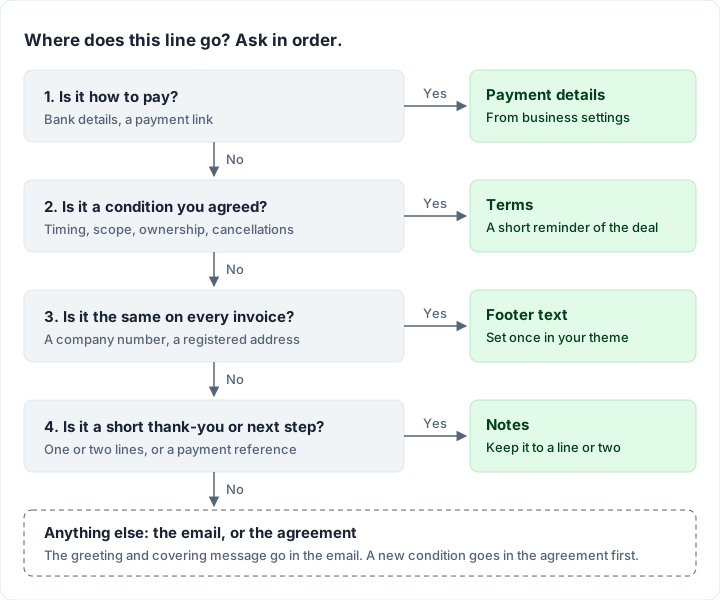
The hard part is usually not the wording but which box a sentence belongs in. This table shows where each kind of line usually goes, with an example:
| What you want to say | Where it goes | Example |
|---|---|---|
| When payment is due | The due date field, repeated in Terms | “Payment due by 16 November 2026.” |
| How to pay | Payment details (from your business settings) | Bank name, account details, a payment link |
| What the price covers, ownership, cancellations, disputes | Terms | “Final files are released when the balance is paid.” |
| Thank you, next step, a reminder | Notes | “Thank you. Kick-off call booked for Wednesday 4 November.” |
| A fixed company line on every invoice | Footer | “Registered in England & Wales · Company no. [number]” |
| The client’s purchase order number | Its own PO field | “PO 4471” |
| “Here is your invoice, due on…” | The email | “Hi Sam, please find invoice CBS-0107 attached.” |
Two things follow from the table. Bank details do not need retyping into the terms if your invoice has a payment section. And the email is not a substitute for the terms, because the PDF is what gets forwarded to an accounts team and filed. For every other field an invoice carries, see the field-by-field invoice checklist.
Invoice terms and conditions examples, by situation#
Each block below is example wording. Replace the brackets, keep only the lines that match what you actually agreed, and keep the whole terms box short enough to read in under a minute. The examples and the notes further down are also in a free Word file and a plain text file, as example wording to adapt, not legal or tax advice.
Payment due date#
Example wording:
Payment is due by [date], [N] days from the invoice date. Please quote invoice [number] with your payment.
Put the same date in the invoice’s due date field so the two never disagree. For Net 15, Net 30 and the other common terms, and five ways to word them, see what Net 30 actually means.
Deposit and balance#
Example wording:
This invoice is the [50%] deposit for [project]. The deposit secures your start date. The balance of [amount] will be invoiced on [delivery / completion].
The mechanics of splitting a job into two invoices, and how the balance invoice shows the deposit already paid, are in deposit and balance invoices.
What the price covers#
A short scope line stops the “I thought that was included” conversation before it starts. The person who started one public thread in a graphic design forum (not a Charming customer) described the situation it prevents:
I never promised source files in my original estimate (just PDFs), and the invoice hasn't been paid yet.
Example wording:
The price covers the items listed in proposal [reference]: [deliverables, e.g. logo, colour palette, two rounds of changes]. Extra work is quoted separately before it starts.
Ownership or usage on full payment#
Example wording:
Final files are released when this invoice is paid in full. [Usage rights as set out in proposal reference] apply from that date.
Use this line only to remind the client of what your proposal or contract already says. Whether ownership or a licence passes, and when, is a question for that agreement and a lawyer, not for this post.
Terms for designers and photographers#
Creative work often has its own terms: kill fees, rounds of revisions, licence length and territory. For trade-specific wording, see a design invoice with a kill fee and billing prints and licensing separately. In Charming, the Photographer template renames the Terms section “Usage licence”, and the invoice form then prompts you to say what the client may do with the work (usage, duration, territory).
Late payment#
Example wording, with the fee left as a placeholder on purpose:
Payments received after [due date] may be charged [agreed late fee], as set out in [our agreement / proposal reference].
We have not put a rate here. Whether you can charge a late fee or interest, and how much, depends on what you agreed and where you and your client are; ask an accountant or lawyer. For the arithmetic, the late fee calculator works out a flat fee or interest on any amount; for more on wording, see late fee wording for your invoice.
Early-payment discount#
Example wording:
Pay by [date] and you may deduct [N]%, paying [discounted amount] instead of [full amount].
How to show it on the invoice is in an early-payment discount, and the early payment discount calculator shows what the offer costs you before you make it.
Questions and disputes#
Example wording:
If anything on this invoice looks wrong, please tell us within [N] days at [email] so we can sort it out before the due date.
This is a practical request; this post does not cover any legal time limits for disputes. If a client does dispute an invoice, what to do when a client disputes an invoice walks through the steps.
Cancellation and rescheduling#
Example wording, stating your own policy:
Bookings cancelled less than [N] days before [the date] are charged [amount or percentage], as set out in [our booking terms]. Rescheduling is free once with [N] days’ notice.
This states your business’s policy only. It says nothing about any rights a client may have by law, and this post does not cover them. Ask a lawyer before you set a cancellation policy, and put it in the booking terms the client agrees to, not only on the invoice.
Currency, bank fees and references#
Example wording:
All amounts are in [currency]. Please quote [invoice number] as the payment reference. [Any transfer fees are paid by the sender.]
The bracketed fee line only reflects a choice you and the client have agreed; leave it out if you have not discussed it.
Purchase orders#
Example wording:
Please match this invoice to PO [number].
If the client issued a purchase order, its accounts team may need the number to match your invoice, so it belongs in its own field near the top as well. See where to put the PO number on an invoice.
A complete terms block for one invoice#
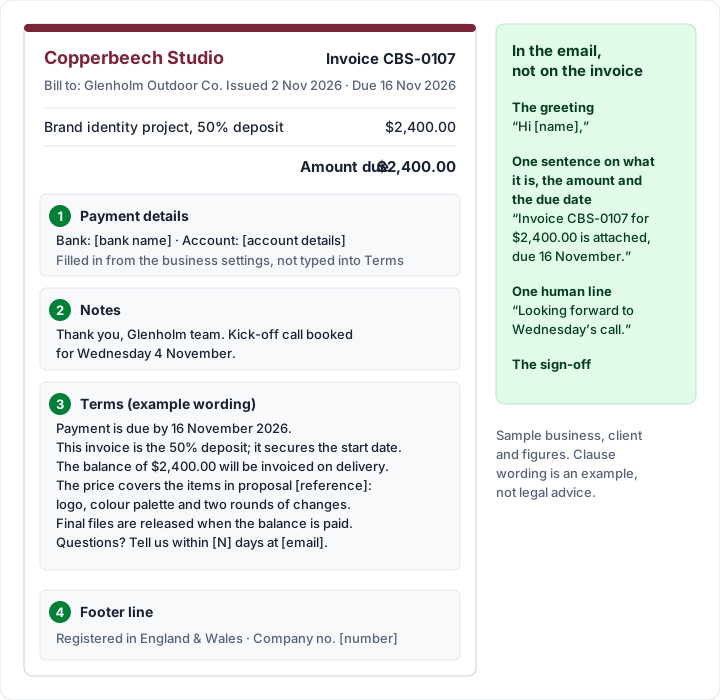
Here is how the pieces fit on one real-looking invoice. The businesses are invented. Copperbeech Studio, a brand designer, has agreed a $4,800.00 brand identity project with Glenholm Outdoor Co., with a 50% deposit.
- Invoice: CBS-0107, issued Monday 2 November 2026, Net 14, so due Monday 16 November 2026.
- Amount: $2,400.00, which is 50% of $4,800.00.
- Payment details section: the studio’s bank details, filled in from its business settings, not typed into the terms.
The Terms box (example wording):
Payment is due by 16 November 2026. This invoice is the 50% deposit for the Glenholm brand identity project; the deposit secures the start date. The balance of $2,400.00 will be invoiced on delivery. The price covers the items in proposal [reference]: logo, colour palette and two rounds of changes. Final files are released when the balance is paid. If anything here looks wrong, please tell us within [N] days at [email].
The Notes box:
Thank you, Glenholm team. Kick-off call booked for Wednesday 4 November.
The email uses a short default message with one human line added. For more wording, see invoice email templates to copy.
Anything longer belongs in the proposal the terms refer to.
Invoice notes and messages: examples#
Notes are the line people actually read on the way to the total, so keep them to one or two sentences. Opinions differ on whether a personal touch matters at all. In a public small-business discussion, the person who started the thread argued against custom messages:
I argue that the invoices are going to accounting departments where nobody cares.
A reply in the same thread suggested the middle ground:
Just a nice thank you for your business.
Neither person is a Charming customer. Both points hold: the person who approves the invoice may never see it, and a short thank-you costs nothing. Some notes that do a job:
| Purpose | Example note |
|---|---|
| Thank you | “Thank you for your business.” |
| Next step | “Kick-off call booked for Wednesday 4 November.” |
| Delivery | “Final files will be shared by link once the balance is paid.” |
| Reference | “Please quote CBS-0107 as the payment reference.” |
| Closure dates | “Our office is closed 24 December to 1 January; payments still arrive as normal.” |
| Repeat booking | “Thank you for booking again. Your next session is on [date].” |
An “invoice message” can mean the note on the invoice or the email it travels with. For full email messages, see invoice email templates to copy.
What to leave out of your terms and notes#
Shorter terms are easier to pay against. These usually do not belong on the invoice:
- New terms the client has never seen. A condition that first appears on the invoice is a surprise, not a reminder. Agree it first, in the proposal or contract, then repeat it. Invoices vs agreements explained covers why the order matters.
- A wall of boilerplate. Your full terms of business belong in the agreement or on your website, with the invoice pointing to them in one line.
- Internal notes. “Charged less because of the delay” or a reminder to yourself prints on the client’s copy.
- Apologies and explanations. If something went wrong, say it in the email or on a call; the invoice is a record.
- Promises you will not keep. “Files delivered within 24 hours of payment” is fine only if you will do it every time.
- Payment instructions typed by hand when your invoice already has a payment details section. Two copies of bank details can drift apart.
Do terms on an invoice bind your client?#
Whether a term on an invoice binds your client depends on what you agreed and where you are. This post does not cover that. Invoices vs agreements explained sets out what tends to matter, and a lawyer can draft terms you can rely on. The example wording above is general information, not legal advice.
Terms and notes in Charming, and the limits#
Charming gives every invoice a Terms box (up to 5,000 characters) and a Footer notes box (up to 2,000 characters). On the PDF they print in separate sections headed “Terms” and “Notes”, and bank details and your payment link print in their own “Payment details” section, so you never retype them. By default the order below the totals is payment details, then notes, then terms, and you can reorder those sections in the Template Studio.
- Defaults on every plan, including Free. When you edit a business, the “Payment and footer defaults” card holds default footer notes and default terms, “Copied onto each new invoice; the invoice keeps its own copy once sent.” Each new invoice starts with them, and you can edit them on that invoice alone.
- Frozen once sent. Changing your default terms later never changes an invoice you have already sent. To change a sent invoice’s terms, void it and issue a new one; how to void an invoice has the steps.
- Rename or hide the section. The Template Studio can rename the Terms heading, as the Photographer template does with “Usage licence”, or hide the Terms or Notes section. If a theme hides one, the form warns you that it will not print.
- A footer line for company details. The theme’s “Footer text” prints at the bottom of every invoice, below your footer notes, for fixed lines such as a company number.
- The email is yours. Charming does not send the invoice email: you download the PDF or copy its private link and write the covering message in your own inbox.
The catches, plainly:
- Clearing the terms on one invoice does not remove them. If your business has default terms and you empty the Terms box on a draft, the default terms still print on the issued invoice. To change the terms for one invoice, edit the text rather than clearing it.
- Plain text only. No bold, no numbered clause formatting and no clause library. Keep your master wording in your own document.
- Saved notes are on paid plans. Saved text snippets (“Insert saved”) are paid-only to create, and they insert into Footer notes, not Terms. For terms you reuse, use the business default.
- AI drafting is on paid plans. It can fill the terms and footer notes from a sentence you write, only while those boxes are empty or untouched, and you review what it writes.
- No contracts or e-signatures. Charming does not hold your agreement or collect signatures; keep those in a contract or e-signature tool.
- Payments are tracked by hand. Charming never processes payments, so you mark an invoice paid yourself. Free-plan invoices carry a “Sent with Charming Invoices” line; on paid plans it is hidden by default.
If you want your terms and a thank-you note on every invoice without retyping them, set them once as defaults and create a free invoice.
Questions people ask#
What should the terms and conditions on an invoice say?#
Usually the due date, how payment is made if that is not shown elsewhere, what the price covers, and any condition you agreed that the person paying needs to see, such as when files are released or how to raise a query. Keep it short and consistent with your agreement. For legal wording you can rely on, ask a lawyer.
What is an invoice message?#
It can mean the short note printed on the invoice or the email the invoice is sent with. On the invoice, keep it to a line such as a thank-you or a next step. In the email, say what the invoice is for, the amount and the due date. See invoice email templates to copy.
What do you write in the notes on an invoice?#
One or two practical or friendly lines: a thank-you, the next step, a payment reference, or a closure date. Conditions of payment belong in the terms, not the notes.
Should an invoice say thank you?#
It is your choice. A one-line thank-you in the notes is common and costs the reader nothing; anything longer is better in the email.
Can I add terms to an invoice after sending it?#
In Charming, an issued invoice is frozen and cannot be edited. If the terms need to change, agree the change with the client, then void the invoice and issue a new one. See how to void an invoice.
Free downloads
No sign-up and no email address. More on the free templates page.
- Download .docx: Invoice terms and notes examples for Word
Invoice terms and notes examples for Word
Word .docxExample wording to adapt for the Terms and Notes boxes on your invoice. General information, not legal or tax advice.
- Download .txt: Invoice terms and notes examples as plain text
Invoice terms and notes examples as plain text
Text .txtThe same terms and notes examples as a plain text file, to paste into any invoice. General information, not legal or tax advice.