Invoice letterhead: add yours in Word, Docs or an app

Nnabuike Okoroafor ·
On this page · 11 sections
You have a letterhead: a designer made it, or you made it yourself for letters and proposals. Now you want your invoices to match, and the questions start. Does the whole page go behind the invoice, or just a strip at the top? What size should the file be? Why does the text land on top of your border? And where do the company number and registered address go?
An invoice letterhead is your business identity printed on the invoice page: your name, logo, address and contact details, usually in a band across the top and sometimes with a strip or border around the edge. It belongs to the page, not to the invoice. The invoice data (number, dates, lines, total, payment details) sits in the clear space it leaves.
This guide covers what to put in a letterhead and what to leave to the invoice, the exact artwork sizes for A4 and US Letter with the arithmetic, how to set one up in Word and Google Docs from their own help pages, and how an invoicing app prints it. If you are working on the look of the whole page, not just the top, our guide to how invoices look is a good companion.
In short#
- A letterhead is identity, not invoice data. Name, logo, address, phone, email, website and any registration lines. Never the invoice number, dates or totals.
- Two kinds: a header band at the top, or full-page artwork with a band, a footer strip and sometimes a border.
- Keep the middle clear. Invoice text prints on top of the artwork, not around it.
- Size the artwork for the page: A4 is 210 × 297 mm (2,480 × 3,508 pixels at 300 dpi); US Letter is 8.5 × 11 in (2,550 × 3,300 pixels at 300 dpi).
- Test it: print one page in black and white, check page 2, and look at it on a phone.
What an invoice letterhead is#
A letterhead (or letter head) is the printed heading of your business stationery. On paper, it was the pre-printed top of the sheet; a letter headed invoice was simply an invoice written on that sheet. Today it is usually a digital file placed behind or above the invoice.
It is easy to mix up with three neighbours:
| Element | What it is | What goes in it |
|---|---|---|
| Logo | Your mark, on its own | The logo file only |
| Letterhead | The page's identity artwork | Logo, business name, address, contact details, optional registration lines and a footer strip |
| Invoice header | The top block of the invoice itself | Your details, the client, the word “Invoice”, the number and the dates |
| Footer | The bottom of the page | Registration lines, payment notes, page numbers |
A logo can live without a letterhead, and our guide to how to add a logo to an invoice covers size, placement and file type. A letterhead almost always includes the logo. The layout of the rest of the page is a separate decision, covered in our guide to invoice layout styles.
What to put on a letterhead, and what to leave to the invoice#
A letterhead is reused on every invoice, letter and statement, so it should only hold things that never change from one document to the next.
On the letterhead:
- Business name as it appears on your contracts and bank account.
- Logo, if you have one.
- Postal address for correspondence.
- Phone, email and website.
- Registration lines (for example a company number or VAT number), if your business has them, often in a footer strip.
Left to the invoice:
- Invoice number, issue date and due date. These change with every invoice.
- The client's details. Different on every invoice.
- Bank or payment details. They belong in a payment section near the total, where the client looks when paying, and they are easier to update as live text than as artwork.
- Terms and notes. Often edited; keep them as text.
Anything printed inside the artwork is a picture, not text: it cannot be copied, searched or changed without redesigning the file. That is a reason to keep the letterhead short. Our guide to what to change on an invoice and what to leave alone has more on what to keep fixed.
UK limited companies: what GOV.UK says about stationery#
If your business is a UK limited company, GOV.UK's guide “Running a limited company: your responsibilities”, in its section “Signs, stationery and promotional material”, says (as of 28 October 2026):
You must include your company’s name on all company documents, publicity and letters.
On business letters, order forms and websites, you must show:
- the company’s registered number
- its registered office address
- where the company is registered (England and Wales, Scotland or Northern Ireland)
- the fact that it’s a limited company (usually by spelling out the company’s full name including ‘Limited’ or ‘Ltd’)
If you want to include directors’ names, you must list all of them.
If you want to show your company’s share capital (how much the shares were worth when you issued them), you must say how much is ‘paid up’ (owned by shareholders).
There are different rules for what you need to include on invoices.
Source: GOV.UK, Signs, stationery and promotional material. If you are outside the UK, check your own company registry. General information, not legal or tax advice; ask an accountant if you are unsure what applies to you.
Invoice header vs letterhead#
People searching for an “invoice header” usually mean the top block of the invoice: who it is from, who it is to, the word “Invoice”, the number and the dates. That block is invoice data and changes every time. The letterhead is the artwork around it and never changes.
On a page with a header-band letterhead, the two stack: the letterhead band at the very top, then the invoice header below it. If your letterhead already shows your name and address, you do not need them twice; if your tool lets you, hide or shrink the “From” block. The field-by-field invoice checklist lists what the header itself needs.
In e-invoicing, “header” has another meaning: the document-level fields of a structured file (seller, buyer, invoice number, dates) as opposed to its line items. If that is what you are after, see what counts as an e-invoice.
Letterhead sizes for A4 and Letter#
Design the artwork at the full page size, in the page's proportions, so nothing is stretched or cropped. Print looks sharp at about 300 dots per inch (dpi); a PDF read on screen needs far less.
| Page | Size | Pixels at 300 dpi | Pixels at 150 dpi |
|---|---|---|---|
| A4 | 210 × 297 mm | 2,480 × 3,508 | 1,240 × 1,754 |
| US Letter | 8.5 × 11 in | 2,550 × 3,300 | 1,275 × 1,650 |
The formula is the page size in inches times the dpi; for millimetres, divide by 25.4 first. A4's 210 mm is 8.27 inches, so 2,480 pixels at 300 dpi.
Keep a safe area#
Invoice text prints over the artwork, so the artwork needs a clear middle. Most tools set the text area with a page margin. The rule of thumb: every decorative element (band, border, footer strip) should sit inside the margin, between the edge of the page and the start of the text.
Margins are often set in points. A point is 1/72 of an inch, so 48 points is about 16.9 mm (0.67 in) and 96 points is about 33.9 mm (1.33 in). If your top band is 30 mm deep, a 48-point margin will put the invoice header on top of it; a 96-point margin clears it.
Example: an A4 letterhead for Oakhurst Surveying#
Oakhurst Surveying Ltd is an invented UK limited company, used here to show the measurements. Its designer chose, as an illustrative design rather than a rule, a 30 mm navy band at the top with the name, logo and contact details, a 15 mm footer strip with the registered details, and nothing in between. The page margin is set to 96 points so the invoice text starts below the band and above the strip.
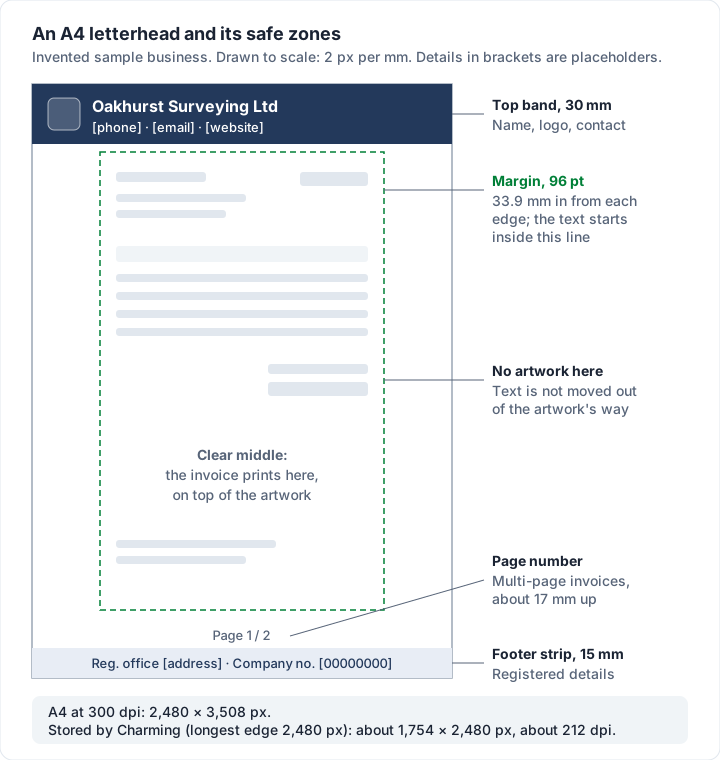
The registered details in the example are placeholders, not real numbers. If you can, put those lines in the invoice's footer as live text instead of baking them into the artwork: they stay searchable, and you can fix a typo without a new file.
How to add a letterhead in Word#
Microsoft's help pages describe two routes, both checked on 28 October 2026. Menu names can differ slightly between versions.
A header-band letterhead (repeats at the top of every page), from Microsoft's guide to adding images to a header or footer:
- Go to Insert, then Header, then Blank.
- Double-click the “[Type here]” placeholder in the header.
- Select Insert, then Pictures, and choose your letterhead image.
- Select Close Header and Footer, or press Esc.
Full-page artwork (behind the text on every page), from Microsoft's guide to inserting a background picture in Word:
- On the Design tab, select Watermark, then Custom Watermark.
- Choose Picture Watermark and select your image.
- Select or clear Washout. Washout fades the picture; clear it to keep your brand colours at full strength.
- Select OK.
Then save the file as a template, so every new invoice starts from it. Our free Word invoice template gives you an invoice layout to put the letterhead on, and our guide to making an invoice in Word covers the rest of the build.
How to add a letterhead in Google Docs#
Google Docs has a header for a band and a watermark for full-page artwork. Google's help pages say neither is available in pageless format, so switch the document to pages first.
A header-band letterhead: go to Insert, then Page elements, then Header (Google's header help page). With the cursor in the header, add your image with Insert, then Image.
Full-page artwork, from Google's help page on inserting watermarks, checked on 28 October 2026:
- Go to Insert, then Page elements, then Watermark.
- In the panel on the right, click Image.
- Click Select image, and upload or choose your letterhead.
- Format it in the panel if needed, then click Done.
Google's page notes: “This feature isn’t available in documents that are in pageless format.” It also says a text background colour can leave gaps in the watermark, so keep text backgrounds off. For the invoice itself, see our guide to invoices in Google Docs.
Adding a letterhead in an invoicing app#
Word and Docs put the letterhead behind a document you lay out by hand. An invoicing app does it the other way round: you upload the artwork once, and every invoice is laid out on top of it.
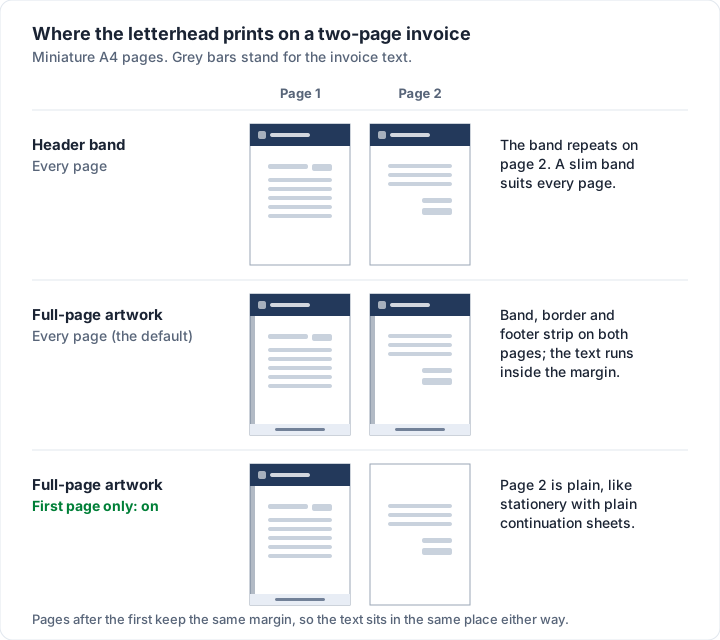
Two things people often want are a custom background image and free placement of the name, address and phone boxes. Charming does the first and not the second, so here is exactly how its letterhead works, checked in our code on 28 October 2026.
How the letterhead works in Charming#
All of this is on every plan, including Free. An owner or admin sets it up in Business settings, under Invoice design, on the Letterhead tab.
| Setting | What it does |
|---|---|
| “Upload letterhead” | Accepts a PNG or JPEG up to 5MB. The panel's own advice: “Use an A4 or Letter-proportioned PNG or JPEG, up to 5MB; leave room in the middle for the invoice itself.” |
| Stored size | Re-encoded as a PNG with its longest edge capped at 2,480 pixels (smaller files are not enlarged) |
| “First page only” | “Print the artwork on the first page only, instead of on every page.” Off by default |
| Page size and margin | On the Page tab: A4 (the default) or Letter, and a margin from 18 to 96 points (default 48; “72pt is one inch.”) |
| “Footer text” | “Printed at the bottom of every invoice, below your footer notes.” The place for company number and registered office lines as live text |
| “Save design” | The letterhead applies once you save the design |
How it prints:
- The artwork fills the whole page and is cropped to fit. A file that is not A4 or Letter-shaped loses its edges.
- Invoice text prints on top of the artwork. Nothing moves out of its way, so keep the middle clear and set the margin to clear your band and borders.
- At 2,480 pixels on the long edge, an A4 letterhead is stored at about 1,754 × 2,480 pixels, about 212 dpi; a Letter one at about 1,916 × 2,480 pixels, about 225 dpi. A 300 dpi file is scaled down, so very fine detail softens slightly. Crisp on screen and on an office printer.
- Multi-page invoices show a page number, centred in the bottom margin, about halfway up it. Keep your footer strip's centre low or leave a gap.
- Templates with a coloured header band or a sidebar print those on top of the artwork too. With a full letterhead, pick a layout without one.
- On the client's web page, the letterhead is shown muted (at 55% opacity), because the web layout re-flows and text no longer lands exactly where the artwork left space for it. The PDF is the exact version.
- Statements carry the same letterhead.
- An issued invoice keeps the letterhead it was issued with. A new letterhead applies to drafts and new invoices only.
The limits, plainly:
- No free placement. You cannot drag the name, address or total to a spot on your artwork. Charming has 60 templates in fixed layouts, and the letterhead sits behind whichever you choose.
- One letterhead per business, not per invoice. Free covers 1 business; paid plans allow unlimited businesses, each with its own design.
- PNG or JPEG only. No PDF, SVG or Word file; export a PNG from your design tool.
- 10 uploads an hour per person, which only matters while you are testing versions.
- Free invoices carry a small “Sent with Charming Invoices” line, letterhead or not. Paid plans (from $29 once; lifetime plans are final sale) hide it by default.
- No card payments or integrations. Clients pay you directly using the details on the invoice, and you mark it paid.
To see how each layout looks before you upload anything, browse the invoice templates. If it fits, create a free invoice and add your letterhead in business settings.
Check your letterhead before you send#
- Print one page in black and white. Pale brand colours can vanish, and dark bands can swallow black text.
- Make a two-page invoice. Check that the band, border or footer behaves on page 2, and that the page number does not sit on your artwork.
- Look at it on a phone. Your client may open the invoice on one; the name and total should still read first.
- Read every line of text near the edges. If any invoice text touches the artwork, increase the margin or slim the artwork.
- Check the file size. An image placed behind every page adds to every PDF you send. A clean PNG at the sizes above is plenty.
Questions people ask#
Do invoices need a letterhead?#
GOV.UK's list of what an invoice must include, which our logo guide quotes, does not mention a letterhead or a logo (as of 28 October 2026). If you run a UK limited company, read GOV.UK's stationery rules quoted above as well. Outside the UK, check your own tax authority or company registry, or ask an accountant.
Can I use my letterhead template as an invoice?#
Yes. Add the invoice parts to it: the word “Invoice”, a unique number, the issue and due dates, the client, the lines, the total and how to pay. The letterhead only supplies your identity.
What size should a letterhead be?#
The full page in its proportions: 2,480 × 3,508 pixels for A4 at 300 dpi, or 2,550 × 3,300 pixels for US Letter. For a header band only, the full page width at the band's depth (a 30 mm band on A4 is about 354 pixels deep at 300 dpi).
What is an invoice header?#
The top block of the invoice: your details, the client's, the word “Invoice”, the number and the dates. A letterhead is the fixed artwork around it.
Should the letterhead be on every page or the first only?#
A slim band works on every page. Heavy artwork with borders and a footer strip often looks better on page 1 only, with plain pages after it, like printed stationery with continuation sheets.