What 768 public discussions about invoicing taught us before pricing

Nnabuike Okoroafor ·
On this page · 5 sections
We did not want to set a price by guessing, so we did something slightly less glamorous first. We collected 768 comments from public online discussions: freelancers, contractors, photographers, consultants and people selling cookies out of their kitchen, all talking about invoicing. Not about our product. As far as we know, nobody in that dataset has heard of us.
Then we read all of it and sorted it by what people actually needed. Here is what came back, and what we did about it. We do not quote or name anyone’s software in this post: the point was to learn what readers need, not to talk about other companies.
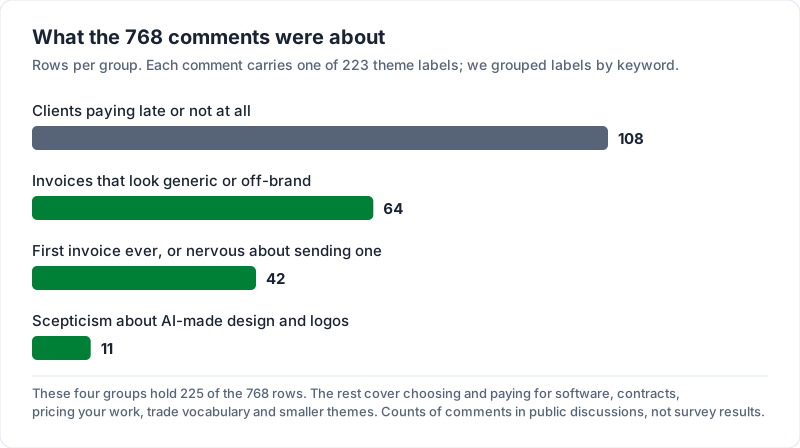
Every comment in the dataset carries one theme label, 223 labels in all. We grouped those labels by keyword (the grouping is ours, not the dataset’s) to get a rough shape of what people talked about. These are counts of comments in public discussions, not survey results:
| Theme group (labels grouped by keyword) | Rows | Largest single label in the group (rows) |
|---|---|---|
| Clients paying late or not at all | 108 | Clients who do not pay on time (25) |
| Invoices that look generic or off-brand | 64 | Customizing invoice templates to match branding (12) |
| First invoice ever, or nervous about sending one | 42 | New or inexperienced freelancer or small business owner (24) |
| Scepticism about AI-made design and logos | 11 | Views on AI-generated design and logos (4, tied with one other label) |
Late payment is close to the top, and it is about clients rather than software. We cover it in asking for money without the awkwardness.
Finding one: people want to know what invoicing will cost them over years#
A large share of the remaining comments were about choosing and paying for software: which plan to pick, what it adds up to over several years, and what happens to your records if you ever move. People were not asking for the cheapest tool. They were asking for a price they could plan around.
So that is what we built. Charming Invoices has a free tier with unlimited clients and invoices, not a monthly allowance. If you want more, you can pay once, not forever (Pro is a subscription for anyone who prefers one). A lifetime licence has no renewal, so there is no next invoice for the price to change on. That is the whole reason it exists. We wrote up the actual numbers and what “lifetime” honestly means in why we built a lifetime plan. If you are moving from another tool, switching invoicing apps covers what to export first.
Finding two: people want invoices that look like their business#
The next-largest group was about the output. People wanted the invoice to carry their brand: their logo at a sensible size, their colours, a layout that matches the rest of their work.
This matters more than it sounds. An invoice is often the last thing a client sees after good work, and for a solo business it is one of the few documents that represents you when you are not in the room. A plain, generic form leaves out the impression you just spent weeks building.
This is the part of the product we already had, honestly, before we had the research to justify it. At the time that meant your logo, one accent colour, and five genuinely different layouts (classic, modern, minimal, bold, playful) rather than one template with a colour picker. It has grown since: today it is 60 templates, 30 fonts and any brand colour you have a hex code for, all on the free plan. We went deeper on that in invoices that look like a tax form.
Finding three: a lot of people are sending their first invoice ever#
A noticeable slice of the dataset was not about software at all. It was people who had never invoiced anyone and were nervous about it. Someone about to bill their first client. Someone who had just started selling cookies. Someone getting ready for their first few freelance projects, unsure where to start.
The emotion in those posts is not about line items. It is the awkwardness of asking for money and the worry about looking unprofessional while doing it. That is a different product problem than “add more features”, and it is why our onboarding tries to get you to a finished, decent-looking invoice fast rather than touring you through settings: a five-step setup checklist that ends with “Send it”. If that is you, start with your first invoice: what actually has to be on it.
Finding four: this audience is wary of AI-made design#
One more thing worth saying out loud, because it shaped what we did not build toward.
There is real, specific scepticism about AI-generated design in this group. These are people whose work is the product (writing, photography, design, craft), and generated output can read to them as a stand-in for what they do.
We do have some drafting assistance in the app, and it is genuinely useful when you are describing the same work for the fourth time. But it is a convenience inside a form, not the pitch. On the homepage it gets one card in the feature list, marked Paid, and we are not going to call ourselves AI-native. The research says that would cost us trust with the exact people we built this for.
What we actually changed#
To be concrete about it:
- Free tier is unlimited on the things that matter (clients and invoices), and we are not planning to change that.
- Paid is a one-time licence on Individual and Team, because what people asked for was a cost they could plan around. Pro is a subscription only for people who would rather pay that way.
- Branding is a first-class feature, not a logo upload slot.
- The first-invoice path is built for someone who is anxious, not someone who is evaluating software.
- AI stays quiet and optional.
None of that is remarkable. It is mostly building for what these discussions asked for. If you are choosing a tool now, how to choose invoicing software has a list of questions to ask any provider before you commit.